Veo is getting a major upgrade. 🚀 We’re rolling out Veo 3.1, our updated video generation model, alongside improved creative controls for filmmakers, storytellers, and developers - many of them with audio. 🧵
Google Veo 3.1 AI Video Generator
Create cinematic AI videos from text prompts or reference images with Google Veo 3.1 AI Video Generator. Generate realistic video with audio, synchronized sound effects, stable visual details, and polished short-form clips for UGC ads, brand stories, product demos, social media campaigns, and creative concept videos.
Video Creations
Introduction about Google Veo 3.1 Video Model
Discover Google Veo 3.1 Video Model, a state-of-the-art AI video generator for text-to-video, image-to-video, native audio generation, reference asset workflows, and cinematic visual production.
This introduction highlights the key strengths of Google Veo 3.1 Video Model, including text-to-video generation, image-to-video creation, prompt rewriting, reference asset images, first and last frame generation, scene extension, realistic physics, and synchronized audio-video output for production-ready UGC and marketing workflows.
Example of Google Veo 3.1 AI Video Generator
Google Veo 3.1 AI Video Generator can turn detailed prompts, product references, lifestyle images, and campaign ideas into high-quality dynamic clips. From realistic product ads and creator-style UGC scenes to cinematic story moments and vertical social videos, Veo 3.1 helps teams create visually consistent AI videos with natural motion, accurate prompt alignment, and polished audio-visual presentation.
Original Image
Video
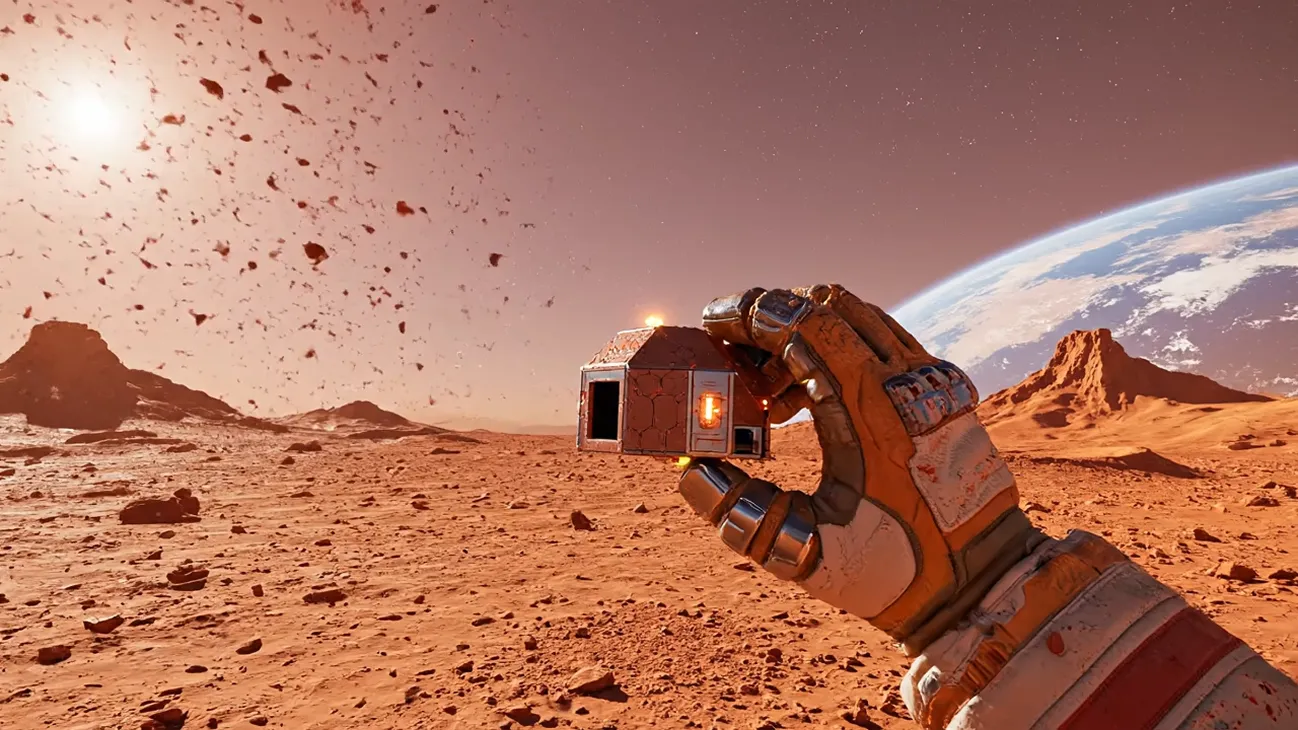
Prompt
At bottom of frame, gloved hand extends, thumb and index fingertip pinching tiny rust-red Mars deployment capsule, nearly hidden by fingers. Camera pushes in briefly for sharp focus on hand and capsule, revealing micro-precision details and tiny scale. Harsh Martian sun glints metallic highlights off surface.Continuous shot: hand draws back to load, then hurls forward with full force—swift, powerful, burdened by spacesuit bulk. First-person POV lunges naturally.Capsule launches at high speed, tiny rust-red dot trailing faint orange glow along clean parabola.Camera tracks forward with realistic handheld shake, subtle motion blur, low-g floaty jitter. Red dust drifts up from steps.POV dips slightly: capsule slams into regolith with muffled thud. Impact bursts radial dust/pebbles, brief shockwave ring and rising cloud glow in bright sun. Dust hangs long in low gravity.Same unbroken take: fingernail-sized capsule erupts open like petals—carbon-fiber/Kevlar struts, inflatable nano-airbags, hydraulic locks extend with pump hum and orange-white mist bursts, NASA-style self-assembly.Camera steps back half-pace, elevates slightly, handheld motion preserved.In ~2s, it inflates to medium Inflatable Mars Habitat Dome: semi-transparent milky-white + orange-edged hemisphere, ~6m diameter, ~4m tall. Hexagonal grid supports, ETFE windows show green plant pods and living modules inside. Radiation coating, solar film strips, top antenna/vents. Futuristic yet practical NASA outpost aesthetic.Expansion churns red dust into slow-drifting low-g clouds; sunlight casts warm volumetric rays and particle glow. Ground compresses into shallow ring depression.Shot stabilizes in gentle upward first-person view, gazing at fully deployed “Mars Rapid Deploy Habitat Dome”. Crisp details: pulsing airbags, soft green interior glow, flickering solar strips, light dust on frames. Intense sun carves bright highlights and deep red shadows. Distant barren desert contrasts with Earth’s morning star.Gloved hand (red-dusted) drops out of bottom frame. Final composition: striking habitat dome in red wasteland—hopeful, tech-awe inspiring.8K cinematic, ultra-detailed, realistic lighting, authentic dust & low-gravity physics.
Core Features of Google Veo 3.1 Video Model
Google Veo 3.1 Video Model brings together text-to-video, image-to-video, reference asset control, scene extension, first and last frame generation, and synchronized audio-video creation in one creative workflow for faster UGC production and professional video ideation.
Generate cinematic videos from text prompts
Describe the subject, scene, camera movement, lighting, product angle, brand mood, and action details to create realistic AI videos with strong prompt adherence and cinematic image quality.
Animate images and reference assets with stable motion
Use product images, character references, or visual ingredients to guide image-to-video creation while preserving important details, composition, and brand identity across the clip.
Create native audio-video content
Generate realistic video with audio, matching ambient sound, dialogue rhythm, Foley-style effects, and audio-visual timing for more complete UGC ads, social videos, and storytelling clips.
Extend scenes and control visual continuity
Use first and last frame workflows, scene extension, and reference-guided generation to connect shots, preserve motion logic, and maintain consistent style through short video sequences.
Advantages of Google Veo 3.1 AI Video Generator
The core advantage of Google Veo 3.1 AI Video Generator is its ability to transform campaign direction, product references, and creative prompts into polished AI video output with fewer manual production steps. It helps marketers, creators, agencies, and ecommerce teams generate realistic UGC-style clips faster while maintaining cinematic visual quality, smooth motion, and native audio-video alignment.
High-quality realism for UGC and brand videos
Produces vivid scenes with natural lighting, detailed textures, realistic camera movement, and strong visual impact for TikTok, Instagram Reels, YouTube Shorts, and paid social campaigns.
Strong prompt alignment and realistic physics
Handles complex scene instructions, object interaction, camera movement, and physical detail with smoother motion and more believable spatial relationships.
Flexible text, image, and reference-led workflow
Supports prompt-based generation and reference-guided creation, helping teams move from product image or ad concept to ready-to-review video more efficiently.
Built for fast creative iteration
Makes it easier to test multiple product angles, hooks, creator scenarios, and visual styles before committing to final ad production or campaign rollout.
Applicable Scenarios of Google Veo 3.1 AI Video Generator
Google Veo 3.1 AI Video Generator is widely applicable to UGC advertising, ecommerce product promotion, social media video creation, film pre-visualization, brand storytelling, education, and creative testing, helping teams produce high-quality AI videos at lower cost and faster speed.
UGC ads and creator-style marketing videos
Generate product demos, testimonial-style scenes, scroll-stopping hooks, lifestyle clips, and creator-inspired ad variations for performance marketing.
Product and ecommerce promotion
Animate product images, build realistic usage scenes, and create short promotional videos that make online storefronts, product pages, and launch campaigns more engaging.
Social media short video creation
Produce vertical videos, cinematic reels, platform-ready campaign clips, and branded story visuals for TikTok, Instagram, YouTube Shorts, and other social channels.
Film concepts and campaign pre-visualization
Turn scripts, campaign briefs, storyboard ideas, or visual concepts into cinematic preview clips for faster creative communication and approval.
Share Google Veo 3.1 Video AI on X.com
Google Veo 3.1 AI Video Generator brings cinematic text-to-video, image-to-video, reference-guided creation, and synchronized audio-video generation into a faster production workflow. From realistic physics and strong prompt adherence to scene extension and UGC-ready output, it helps creators turn campaign ideas into polished AI video clips for marketing, storytelling, ecommerce, and social media. Check out these impressive videos created with Google Veo 3.1!

Introducing Google Veo 3.1 Characters stay consistent, no matter the angle. Cinematic, fast, unreal Make it UNLIMITED with the link below 👇 Available now on Freepik

Veo 3.1 + Nano Banana is insane 🤯 Google’s new models let us make million-dollar looking ads for brands like Wander. Copy our entire process for making this ad below 👇🧵

Blown away by Google Veo 3.1's detail. Definitely beats all the sora hype. Here is Giza Rising, made with Veo 3.1
How to Use Google Veo 3.1 AI Video Generator
Create cinematic AI videos with Google Veo 3.1 in just a few easy steps.
Input Text or Reference Image
Enter a detailed prompt describing the scene, subject, motion, camera angle, product details, and style, or upload a reference image as the starting visual material.
Set Video Options
Choose duration, aspect ratio, resolution, and reference-related options according to your campaign goal, publishing channel, and creative direction.
Generate and Refine
Start the generation task, preview the AI video result, then refine the prompt, reference assets, or settings to improve motion, composition, lighting, and audio-visual timing.