
I made a Grok Bot that can use Suno, Midjourney, and Opus to make music videos "Claudia" (the Grok Bot) made this teaser autonomously with @imagine x.ai/bot/zvsgYtQHUc…
Midjourney Video AI Generator
Turn a still image into a moving scene with Midjourney Video on UGC Maker. Upload a starting frame and describe the action or camera movement to develop a product shot, social clip, or visual story.
Loading...
Introduction to Midjourney Video AI Generator
Explore how a starting image can become a moving scene.
Your starting image establishes the subject and composition. Use the motion prompt to guide what changes over the shot, including subject movement, camera direction, and activity in the background.
Creative Examples for Midjourney Video AI Generator
Explore video concepts for product campaigns, lifestyle content, and cinematic storytelling. Start with a clear visual direction and describe the action you want to see.
Original Image
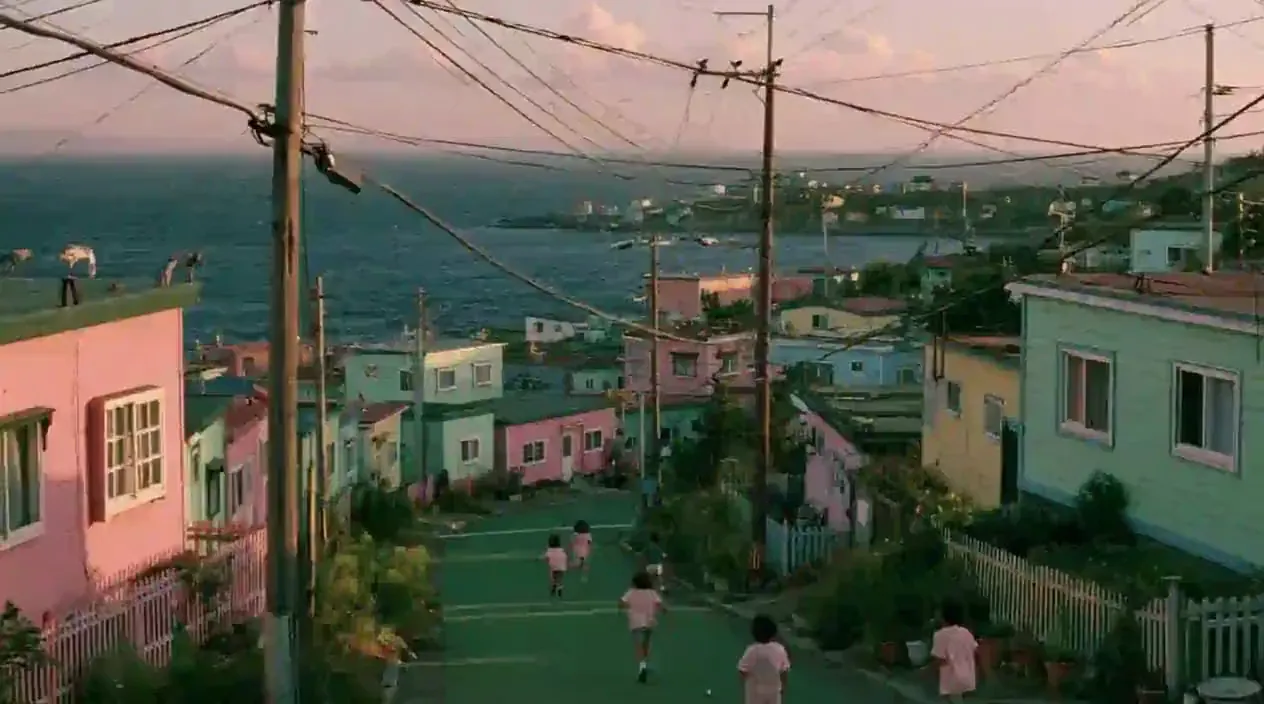
Video
Prompt
Art style & Vibe: A nostalgic, whimsical 1990s film photograph with the warm, slightly faded color grading, low contrast, and natural film grain characteristic of a vintage movie frame. The color palette is dominated by dreamy pastel pinks, greens, and blues. Setting: A hillside coastal village under a soft, hazy sky with pale pink-tinged clouds. A green-painted paved road slopes downward toward the dark blue ocean, where several children wearing light pink t-shirts are running and playing freely on the street. Details: Dense clusters of small, pastel-colored houses in shades of pink, green, light blue, and yellow flank both sides of the sloping road, decorated with small fences, potted plants, and wild greenery. Old utility poles and a messy web of overhead power lines stretch across the sky. In the far background, the ocean meets a hazy horizon, and more tiny houses are scattered along a distant rocky peninsula. Camera & Composition: A natural, eye-level cinematic shot capturing everyday, nostalgic community life. Soft outdoor lighting, film-like blur, and candid movement.
Key Features of Midjourney Video AI Generator
Start from one image and use a written prompt to direct your video.
Animate a Starting Image
Upload one starting image to establish the opening subject and composition. Use a product photo, portrait, illustration, or another visual you want to animate.
Describe the Motion
Use your prompt to describe subject movement, camera direction, and environmental changes for the scene.
Choose 480p or 720p
Select 480p or 720p for your video. Review the displayed credit cost before generating.
Input and Framing Limits
This integration does not support ending-frame uploads or a separate aspect ratio setting.
Build Motion Ideas from Existing Images
Use the visuals you already have to explore movement, plan a shot, and communicate a motion direction.
Reuse Visuals You Already Have
Develop a motion concept from a product photo, illustration, or campaign image you already have. Use it as the starting point for a social clip or presentation.
Plan a Camera Treatment
Describe a camera move and review how it develops from your starting composition. Use the result to assess a shot idea before a shoot or a larger edit.
Communicate a Motion Concept
Show a motion idea in a pitch or design review. A generated clip can help explain the intended movement and mood alongside your still-image brief.
Compare Different Directions
Adjust the motion prompt after reviewing a result, then generate another version. Compare the action and camera movement to decide what to develop further.
How to Use Midjourney Video AI Generator
Create a video from a starting image in three steps.
Step 1: Upload a Starting Frame
Choose the image you want to animate. A starting image is required; this generator does not create videos from text alone.
Step 2: Describe Motion and Choose Resolution
Write the action and camera movement you want to see, then select 480p or 720p. Review the displayed credit cost before generating.
Step 3: Generate and Review
Start generation and review the video. Adjust your prompt or starting image to explore another variation, then download your selected result.

Explore Midjourney Video Creations on X
Discover creative approaches to image animation, camera movement, product storytelling, and social video.

🎬New MV【composition】 新しいMVつくりました! Music : Suno Visual : Midjourney Video Generation : MiniMax H3 MiniMax H3はオブジェクトをレイヤーとして処理する能力が高くて面白い! プロンプトの通りも良すぎるので、いろんなタイプのプロンプト試すのが楽しいかもです🍿
have you tried the latest edit model updates? do you think there's anything we should add there? x.com/midjourney/sta… what do you think the updated animation and video tool should look like?

We’re gonna start testing our first V8.2 edit model today. This model supports editing with instructions, generating images with other images (up to 4 references), brush-based inpainting, and outpainting. It also works with personalization, moodboards, and srefs. Have fun!


sref 2687313947 –sv 6 Video by Midjourney @midjourney [prompt] --sref 2687313947 --sv 6 --sw 500 --stylize 500 --v 8.2

sref 2687313947 –sv 6 Midjourney, sref code. Iridescent Blue & Gold Chrome Style. V7 Style Reference: –sref random → sref 2687313947. [prompt] --sref 2687313947 --sv 6 --sw 500 --stylize 500 --v 8.2 sref-code.com/portfolio/sref…

Midjourney Video Model Guide
Explore the official Midjourney guide to video creation, motion, and working with starting images.
