
I made a Grok Bot that can use Suno, Midjourney, and Opus to make music videos "Claudia" (the Grok Bot) made this teaser autonomously with @imagine x.ai/bot/zvsgYtQHUc…
Midjourney Video AI 影片生成器
在 UGC Maker 使用 Midjourney Video,將靜態圖片變成動態場景。上傳起始影格,描述動作或鏡頭運動,發展產品鏡頭、社群短片或視覺故事。
Loading...
Midjourney Video AI 影片生成器介紹
探索如何將起始圖片變成動態場景。
起始圖片確定主體與構圖。用運動提示詞引導鏡頭中的變化,包括主體運動、鏡頭方向與背景活動。
Midjourney Video AI 影片生成器創意示例
探索產品行銷、生活方式內容與電影感敘事的影片概念。從清晰的視覺方向開始,描述想看到的動作。
原始圖片
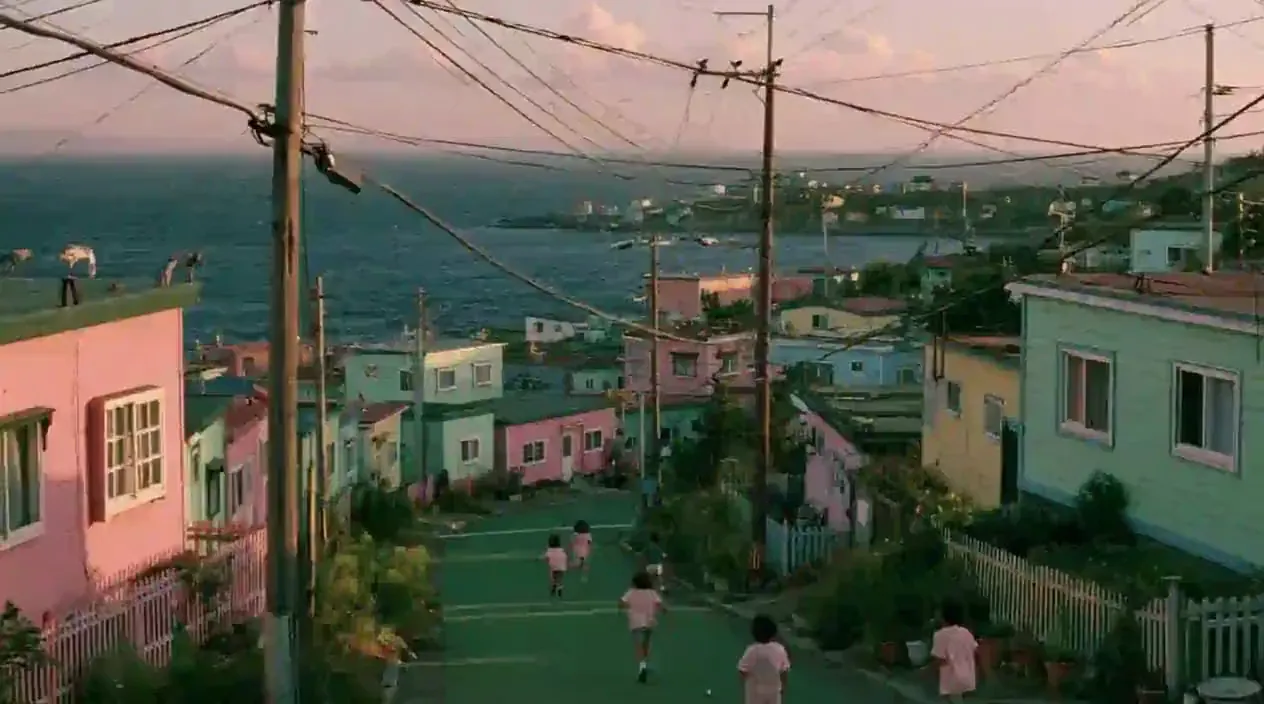
影片
提示詞
Art style & Vibe: A nostalgic, whimsical 1990s film photograph with the warm, slightly faded color grading, low contrast, and natural film grain characteristic of a vintage movie frame. The color palette is dominated by dreamy pastel pinks, greens, and blues. Setting: A hillside coastal village under a soft, hazy sky with pale pink-tinged clouds. A green-painted paved road slopes downward toward the dark blue ocean, where several children wearing light pink t-shirts are running and playing freely on the street. Details: Dense clusters of small, pastel-colored houses in shades of pink, green, light blue, and yellow flank both sides of the sloping road, decorated with small fences, potted plants, and wild greenery. Old utility poles and a messy web of overhead power lines stretch across the sky. In the far background, the ocean meets a hazy horizon, and more tiny houses are scattered along a distant rocky peninsula. Camera & Composition: A natural, eye-level cinematic shot capturing everyday, nostalgic community life. Soft outdoor lighting, film-like blur, and candid movement.
Midjourney Video AI 影片生成器核心功能
從一張圖片開始,用文字提示詞指導影片創作。
讓起始圖片動起來
上傳一張起始圖片,確定開場主體與構圖。可使用產品照、肖像、插畫或其他想製作成動態內容的視覺素材。
描述運動
使用提示詞描述場景中主體的運動、鏡頭方向與環境變化。
選擇 480p 或 720p
為影片選擇 480p 或 720p,生成前查看顯示的點數費用。
輸入與畫幅限制
此整合不支援上傳結束影格,也沒有單獨的長寬比設定。
從現有圖片構思動態創意
利用已有視覺素材探索運動、規劃鏡頭,並傳達動態方向。
重用現有視覺素材
從已有產品照、插畫或行銷圖片發展動態概念,作為社群短片或展示的起點。
規劃鏡頭處理方式
描述鏡頭運動,檢查其如何從起始構圖展開。在拍攝或大型剪輯前,用結果評估鏡頭創意。
傳達動態概念
在提案或設計評審中展示動態創意。生成短片可配合靜態圖片簡報,解釋預期的運動與氛圍。
比較不同方向
檢查結果後調整運動提示詞,再生成另一個版本。比較動作與鏡頭運動,決定繼續發展的方向。
如何使用 Midjourney Video AI 影片生成器
透過三個步驟,將起始圖片製作成影片。
步驟 1:上傳起始影格
選擇想製作成動態影片的圖片。必須提供起始圖片,本生成器不支援僅用文字建立影片。
步驟 2:描述運動並選擇解析度
寫明想看到的動作與鏡頭運動,再選擇 480p 或 720p。生成前查看顯示的點數費用。
步驟 3:生成並檢查
開始生成並檢查影片。調整提示詞或起始圖片探索另一種效果,然後下載選定結果。

在 X 上探索 Midjourney Video 創作
發現圖片動畫、鏡頭運動、產品敘事與社群影片的創意方法。

🎬New MV【composition】 新しいMVつくりました! Music : Suno Visual : Midjourney Video Generation : MiniMax H3 MiniMax H3はオブジェクトをレイヤーとして処理する能力が高くて面白い! プロンプトの通りも良すぎるので、いろんなタイプのプロンプト試すのが楽しいかもです🍿
have you tried the latest edit model updates? do you think there's anything we should add there? x.com/midjourney/sta… what do you think the updated animation and video tool should look like?

We’re gonna start testing our first V8.2 edit model today. This model supports editing with instructions, generating images with other images (up to 4 references), brush-based inpainting, and outpainting. It also works with personalization, moodboards, and srefs. Have fun!


sref 2687313947 –sv 6 Video by Midjourney @midjourney [prompt] --sref 2687313947 --sv 6 --sw 500 --stylize 500 --v 8.2

sref 2687313947 –sv 6 Midjourney, sref code. Iridescent Blue & Gold Chrome Style. V7 Style Reference: –sref random → sref 2687313947. [prompt] --sref 2687313947 --sv 6 --sw 500 --stylize 500 --v 8.2 sref-code.com/portfolio/sref…

Midjourney Video 模型指南
探索 Midjourney 官方指南,瞭解影片創作、運動與起始圖片的使用。
