免費 UGC 影片生成器,無需註冊

在 UGC Maker AI 上免費創作 UGC 風格影片。描述想法或上傳首尾影格,讓 MiniMax H3 生成適用於產品亮相、UGC 廣告或社群貼文的短片。無需註冊。

100% 免費
由 MiniMax H3 驅動
免註冊
無需訂閱
長寬比

探索進階影片模型 API

探索 Flaq AI 的領先圖生影片 API,更快速、可靠地生成產品故事、UGC 廣告和社群短片。

Seedance 2.5 圖生影片 API

用 ByteDance 的 Seedance 2.5 讓產品圖片動起來。透過提示詞和開場或結尾影格,引導鏡頭運動與場景過渡。

MiniMax H3 圖生影片 API

用 MiniMax H3 將首影格變為動態場景。可選擇加入尾影格,塑造產品影片的最終構圖。

Wan 3.0 圖生影片 API

用 Alibaba 的 Wan 3.0 讓靜態圖片煥發生機。透過首尾影格引導視覺敘事,製作產品亮相與行銷預告。

FLUX 3 圖生影片 API

用 Black Forest Labs 的 FLUX 3 創作富有表現力的圖像動畫,將一致的視覺、動作和原生音訊融入同一場景。

Gemini Omni 1.1 Flash 圖生影片 API

用 Google 的 Gemini Omni 1.1 Flash 讓首影格動起來。可選擇使用尾影格引導,控制場景如何發展和收尾。

探索免費 UGC 影片範例

探索產品廣告與人物主導的故事,複製並調整範例提示詞。
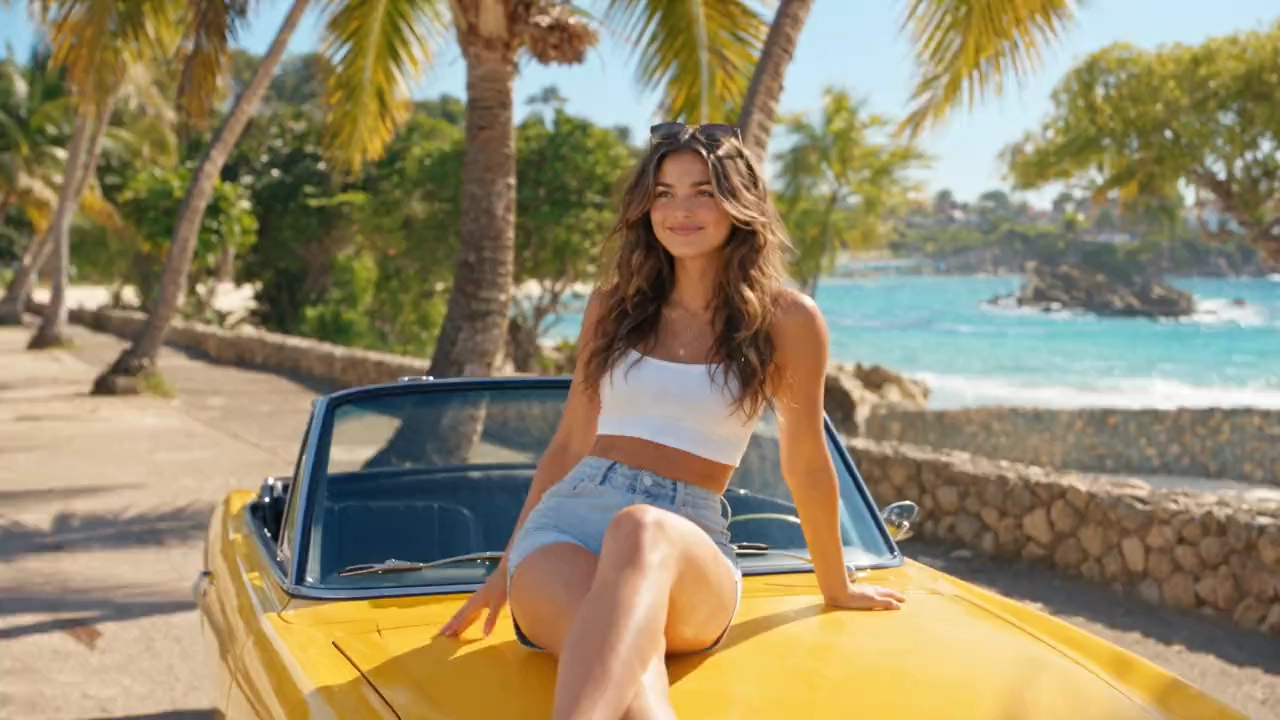
原始圖片
Use the supplied reference image as the strict character, wardrobe, and styling reference for Luna. Create one continuous 15-second, 16:9 photorealistic Fanta summer commercial; never output a still or storyboard. Preserve her exact face, honey-brown wavy hair, hazel eyes, radiant skin, warm smile, white crop top, light-blue denim shorts, white sneakers, layered gold necklaces, sunglasses, yellow vintage convertible, and orange Fanta can. 0–4s: on a bright tropical beach road, Luna relaxes on the convertible hood, catches an ice-cold Fanta, says “Summer starts now!”, flips and opens it as fizz and condensation catch the sun. 4–7s: macro chilled aluminum, droplets, orange bubbles, citrus splashes, then a refreshing sip. 7–10s: smooth gimbal move through beach volleyball; Luna and friends celebrate, take cold cans from a cooler, and laugh. 10–13s: golden-hour retro food truck, burgers and fries, friends toast cans, colorful bulbs and street musicians, dancing. 13–15s: sunset beach bonfire; sparklers glow as Luna raises the can and says “Taste the sunshine!” while the camera pulls back to friends, waves, and horizon. Vibrant citrus-orange palette, stable faces and product shape, readable authentic Fanta branding, realistic liquid and light, shallow depth of field, smooth cinematic movement, upbeat summer music, crisp dialogue, 4K HDR. No subtitles, extra text, watermarks, or duplicated people.
提示詞
Use the supplied reference image as the strict character, wardrobe, and styling reference for Luna. Create one continuous 15-second, 16:9 photorealistic Fanta summer commercial; never output a still or storyboard. Preserve her exact face, honey-brown wavy hair, hazel eyes, radiant skin, warm smile, white crop top, light-blue denim shorts, white sneakers, layered gold necklaces, sunglasses, yellow vintage convertible, and orange Fanta can. 0–4s: on a bright tropical beach road, Luna relaxes on the convertible hood, catches an ice-cold Fanta, says “Summer starts now!”, flips and opens it as fizz and condensation catch the sun. 4–7s: macro chilled aluminum, droplets, orange bubbles, citrus splashes, then a refreshing sip. 7–10s: smooth gimbal move through beach volleyball; Luna and friends celebrate, take cold cans from a cooler, and laugh. 10–13s: golden-hour retro food truck, burgers and fries, friends toast cans, colorful bulbs and street musicians, dancing. 13–15s: sunset beach bonfire; sparklers glow as Luna raises the can and says “Taste the sunshine!” while the camera pulls back to friends, waves, and horizon. Vibrant citrus-orange palette, stable faces and product shape, readable authentic Fanta branding, realistic liquid and light, shallow depth of field, smooth cinematic movement, upbeat summer music, crisp dialogue, 4K HDR. No subtitles, extra text, watermarks, or duplicated people.
影片

用提示詞或兩影格畫面構思 UGC 影片

從文字創意出發,或上傳首尾影格引導轉場。無需開通帳號,即可在 UGC Maker AI 上免費創作 UGC 風格影片概念。

首尾影格控制

分別上傳開場與結尾圖片,為生成的轉場確定起始和結束畫面。

透過提示詞控制動作

描述主體動作、移動方式、鏡頭方向或產品互動。使用首尾影格時,請說明場景應如何在兩影格間運動。

內建音訊

生成帶有音訊的短影片,方便作為產品、創作者或社群內容創意進行預覽。

免費測試轉場

無需訂閱即可嘗試不同影格對和動作提示詞。完成的短片保留在瀏覽器本機歷史中,方便查看。

創作 UGC 風格產品與社群影片

將一對畫面轉為產品亮相、前後對比創意或社群轉場。免費探索講述故事的新方式,無需註冊。

產品示範影片

在 UGC 風格短片中,讓產品從清晰的開場畫面過渡到結果、使用場景或細節鏡頭。

UGC 前後對比影片

規劃變裝、日常流程或產品效果時,用一影格表示初始狀態,另一影格表示完成狀態。

創作者風格產品轉場

錄製創作者產品影片前,嘗試開箱、造型、使用或交接轉場。

付費社群廣告與行銷短片

用現有產品素材,為直式廣告、新品發佈創意和行銷分鏡製作短影片概念。

如何使用 UGC Maker AI 的免費 UGC 影片生成器

無需註冊或訂閱。描述場景即可從文字生成影片,或同時加入首尾影格引導轉場。選擇版面、免費生成、預覽短片,再下載結果。

從提示詞或兩影格畫面開始

描述 UGC 風格場景。如需引導圖生影片轉場,請在首影格上傳開場圖片、尾影格上傳結尾圖片,兩張圖片需同時使用。

描述動作並選擇版面

僅用提示詞時,描述場景、動作和鏡頭方向。使用兩影格時,描述兩者間的過渡,再根據投放位置選擇 16:9、9:16 或 1:1。

生成並下載短片

提交請求,預覽完成的影片,再點選下載儲存副本。也可以在本機歷史中重新查看。

Manual guide

免費 UGC 影片生成器常見問題

更多免費 UGC 影片生成器文章與資源