
Opus Clip AI 評測:找到適合你的短影片流程
了解 OpusClip 如何將長影片再利用,再用 UGC Maker AI 創作原創影片。使用下方影片生成器,將提示詞或圖片轉為下一次行銷活動的全新短片。
0 / 5000
探索 AI 影片範例
觀看健身與旅行創作者影片概念,探索每支影片背後的提示詞。
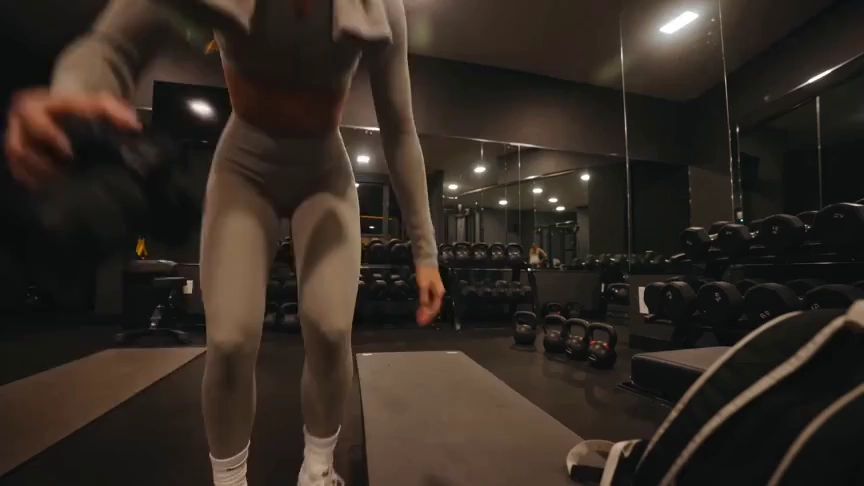
原始圖片
提示詞
Create a 15-second, 16:9 intimate end-of-workout vlog starring one consistent fictional 24-year-old Brazilian fitness creator, CHASE: slim athletic build, real glowing skin, expressive brown eyes, and long wavy chestnut-brown hair in a loose ponytail. She wears a fitted long-sleeve workout top, high-waisted leggings, white socks, sneakers, and a towel over her shoulders. Handheld DV-camcorder vlog footage with warm 16mm-inspired analog tape: CHASE films herself at arm’s length, then sets the camera on a bench, gym bag, or beside a stretching mat; the camera never appears in frame or reflection. Include subtle shake, drifting framing, autofocus hunting, rushed reframes, uneven zooms, occasional face crops, tape grain, soft lamp halos, exposure shifts, low contrast, and accurate skin. In a mostly empty boutique gym late evening with warm lights, darker corners, mats, mirrors, dumbbells, workout bag, and protein shake, keep her tired, funny, unpolished, breathing audibly, relaxed, and natural. Sequence: on the mat, “Okay… that session is officially over.” Stretching, “I definitely pushed that last set too far.” Shoulder roll, “Tomorrow is going to be interesting.” Close-up sipping a shake, “Wait… this one is actually good.” Side lean, “I’d call today a solid eight and a half.” Resting on one knee, “Exhausted, but in the best way.” Finally bags up and waves: “I’m calling it. See you at the next workout.” Natural English lip sync, blinking, micro-expressions, identical face, hair, wardrobe, and physique. Avoid polished commercial styling, plastic skin, robotic movement, face swaps, added people, captions, logos, watermarks, visible camera, or AI artifacts.
影片
OpusClip 評測:它能做什麼?
OpusClip 專注於將現有素材轉為短片。其編輯工具幫助創作者整理短片,以便發佈到社群平台。
AI 影片剪輯
OpusClip 識別長影片中的片段,將其轉為短片。適合已有訪談、錄製內容或其他素材,希望進行再利用的創作者。
字幕與畫面重構
字幕與畫面重構工具幫助現有短片適應社群觀看場景,同時保持說話者或主體突出。
剪輯後的編輯
其編輯器提供基於文字的編輯、版面與 AI 補充鏡頭,便於在初步篩選後完善短片。
UGC Maker AI 適合哪些需求
想透過創意或圖片生成新場景時,可使用 UGC Maker AI。本頁生成器創作原創素材,而非自動剪切長篇錄製內容。
選擇合適的起點
現有素材有助於判斷哪種流程更適合任務。
已錄製的訪談與 Podcast
OpusClip 旨在將已有對話再利用為更短片段,便於社群傳播。
新產品創意
從產品圖片開始,描述希望 UGC Maker AI 生成的動作、場景或互動。
社群影片吸睛開場
短影片行銷需要原創視覺時,可透過提示詞探索全新開場場景。
創意變體
使用 UGC Maker AI 根據同一份創意說明嘗試不同場景方向,再在紀錄中查看生成影片。
使用 UGC Maker AI 創作影片
直接在本頁嘗試另一種影片生成流程。
從提示詞或圖片開始
描述場景或上傳圖片,引導影片的主體與外觀。
選擇影片模型
選擇可用模型,調整其支援的時長、版面與生成設定。
生成並查看
登入後提交影片任務,並在影片紀錄中查看結果。最佳化提示詞,探索其他方向。

探索更多 AI 創作工具
用 UGC Maker AI 上的圖像與影片工具,構思下一次視覺創意。


























