
Opus Clip AI im Überblick: Finde deinen Kurzvideo-Workflow
Entdecke, wie OpusClip lange Videos weiterverwertet, und erstelle anschließend eigene Videos mit UGC Maker AI. Verwandle mit dem Videogenerator unten Prompts oder Bilder in neue Clips für deine nächste Kampagne.
0 / 5000
KI-Videobeispiele entdecken
Sieh dir Fitness- und Reise-Creator-Konzepte an und entdecke die Prompts hinter jedem Video.
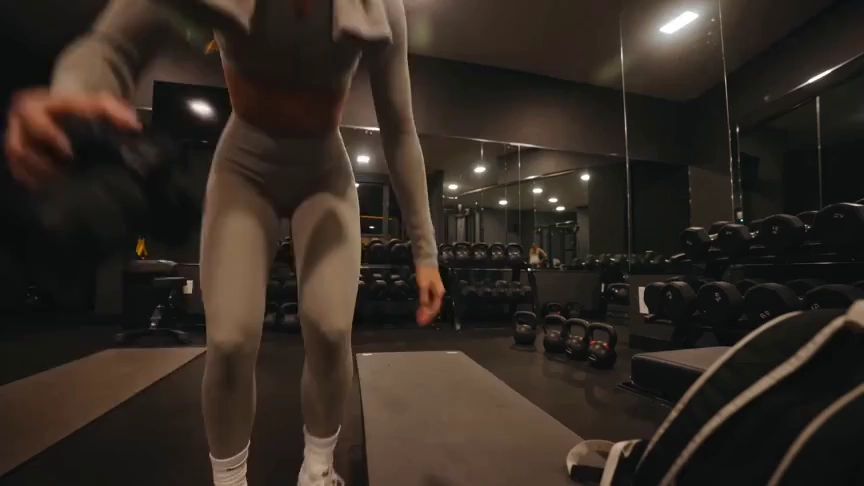
Originalbild
Prompt
Create a 15-second, 16:9 intimate end-of-workout vlog starring one consistent fictional 24-year-old Brazilian fitness creator, CHASE: slim athletic build, real glowing skin, expressive brown eyes, and long wavy chestnut-brown hair in a loose ponytail. She wears a fitted long-sleeve workout top, high-waisted leggings, white socks, sneakers, and a towel over her shoulders. Handheld DV-camcorder vlog footage with warm 16mm-inspired analog tape: CHASE films herself at arm’s length, then sets the camera on a bench, gym bag, or beside a stretching mat; the camera never appears in frame or reflection. Include subtle shake, drifting framing, autofocus hunting, rushed reframes, uneven zooms, occasional face crops, tape grain, soft lamp halos, exposure shifts, low contrast, and accurate skin. In a mostly empty boutique gym late evening with warm lights, darker corners, mats, mirrors, dumbbells, workout bag, and protein shake, keep her tired, funny, unpolished, breathing audibly, relaxed, and natural. Sequence: on the mat, “Okay… that session is officially over.” Stretching, “I definitely pushed that last set too far.” Shoulder roll, “Tomorrow is going to be interesting.” Close-up sipping a shake, “Wait… this one is actually good.” Side lean, “I’d call today a solid eight and a half.” Resting on one knee, “Exhausted, but in the best way.” Finally bags up and waves: “I’m calling it. See you at the next workout.” Natural English lip sync, blinking, micro-expressions, identical face, hair, wardrobe, and physique. Avoid polished commercial styling, plastic skin, robotic movement, face swaps, added people, captions, logos, watermarks, visible camera, or AI artifacts.
Video
OpusClip im Überblick: Was macht es?
OpusClip konzentriert sich darauf, vorhandenes Videomaterial in kurze Clips zu verwandeln. Seine Bearbeitungstools helfen Kreativen, diese Clips für soziale Plattformen vorzubereiten.
KI-gestütztes Kürzen von Videos
OpusClip erkennt Momente in längeren Videos und macht daraus kürzere Clips. Es eignet sich für Kreative, die bereits Interviews, Aufzeichnungen oder anderes Material zur Weiterverwertung haben.
Untertitel und Bildausschnitt-Anpassung
Tools für Untertitel und Bildausschnitte helfen, bestehende Clips für soziale Medien anzupassen und dabei die sprechende Person oder das Motiv im Fokus zu behalten.
Bearbeitung nach der Clip-Auswahl
Der Editor bietet textbasierte Bearbeitung, Layouts und KI-B-Roll, um Clips nach der ersten Auswahl zu verfeinern.
Wann UGC Maker AI passt
Nutze UGC Maker AI, wenn du eine neue Szene aus einer Idee oder einem Bild generieren möchtest. Der Generator auf dieser Seite erstellt eigenes Videomaterial, statt automatisch eine lange Aufnahme zu kürzen.
Den richtigen Ausgangspunkt wählen
Dein Ausgangsmaterial hilft zu bestimmen, welcher Workflow zur Aufgabe passt.
Aufgezeichnete Interviews und Podcasts
OpusClip hilft dabei, ein bestehendes Gespräch in kürzere Momente zur Verbreitung in sozialen Medien umzuwandeln.
Neue Produktkonzepte
Beginne mit einem Produktbild und beschreibe Bewegung, Umgebung oder Interaktion, die UGC Maker AI generieren soll.
Aufhänger für Social-Media-Videos
Entdecke neue Einstiegsszenen aus Prompts, wenn du eigene Bildwelten für eine Kurzvideo-Kampagne brauchst.
Kreative Varianten
Probiere mit UGC Maker AI verschiedene Szenenrichtungen aus demselben Briefing aus und prüfe anschließend die generierten Videos in deinem Verlauf.
Ein Video mit UGC Maker AI erstellen
Probiere den alternativen Generierungsworkflow direkt auf dieser Seite aus.
Mit einem Prompt oder Bild beginnen
Beschreibe eine Szene oder lade ein Bild hoch, um Motiv und Aussehen deines Videos zu steuern.
Videomodell wählen
Wähle ein verfügbares Modell und passe die unterstützte Dauer, das Layout und die Generierungseinstellungen an.
Generieren und prüfen
Melde dich an, sende dein Video ab und prüfe das Ergebnis im Videoverlauf. Verfeinere deinen Prompt, um eine andere Richtung auszuprobieren.

Weitere KI-Kreativtools entdecken
Entwickle deine nächste Bildidee mit den Bild- und Videotools auf UGC Maker AI.


























