
Opus Clip AI 리뷰: 나에게 맞는 짧은 동영상 작업 흐름
OpusClip의 긴 동영상 재활용 방식을 알아보고 UGC Maker AI로 독창적인 동영상을 제작하세요. 아래 생성기를 사용해 프롬프트나 이미지를 다음 캠페인용 새 클립으로 바꾸세요.
0 / 5000
AI 동영상 예시 살펴보기
피트니스 및 여행 크리에이터 콘셉트를 보고 각 동영상에 사용된 프롬프트를 살펴보세요.
원본 이미지
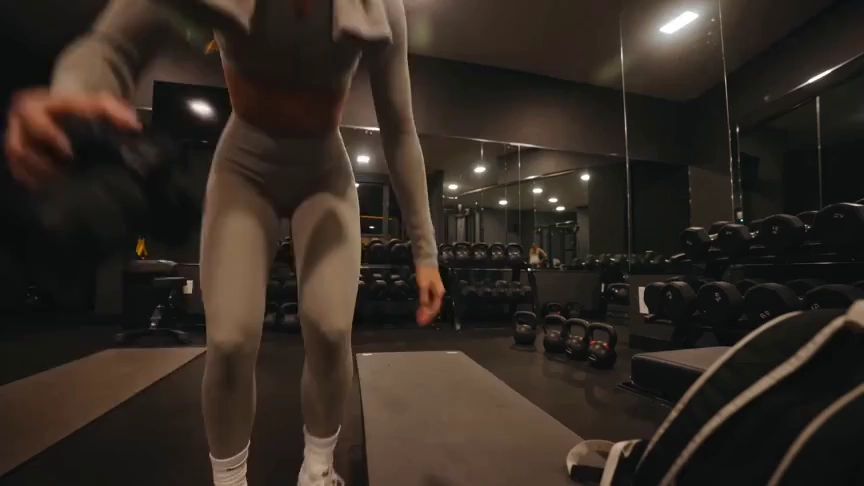
프롬프트
Create a 15-second, 16:9 intimate end-of-workout vlog starring one consistent fictional 24-year-old Brazilian fitness creator, CHASE: slim athletic build, real glowing skin, expressive brown eyes, and long wavy chestnut-brown hair in a loose ponytail. She wears a fitted long-sleeve workout top, high-waisted leggings, white socks, sneakers, and a towel over her shoulders. Handheld DV-camcorder vlog footage with warm 16mm-inspired analog tape: CHASE films herself at arm’s length, then sets the camera on a bench, gym bag, or beside a stretching mat; the camera never appears in frame or reflection. Include subtle shake, drifting framing, autofocus hunting, rushed reframes, uneven zooms, occasional face crops, tape grain, soft lamp halos, exposure shifts, low contrast, and accurate skin. In a mostly empty boutique gym late evening with warm lights, darker corners, mats, mirrors, dumbbells, workout bag, and protein shake, keep her tired, funny, unpolished, breathing audibly, relaxed, and natural. Sequence: on the mat, “Okay… that session is officially over.” Stretching, “I definitely pushed that last set too far.” Shoulder roll, “Tomorrow is going to be interesting.” Close-up sipping a shake, “Wait… this one is actually good.” Side lean, “I’d call today a solid eight and a half.” Resting on one knee, “Exhausted, but in the best way.” Finally bags up and waves: “I’m calling it. See you at the next workout.” Natural English lip sync, blinking, micro-expressions, identical face, hair, wardrobe, and physique. Avoid polished commercial styling, plastic skin, robotic movement, face swaps, added people, captions, logos, watermarks, visible camera, or AI artifacts.
비디오
OpusClip 리뷰: 어떤 기능이 있나요?
OpusClip은 기존 영상을 짧은 클립으로 전환하는 데 중점을 둡니다. 편집 도구는 크리에이터가 소셜 플랫폼용 클립을 준비하도록 돕습니다.
AI 동영상 클리핑
OpusClip은 긴 동영상에서 장면을 찾아 짧은 클립으로 만듭니다. 인터뷰, 녹화 영상 등 재활용할 기존 영상이 있는 크리에이터에게 적합합니다.
자막 및 화면 재구성
자막과 화면 재구성 도구는 화자나 피사체에 초점을 유지하면서 기존 클립을 소셜 시청 환경에 맞게 조정합니다.
클리핑 후 편집
편집기는 텍스트 기반 편집, 레이아웃, AI B롤을 제공해 초기 선택 이후 클립을 다듬을 수 있습니다.
UGC Maker AI가 적합한 경우
아이디어나 이미지로 새 장면을 생성하고 싶을 때 UGC Maker AI를 사용하세요. 이 페이지의 생성기는 긴 녹화 영상을 자동으로 자르는 대신 독창적인 영상을 만듭니다.
적절한 시작점 선택
보유한 원본 자료를 바탕으로 작업에 맞는 흐름을 정할 수 있습니다.
녹화된 인터뷰와 팟캐스트
OpusClip은 기존 대화 영상을 소셜 배포용 짧은 장면으로 재활용하도록 설계되었습니다.
새 제품 콘셉트
제품 이미지로 시작해 UGC Maker AI가 생성할 움직임, 배경, 상호작용을 설명하세요.
소셜 동영상 후킹 장면
숏폼 캠페인에 독창적인 시각 요소가 필요할 때 프롬프트로 새 시작 장면을 탐색하세요.
창작 변형
UGC Maker AI에서 같은 제작 설명으로 여러 장면 방향을 시도한 뒤 기록에서 생성된 동영상을 확인하세요.
UGC Maker AI로 동영상 제작
이 페이지에서 다른 동영상 생성 방식을 직접 시도하세요.
프롬프트 또는 이미지로 시작
장면을 설명하거나 이미지를 업로드해 동영상의 피사체와 외형을 유도하세요.
동영상 모델 선택
사용 가능한 모델을 선택하고 지원하는 길이, 레이아웃, 생성 설정을 조정하세요.
생성 및 검토
로그인 후 동영상 생성을 제출하고 동영상 기록에서 결과를 확인하세요. 프롬프트를 다듬어 다른 방향을 탐색하세요.

더 많은 AI 창작 도구 살펴보기
UGC Maker AI의 이미지 및 동영상 도구로 다음 시각적 아이디어를 구현하세요.


























