
Opus Clip AIレビュー:自分に合う短編動画制作フローを探す
OpusClipによる長い動画の再活用を知り、UGC Maker AIでオリジナル動画を作成しましょう。下の動画生成ツールで、プロンプトや画像から次のキャンペーン向けの新しい動画を制作できます。
0 / 5000
AI動画の作例を見る
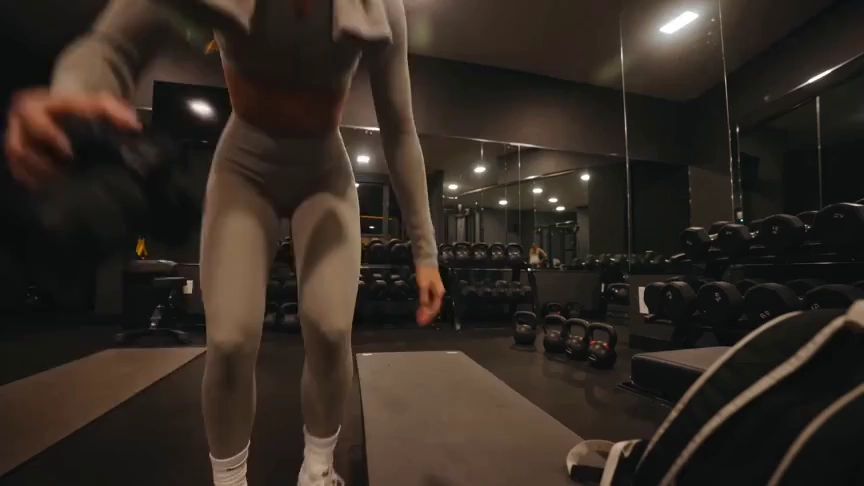
フィットネスや旅行系クリエイターの動画コンセプトと、それぞれに使われたプロンプトをご覧ください。
オリジナル画像
プロンプト
Create a 15-second, 16:9 intimate end-of-workout vlog starring one consistent fictional 24-year-old Brazilian fitness creator, CHASE: slim athletic build, real glowing skin, expressive brown eyes, and long wavy chestnut-brown hair in a loose ponytail. She wears a fitted long-sleeve workout top, high-waisted leggings, white socks, sneakers, and a towel over her shoulders. Handheld DV-camcorder vlog footage with warm 16mm-inspired analog tape: CHASE films herself at arm’s length, then sets the camera on a bench, gym bag, or beside a stretching mat; the camera never appears in frame or reflection. Include subtle shake, drifting framing, autofocus hunting, rushed reframes, uneven zooms, occasional face crops, tape grain, soft lamp halos, exposure shifts, low contrast, and accurate skin. In a mostly empty boutique gym late evening with warm lights, darker corners, mats, mirrors, dumbbells, workout bag, and protein shake, keep her tired, funny, unpolished, breathing audibly, relaxed, and natural. Sequence: on the mat, “Okay… that session is officially over.” Stretching, “I definitely pushed that last set too far.” Shoulder roll, “Tomorrow is going to be interesting.” Close-up sipping a shake, “Wait… this one is actually good.” Side lean, “I’d call today a solid eight and a half.” Resting on one knee, “Exhausted, but in the best way.” Finally bags up and waves: “I’m calling it. See you at the next workout.” Natural English lip sync, blinking, micro-expressions, identical face, hair, wardrobe, and physique. Avoid polished commercial styling, plastic skin, robotic movement, face swaps, added people, captions, logos, watermarks, visible camera, or AI artifacts.
ビデオ
OpusClipレビュー:何ができる?
OpusClipは既存の映像を短いクリップにすることに特化しています。編集ツールで、SNS向けの仕上げをサポートします。
AI動画切り抜き
OpusClipは長い動画の中から場面を見つけ、短いクリップに変換します。インタビュー、録画、その他の映像素材をすでに持ち、再活用したいクリエイターに向いています。
字幕とリフレーミング
字幕とリフレーミングのツールで、話者や被写体を目立たせながら、既存の動画をSNSで見やすい形に調整できます。
切り抜き後の編集
エディターにはテキストベースの編集、レイアウト、AI Bロールがあり、最初の選別後に動画を仕上げられます。
UGC Maker AIの活用どころ
アイデアや画像から新しいシーンを生成したい場合は、UGC Maker AIが使えます。このページの生成ツールは、長い録画を自動で切り抜くのではなく、オリジナル映像を作成します。
適切な出発点を選ぶ
手元の素材に応じて、作業に合う制作フローを選びましょう。
録画済みのインタビュー・ポッドキャスト
OpusClipは、既存の会話動画をSNS配信用の短い場面に再活用できるよう設計されています。
新しい商品コンセプト
商品画像から始め、UGC Maker AIに生成してほしい動き、背景、やり取りを説明します。
SNS動画のつかみ
短編動画キャンペーンに独自の映像が必要なとき、プロンプトから新しい冒頭シーンを試せます。
クリエイティブの別案
UGC Maker AIで同じ企画から異なるシーンの方向性を試し、生成した動画を履歴で確認できます。
UGC Maker AIで動画を作成
このページで別の動画生成フローを直接試せます。
プロンプトまたは画像から開始
シーンを説明するか画像をアップロードし、動画の被写体と見た目を指定します。
動画モデルを選択
利用可能なモデルを選び、対応する長さ、レイアウト、生成設定を調整します。
生成して確認
ログインして動画の生成を送信し、動画履歴で結果を確認します。プロンプトを調整して別の方向性も試せます。

さらに多くのAIクリエイティブツールを見る
UGC Maker AIの画像・動画ツールで、次のビジュアルアイデアを形にしましょう。


























