
ASMRテンプレートを選択
心地よいテンプレート付きAI ASMR動画生成ツール
画像やシーンのアイデアを心地よいASMR動画に。カット、タッピング、砂、スライムのテンプレートを選び、UGC Maker AIで欲しい動きと音を指定しましょう。
AI ASMR動画の作例を見る
氷、液体、チョコレートの質感が動く様子を見て、プロンプトをコピーし、自分のASMR動画を作りましょう。
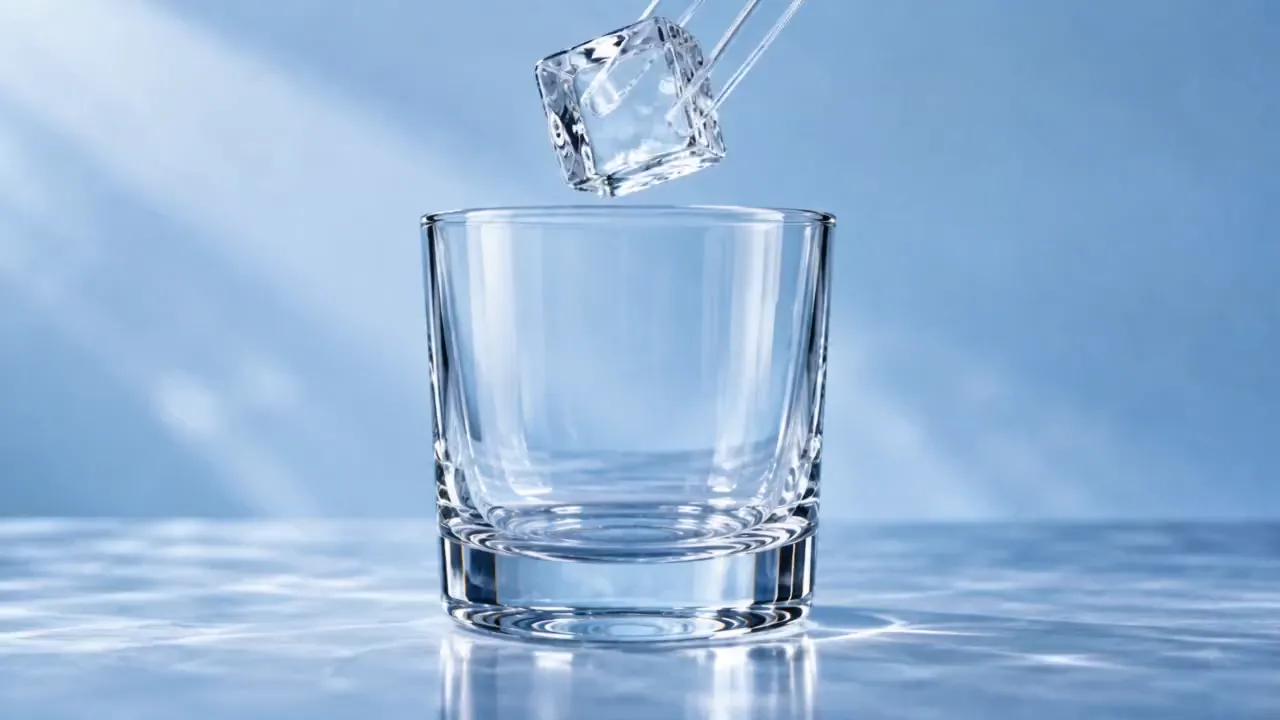
オリジナル画像
プロンプト
15-second 16:9 reference-image-to-video ASMR video. Begin from the exact reference-image composition and retain the glass vessel, ice geometry, liquid colors, and cool studio lighting. No labels, text, logos, face, or drinking action.
0–2s: a clear square ice cube is placed into the empty glass with a crisp resonant clink.
2–4s: a thin stream of cobalt-blue liquid flows around the ice and fills the lower third of the glass.
4–7s: a second stream of amber liquid enters from the opposite side, forming visible swirling boundaries without instantly mixing.
7–9s: a glass stirrer turns once; the colors spiral around the cube in layered ribbons.
9–11s: a second ice cube drops in, displacing the liquid and creating a controlled ripple against the glass.
11–14s: condensation beads form and slide down the outer surface while the internal colors settle into a rich gradient.
14–15s: close macro of one bead rolling downward, ending on a clear glass chime.
Camera: extreme macro at glass height, slow focus transition from the pour to the condensation bead. Audio: precise ice clinks, liquid pour, glass stir, no music, no voice.
ビデオ
ASMR動画の細部を演出
焦点を絞ったシーン、意図的な動き、明確な音の説明を使いましょう。
心地よいプロンプトテンプレート
ガラスの果物、キネティックサンド、スライム、タッピングから始め、プロンプトで素材、被写体、テンポを変えられます。
画像から動画を制作
画像をアップロードして冒頭の見た目を指定し、被写体をどう動かしたいか説明します。
対応モデルで音も生成
欲しい接触音を説明し、音声対応モデルで生成します。選択したモデルに音声スイッチがある場合は、オンにしてください。
生成した別案を確認
動画履歴で生成したクリップを比較し、好みの動き、構図、音に向けてプロンプトを調整できます。
心地よい動画のアイデアを探す
ひとつの触感的な動作を中心に短い動画を作りましょう。
カットとスライス
カメラアングルを工夫し、滑らかなカット、層状の素材、質感のクローズアップを試せます。
砂と柔らかい素材
控えめな動きで、粒が崩れる様子、優しい圧縮、整然と並ぶ形を試しましょう。
スライムと泡の質感
ゆっくり伸びる動き、折り重なり、小さな弾ける音を説明し、触感が伝わる映像と音のアイデアを形にします。
タッピングと物音
安定した構図で、軽い接触、表面の質感、静かなシーンに焦点を当てます。
AI ASMR動画の作り方
テンプレートから始め、動作と音の両方を指定します。
テンプレートと画像を選択
ASMRプリセットを選び、被写体や開始時の構図を指定したい場合は画像をアップロードします。
動きと音を説明
具体的な動作、テンポ、音をプロンプトに記入します。音声対応モデルを使い、スイッチがある場合は音声を有効にしてください。
生成して音を確認
動画を生成し、音付きで確認します。タイミングや質感を改善したい場合は、プロンプトやモデル設定を調整してください。

さらに多くのAIクリエイティブツールを見る
UGC Maker AIの画像・動画ツールで、次のビジュアルアイデアを形にしましょう。






続きを読む表示を減らす





















AI ASMR動画生成ツールのよくある質問
AI ASMR動画の関連記事
Loading...