
0 / 5000
空飛ぶ車のAI生成:車の写真を離陸動画に変換
AIで愛車を飛ばしましょう。車両写真、参照動画、プロンプトを使い、SNS投稿や企画向けの映画風フライングカークリップを制作できます。
空飛ぶ車のブランド演出とハイウェイ飛行
車両画像、参照動画、調整したプロンプトで制作した、街中のブランド登場シーンとハイウェイの飛行シーケンスを探索できます。
オリジナル画像
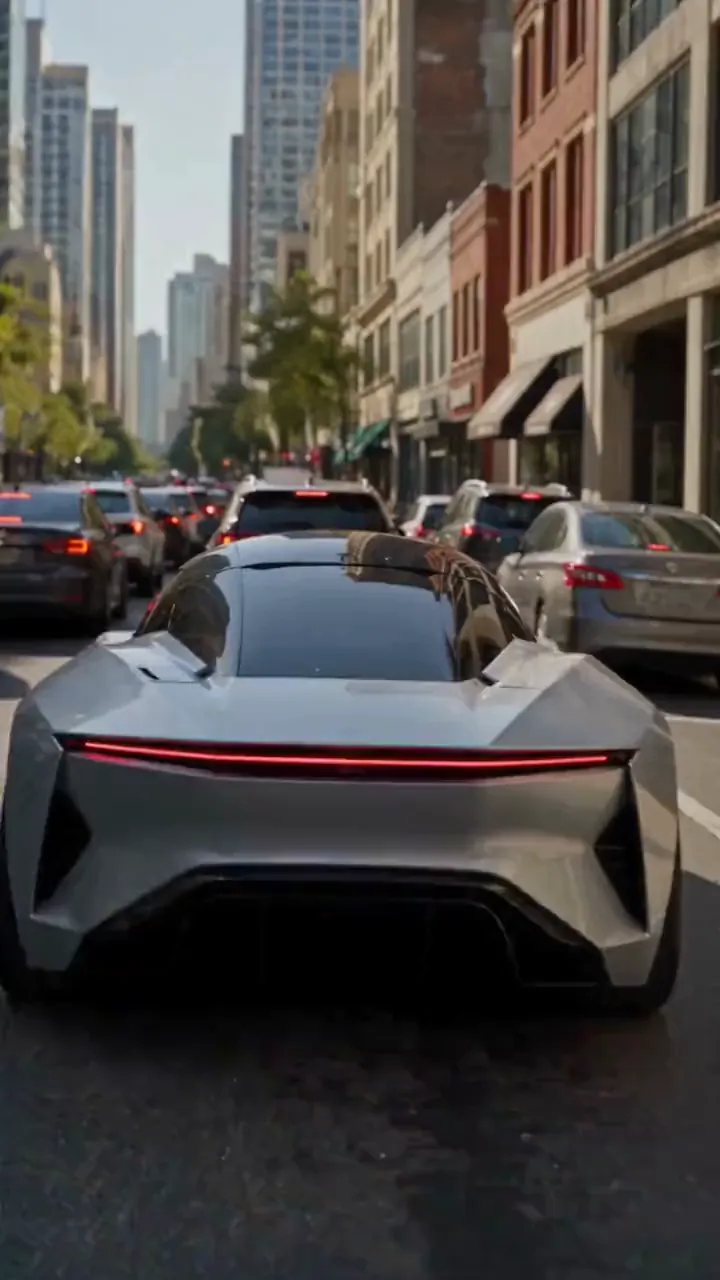
ビデオ
プロンプト
Create a photorealistic 15-second automotive scene on an ordinary modern city road in natural daylight, following the shot sequence below. REFERENCE ROLES <<<hint/1.webp>>> is the replacement vehicle. Replace the main vehicle from <<<hint/1.mp4>>> with the vehicle shown in <<<hint/1.webp>>>. Preserve its body shape, paint color, proportions and wheels throughout every shot. Use only the vehicle itself from <<<hint/1.webp>>>. Use <<<hint/1.mp4>>> as the reference for the vehicle’s jet-powered takeoff, flight behavior and strong downward jets. Extend that motion naturally into the controlled landing described below. <<<hint/1_1.webp>>> is the replacement logo. Replace the original logos in the existing roadside advertisements from <<<hint/1.mp4>>>, including billboards and wall advertisements, with the logo from <<<hint/1_1.webp>>>. Remove the original advertising logos completely. Reproduce the design, colors and lettering in <<<hint/1_1.webp>>> faithfully, without redesigning, misspelling or combining it with another logo. Retain the existing advertising structures and layout. Fit the replacement logo naturally to each advertising surface, matching its perspective, lighting and material. Replace only the advertising artwork; do not create additional advertising placements. Apply <<<hint/1_1.webp>>> only to roadside advertisements. Never place it on the vehicle. Keep the vehicle free of brand advertising throughout. Keep all brand advertisements outside the camera frame until after landing. Apart from the vehicle motion and existing advertising references specified above, use the daylight city setting and shot plan below. VISUAL STYLE Restrained documentary camera work, everyday traffic, natural reflections, realistic shadows and believable vehicle weight. Maintain the same replacement vehicle consistently across every cut. 0–3s: Street-level rear three-quarter tracking shot. The vehicle slows behind a short traffic jam. Ordinary shops, concrete buildings and parked vehicles line the street. Keep brand advertisements out of frame. 3–6s: Cut to a low roadside view. Strong white cold-gas jets fire straight downward beneath the vehicle, blowing dust across the asphalt. The vehicle slowly lifts until its wheels clear the stopped traffic. Attach the jets naturally beneath the replacement vehicle and keep them synchronized with its movement. 6–10s: Wide side tracking shot. The vehicle flies forward over the queue, upright and level, with continuous strong downward white vapor jets. Keep the vehicle, its moving shadow and the traffic together in frame. Maintain believable weight and steady forward momentum. 10–12s: Rear three-quarter view. The vehicle clears the last stopped vehicle and descends into an empty lane, with downward jets still running. Reduce its altitude smoothly while maintaining a stable, upright posture. 12–15s: Low roadside shot. The tires touch down, the suspension compresses and the jets shut down. Only after landing, the vehicle accelerates past the existing roadside advertisements, whose original logos have been replaced with the exact logo from <<<hint/1_1.webp>>>. Frame the moving vehicle and an existing roadside billboard together for the final shot. Keep the vehicle free of brand advertising. SOUND City traffic, idling vehicles, ignition hiss, cold-gas thrust, tire touchdown and an electric motor accelerating away.
自分だけのフライングカー効果を制作
画像・動画参照とプロンプトで車両、動き、シーンを導きます。
車の写真から開始
車両写真と飛行参照で、離陸、車列の上空飛行、道路への復帰を含むハイウェイシーンを制作します。
自分のロゴでブランドを演出
車両画像、ロゴ、参照動画を組み合わせ、道路沿いのブランド広告を含むフライングカープロモーションを構想できます。
Tesla Roadsterの飛行を再現
参照動画の主役の車を自分の車に置換。ジェット離陸、空中ロール、元の環境、カメラの動き、タイミングを動画で誘導します。
複数の動画モデルを探索
Seedance 2.5から始めるほか、Seedance 2.0、Wan 3.0、Kling 3.0などを試し、空飛ぶ車のアイデアを異なる解釈で表現できます。
車コンテンツを道路の先へ
見慣れた車と動きの参照からアイデアを構想し、共有やプレゼンに使える動画へ仕上げましょう。
クリエイティブの方向性から開始
動画の出発点を選び、参照とプロンプトを調整。シーン全体をゼロから記述する必要はありません。
コンセプトを自分らしく
写真で車の外観を誘導し、見慣れた車を意外な飛行シーンの主役にしましょう。
気に入った動きを活用
参照動画で思い描く飛行を示し、動作とカメラの方向を伝えやすくします。
クリエイティブの方向性を比較
履歴で生成バージョンを比較し、車の外観、動き、画角を少しずつ改善できます。
クリエイティブ企画のフライングカー動画
SNSコンテンツ、車のキャンペーン、視覚的な物語向けにフライングカー動画を構想しましょう。
車のSNSクリップ
車両写真を架空のフライングカー動画にし、TikTok、InstagramなどのSNSに活用できます。
ブランドプロモーションの構想
プロジェクトに合う車両とブランド表現で車のキャンペーン案を探り、チームに共有しましょう。
車好き向けの編集動画
車のコミュニティやファン投稿向けに、Teslaのフライングカー動画を自分らしく制作できます。
物語や企画提案のビジュアル
架空の車両飛行を、絵コンテ、プレゼン、企画提案のカット構想に使えます。
AIで空飛ぶ車の動画を作る方法
プリセットを選び、参照素材を調整して動画を生成します。
アイデアプリセットを選択
作りたい動画に合うアイデアプリセットを選びましょう。
参照素材をカスタマイズ
鮮明な車両写真と、選んだプリセットに必要な参照を追加。動きのプロンプトと利用可能な動画設定を調整します。
生成して確認
動画を生成し、制作履歴で車の外観と動きを確認。参照素材やプロンプトを調整して仕上がりを改善しましょう。

クリエイティブ動画向けのその他のAIツール
映画風エフェクト、車のコンセプト、SNSコンテンツ向けの画像・動画ツールを探索できます。


























