
0 / 5000
Générateur IA de voitures volantes : de la photo au décollage
Faites voler votre voiture avec l’IA. Utilisez photo du véhicule, référence vidéo et prompt pour un clip cinéma destiné aux posts sociaux ou campagnes créatives.
Révélations de marque et vols de voitures sur autoroute
Explorez une révélation de marque en ville et un vol sur autoroute réalisés avec images de véhicules, références vidéo et prompts adaptés.
Image originale
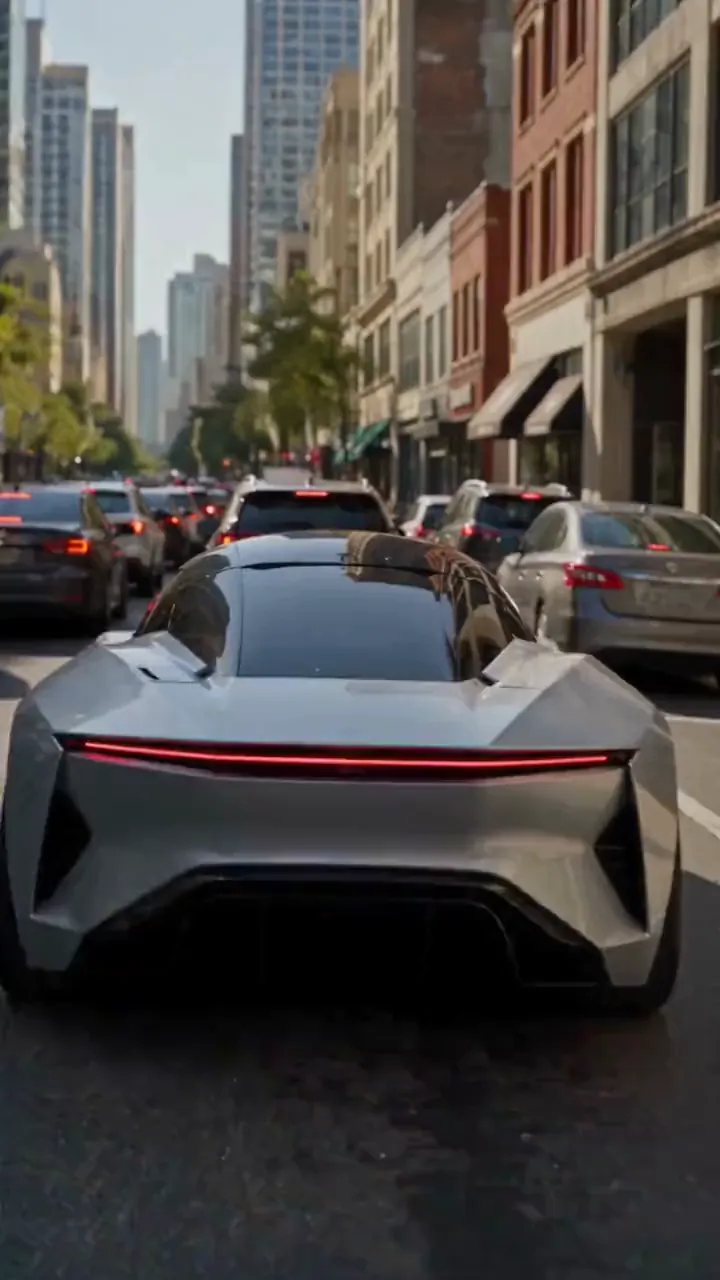
Vidéo
Invite
Create a photorealistic 15-second automotive scene on an ordinary modern city road in natural daylight, following the shot sequence below. REFERENCE ROLES <<<hint/1.webp>>> is the replacement vehicle. Replace the main vehicle from <<<hint/1.mp4>>> with the vehicle shown in <<<hint/1.webp>>>. Preserve its body shape, paint color, proportions and wheels throughout every shot. Use only the vehicle itself from <<<hint/1.webp>>>. Use <<<hint/1.mp4>>> as the reference for the vehicle’s jet-powered takeoff, flight behavior and strong downward jets. Extend that motion naturally into the controlled landing described below. <<<hint/1_1.webp>>> is the replacement logo. Replace the original logos in the existing roadside advertisements from <<<hint/1.mp4>>>, including billboards and wall advertisements, with the logo from <<<hint/1_1.webp>>>. Remove the original advertising logos completely. Reproduce the design, colors and lettering in <<<hint/1_1.webp>>> faithfully, without redesigning, misspelling or combining it with another logo. Retain the existing advertising structures and layout. Fit the replacement logo naturally to each advertising surface, matching its perspective, lighting and material. Replace only the advertising artwork; do not create additional advertising placements. Apply <<<hint/1_1.webp>>> only to roadside advertisements. Never place it on the vehicle. Keep the vehicle free of brand advertising throughout. Keep all brand advertisements outside the camera frame until after landing. Apart from the vehicle motion and existing advertising references specified above, use the daylight city setting and shot plan below. VISUAL STYLE Restrained documentary camera work, everyday traffic, natural reflections, realistic shadows and believable vehicle weight. Maintain the same replacement vehicle consistently across every cut. 0–3s: Street-level rear three-quarter tracking shot. The vehicle slows behind a short traffic jam. Ordinary shops, concrete buildings and parked vehicles line the street. Keep brand advertisements out of frame. 3–6s: Cut to a low roadside view. Strong white cold-gas jets fire straight downward beneath the vehicle, blowing dust across the asphalt. The vehicle slowly lifts until its wheels clear the stopped traffic. Attach the jets naturally beneath the replacement vehicle and keep them synchronized with its movement. 6–10s: Wide side tracking shot. The vehicle flies forward over the queue, upright and level, with continuous strong downward white vapor jets. Keep the vehicle, its moving shadow and the traffic together in frame. Maintain believable weight and steady forward momentum. 10–12s: Rear three-quarter view. The vehicle clears the last stopped vehicle and descends into an empty lane, with downward jets still running. Reduce its altitude smoothly while maintaining a stable, upright posture. 12–15s: Low roadside shot. The tires touch down, the suspension compresses and the jets shut down. Only after landing, the vehicle accelerates past the existing roadside advertisements, whose original logos have been replaced with the exact logo from <<<hint/1_1.webp>>>. Frame the moving vehicle and an existing roadside billboard together for the final shot. Keep the vehicle free of brand advertising. SOUND City traffic, idling vehicles, ignition hiss, cold-gas thrust, tire touchdown and an electric motor accelerating away.
Créez votre effet de voiture volante
Guidez véhicule, mouvement et scène par références visuelles et prompt.
Partez d’une photo de voiture
Utilisez photo du véhicule et référence de vol pour une scène d’autoroute avec décollage, survol du trafic et retour sur la route.
Révélez votre marque avec votre logo
Combinez image du véhicule, logo et référence vidéo pour une promotion de voiture volante avec panneaux routiers de marque.
Recréez le vol du Tesla Roadster
Remplacez la voiture principale du clip par la vôtre. La référence guide décollage à réaction, tonneau aérien, décor original, caméra et rythme.
Explorez plusieurs modèles vidéo
Partez de Seedance 2.5 ou essayez Seedance 2.0, Wan 3.0, Kling 3.0 et d’autres modèles pour explorer différentes interprétations de votre idée.
Emmenez vos contenus automobiles au-delà de la route
Développez une idée depuis un véhicule familier et une référence de mouvement, puis affinez-la en clip à partager ou présenter.
Partez d’une direction créative
Choisissez une direction initiale puis adaptez références et prompt au lieu d’écrire toute la scène de zéro.
Appropriez-vous le concept
Placez un véhicule familier au centre d’un vol inattendu, en guidant son apparence avec votre photo.
Partez d’un mouvement que vous aimez
Montrez le vol imaginé avec un clip de référence pour communiquer plus facilement action et caméra.
Comparez les directions créatives
Comparez les versions dans l’historique et affinez progressivement aspect, mouvement ou cadrage du véhicule.
Vidéos de voitures volantes pour projets créatifs
Développez des clips pour contenus sociaux, campagnes automobiles et narration visuelle.
Clips automobiles pour les réseaux sociaux
Transformez une photo de véhicule en clip fictif de voiture volante pour TikTok, Instagram et d’autres réseaux.
Concepts de promotion de marque
Explorez une campagne automobile avec un véhicule et une identité de marque adaptés au projet, puis partagez le concept avec votre équipe.
Montages pour passionnés d’automobile
Créez votre version du clip de voiture volante Tesla pour les communautés automobiles et publications de fans.
Visuels pour récits et propositions
Utilisez un vol automobile imaginaire comme concept de plan pour storyboard, présentation ou proposition créative.
Comment créer une vidéo IA de voiture volante
Choisissez une idée prédéfinie, personnalisez vos références et générez la vidéo.
Choisissez une idée prédéfinie
Choisissez l’idée prédéfinie correspondant à la vidéo souhaitée.
Personnalisez vos références
Ajoutez une photo nette du véhicule et les références requises par votre idée. Ajustez le prompt de mouvement et les réglages vidéo disponibles.
Générez et vérifiez
Générez la vidéo puis vérifiez l’aspect et le mouvement du véhicule dans l’historique de création. Ajustez références ou prompt pour affiner le résultat.

Autres outils IA pour vidéos créatives
Explorez des outils image et vidéo pour effets cinéma, concepts automobiles et contenus sociaux.


























