
0 / 5000
Generator AI Mobil Terbang: Foto Mobil menjadi Video Lepas Landas
Terbangkan mobil Anda dengan AI. Gunakan foto kendaraan, referensi video, dan prompt untuk klip sinematik bagi posting sosial atau kampanye kreatif.
Pengungkapan Merek Mobil Terbang dan Penerbangan Jalan Tol
Jelajahi pengungkapan merek di kota dan penerbangan jalan tol dari gambar kendaraan, referensi video, dan prompt khusus.
Gambar Asli
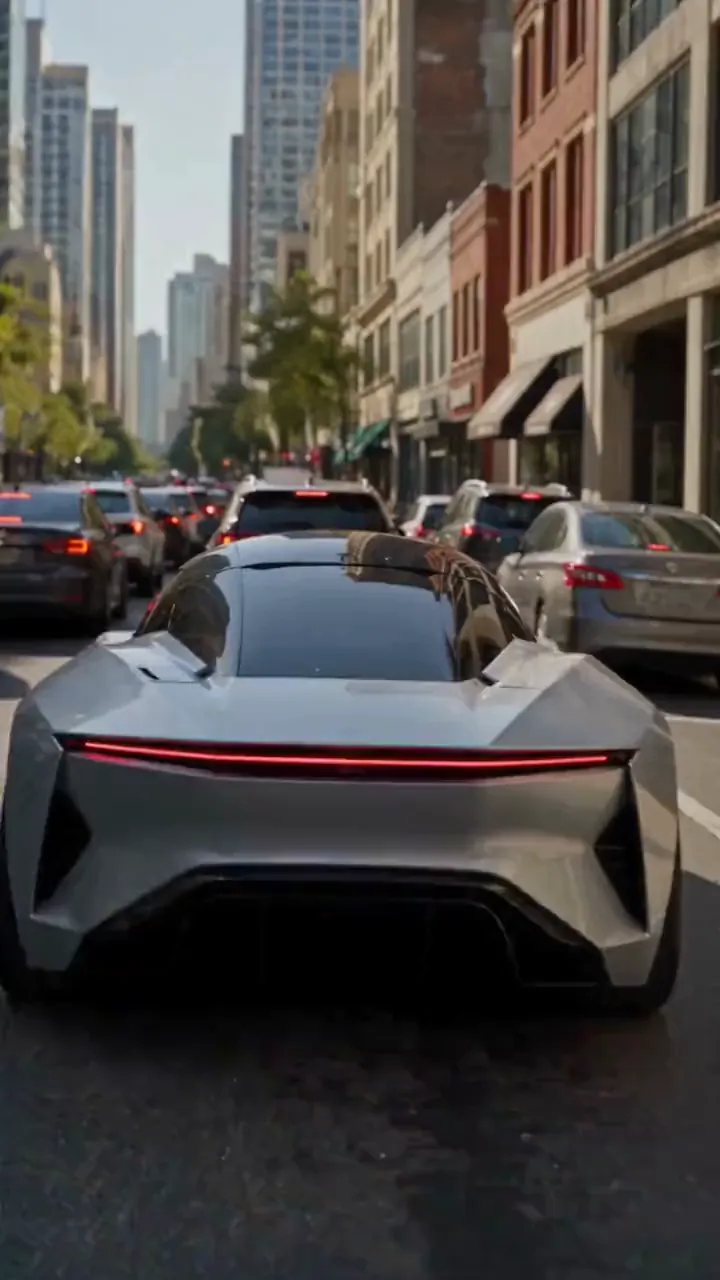
Video
Prompt
Create a photorealistic 15-second automotive scene on an ordinary modern city road in natural daylight, following the shot sequence below. REFERENCE ROLES <<<hint/1.webp>>> is the replacement vehicle. Replace the main vehicle from <<<hint/1.mp4>>> with the vehicle shown in <<<hint/1.webp>>>. Preserve its body shape, paint color, proportions and wheels throughout every shot. Use only the vehicle itself from <<<hint/1.webp>>>. Use <<<hint/1.mp4>>> as the reference for the vehicle’s jet-powered takeoff, flight behavior and strong downward jets. Extend that motion naturally into the controlled landing described below. <<<hint/1_1.webp>>> is the replacement logo. Replace the original logos in the existing roadside advertisements from <<<hint/1.mp4>>>, including billboards and wall advertisements, with the logo from <<<hint/1_1.webp>>>. Remove the original advertising logos completely. Reproduce the design, colors and lettering in <<<hint/1_1.webp>>> faithfully, without redesigning, misspelling or combining it with another logo. Retain the existing advertising structures and layout. Fit the replacement logo naturally to each advertising surface, matching its perspective, lighting and material. Replace only the advertising artwork; do not create additional advertising placements. Apply <<<hint/1_1.webp>>> only to roadside advertisements. Never place it on the vehicle. Keep the vehicle free of brand advertising throughout. Keep all brand advertisements outside the camera frame until after landing. Apart from the vehicle motion and existing advertising references specified above, use the daylight city setting and shot plan below. VISUAL STYLE Restrained documentary camera work, everyday traffic, natural reflections, realistic shadows and believable vehicle weight. Maintain the same replacement vehicle consistently across every cut. 0–3s: Street-level rear three-quarter tracking shot. The vehicle slows behind a short traffic jam. Ordinary shops, concrete buildings and parked vehicles line the street. Keep brand advertisements out of frame. 3–6s: Cut to a low roadside view. Strong white cold-gas jets fire straight downward beneath the vehicle, blowing dust across the asphalt. The vehicle slowly lifts until its wheels clear the stopped traffic. Attach the jets naturally beneath the replacement vehicle and keep them synchronized with its movement. 6–10s: Wide side tracking shot. The vehicle flies forward over the queue, upright and level, with continuous strong downward white vapor jets. Keep the vehicle, its moving shadow and the traffic together in frame. Maintain believable weight and steady forward momentum. 10–12s: Rear three-quarter view. The vehicle clears the last stopped vehicle and descends into an empty lane, with downward jets still running. Reduce its altitude smoothly while maintaining a stable, upright posture. 12–15s: Low roadside shot. The tires touch down, the suspension compresses and the jets shut down. Only after landing, the vehicle accelerates past the existing roadside advertisements, whose original logos have been replaced with the exact logo from <<<hint/1_1.webp>>>. Frame the moving vehicle and an existing roadside billboard together for the final shot. Keep the vehicle free of brand advertising. SOUND City traffic, idling vehicles, ignition hiss, cold-gas thrust, tire touchdown and an electric motor accelerating away.
Buat Efek Mobil Terbang Sendiri
Pandu kendaraan, gerak, dan adegan melalui referensi visual dan prompt.
Mulai dari Foto Mobil
Gunakan foto kendaraan dan referensi terbang untuk adegan jalan tol dengan lepas landas, terbang di atas lalu lintas, dan kembali ke jalan.
Pengungkapan Merek dengan Logo Anda
Gabungkan gambar kendaraan, logo, dan referensi video untuk promosi mobil terbang dengan iklan merek di pinggir jalan.
Buat Ulang Penerbangan Tesla Roadster
Ganti mobil utama di klip referensi dengan kendaraan sendiri. Pandu lepas landas bertenaga jet, putaran berguling di udara, latar asli, kamera, dan waktu lewat klip itu.
Jelajahi Berbagai Model Video
Mulai dengan Seedance 2.5 atau coba Seedance 2.0, Wan 3.0, Kling 3.0, dan model tersedia lain untuk berbagai tafsir ide mobil terbang.
Bawa Konten Mobil Melampaui Jalan
Kembangkan ide dari kendaraan familier dan referensi gerak, lalu sempurnakan menjadi klip untuk dibagikan atau dipresentasikan.
Mulai dengan Arah Kreatif
Pilih arah awal lalu sesuaikan referensi dan prompt tanpa menulis seluruh adegan dari nol.
Jadikan Konsep Milik Anda
Jadikan kendaraan familier pusat adegan terbang tak terduga, dengan foto Anda sebagai panduan tampilannya.
Bangun dari Gerakan Favorit
Tunjukkan penerbangan yang diinginkan lewat klip referensi agar aksi dan arah kamera lebih mudah dipahami.
Bandingkan Arah Kreatif
Bandingkan versi di riwayat dan sempurnakan tampilan, gerak, atau bingkai kendaraan secara bertahap.
Video Mobil Terbang untuk Proyek Kreatif
Kembangkan klip mobil terbang untuk konten sosial, kampanye otomotif, dan cerita visual.
Klip Otomotif untuk Media Sosial
Ubah foto kendaraan menjadi klip mobil terbang fiktif untuk TikTok, Instagram, dan kanal sosial lain.
Konsep Promosi Merek
Jelajahi ide kampanye otomotif memakai kendaraan dan identitas merek yang relevan, lalu bagikan konsep dengan tim.
Editan Penggemar Mobil
Buat versi pribadi klip mobil terbang Tesla untuk komunitas otomotif dan posting penggemar.
Visual Cerita dan Proposal
Gunakan penerbangan kendaraan imajiner sebagai konsep pengambilan gambar untuk storyboard, presentasi, atau proposal kreatif.
Cara Membuat Video AI Mobil Terbang
Pilih ide preset, sesuaikan referensi, lalu buat video.
Pilih Ide Preset
Pilih ide preset yang sesuai dengan video yang ingin dibuat.
Sesuaikan Referensi
Tambahkan foto kendaraan yang jelas dan referensi untuk preset pilihan. Sesuaikan prompt gerak dan pengaturan video yang tersedia.
Buat dan Tinjau
Buat video lalu tinjau penampilan dan gerak kendaraan di riwayat kreasi. Sesuaikan referensi atau prompt untuk menyempurnakan hasil.

Alat AI Lain untuk Video Kreatif
Jelajahi alat gambar dan video untuk efek sinematik, konsep otomotif, dan konten sosial.


























