
0 / 5000
เครื่องมือสร้างรถบิน AI: เปลี่ยนภาพรถเป็นวิดีโอบินขึ้น
ทำรถของคุณให้บินด้วย AI ใช้ภาพรถ วิดีโออ้างอิง และพรอมต์เพื่อสร้างคลิปภาพยนตร์สำหรับโพสต์โซเชียลหรือแคมเปญสร้างสรรค์
เปิดตัวแบรนด์รถบินและบินบนทางหลวง
สำรวจการเปิดตัวแบรนด์ในเมืองและลำดับบินบนทางหลวงที่สร้างด้วยภาพรถ วิดีโออ้างอิง และพรอมต์ปรับเฉพาะ
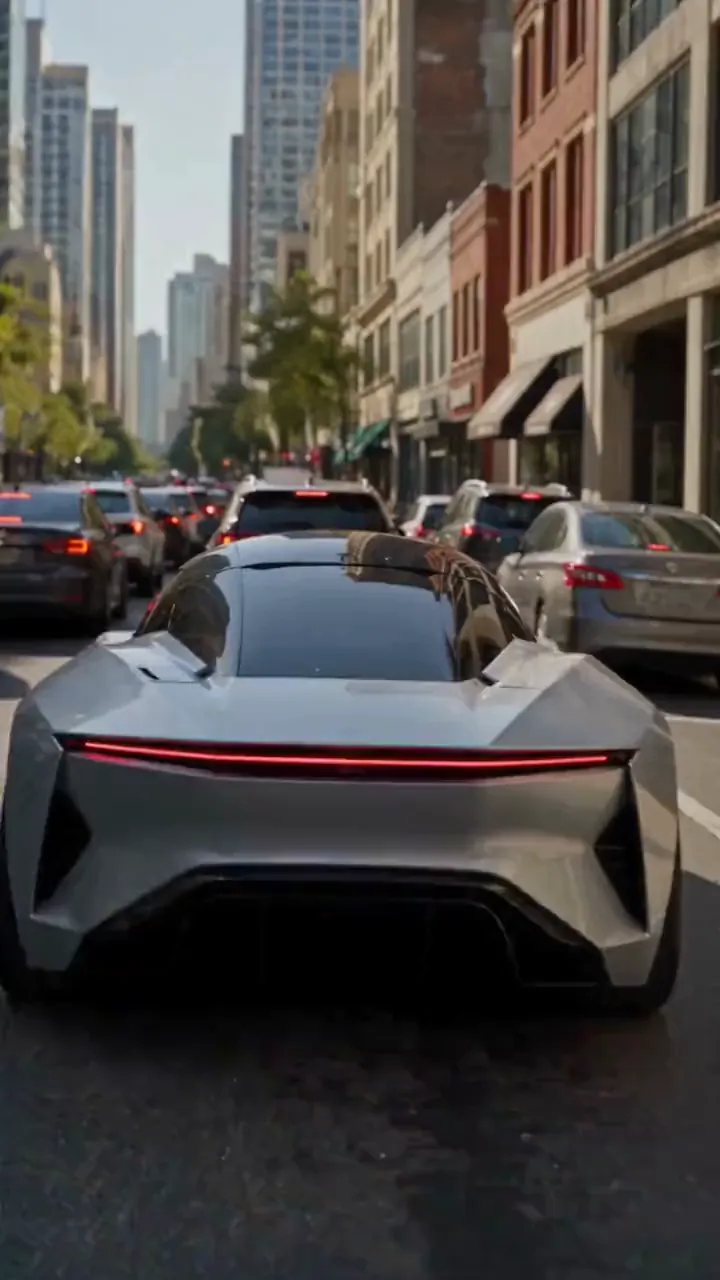
รูปต้นฉบับ
วิดีโอ
พรอมต์
Create a photorealistic 15-second automotive scene on an ordinary modern city road in natural daylight, following the shot sequence below. REFERENCE ROLES <<<hint/1.webp>>> is the replacement vehicle. Replace the main vehicle from <<<hint/1.mp4>>> with the vehicle shown in <<<hint/1.webp>>>. Preserve its body shape, paint color, proportions and wheels throughout every shot. Use only the vehicle itself from <<<hint/1.webp>>>. Use <<<hint/1.mp4>>> as the reference for the vehicle’s jet-powered takeoff, flight behavior and strong downward jets. Extend that motion naturally into the controlled landing described below. <<<hint/1_1.webp>>> is the replacement logo. Replace the original logos in the existing roadside advertisements from <<<hint/1.mp4>>>, including billboards and wall advertisements, with the logo from <<<hint/1_1.webp>>>. Remove the original advertising logos completely. Reproduce the design, colors and lettering in <<<hint/1_1.webp>>> faithfully, without redesigning, misspelling or combining it with another logo. Retain the existing advertising structures and layout. Fit the replacement logo naturally to each advertising surface, matching its perspective, lighting and material. Replace only the advertising artwork; do not create additional advertising placements. Apply <<<hint/1_1.webp>>> only to roadside advertisements. Never place it on the vehicle. Keep the vehicle free of brand advertising throughout. Keep all brand advertisements outside the camera frame until after landing. Apart from the vehicle motion and existing advertising references specified above, use the daylight city setting and shot plan below. VISUAL STYLE Restrained documentary camera work, everyday traffic, natural reflections, realistic shadows and believable vehicle weight. Maintain the same replacement vehicle consistently across every cut. 0–3s: Street-level rear three-quarter tracking shot. The vehicle slows behind a short traffic jam. Ordinary shops, concrete buildings and parked vehicles line the street. Keep brand advertisements out of frame. 3–6s: Cut to a low roadside view. Strong white cold-gas jets fire straight downward beneath the vehicle, blowing dust across the asphalt. The vehicle slowly lifts until its wheels clear the stopped traffic. Attach the jets naturally beneath the replacement vehicle and keep them synchronized with its movement. 6–10s: Wide side tracking shot. The vehicle flies forward over the queue, upright and level, with continuous strong downward white vapor jets. Keep the vehicle, its moving shadow and the traffic together in frame. Maintain believable weight and steady forward momentum. 10–12s: Rear three-quarter view. The vehicle clears the last stopped vehicle and descends into an empty lane, with downward jets still running. Reduce its altitude smoothly while maintaining a stable, upright posture. 12–15s: Low roadside shot. The tires touch down, the suspension compresses and the jets shut down. Only after landing, the vehicle accelerates past the existing roadside advertisements, whose original logos have been replaced with the exact logo from <<<hint/1_1.webp>>>. Frame the moving vehicle and an existing roadside billboard together for the final shot. Keep the vehicle free of brand advertising. SOUND City traffic, idling vehicles, ignition hiss, cold-gas thrust, tire touchdown and an electric motor accelerating away.
สร้างเอฟเฟกต์รถบินของคุณ
กำกับรถ การเคลื่อนไหว และฉากด้วยภาพอ้างอิงและพรอมต์
เริ่มจากภาพรถ
ใช้ภาพรถและการบินอ้างอิงสร้างฉากทางหลวงที่มีการบินขึ้น บินเหนือการจราจร และกลับสู่ถนน
เปิดตัวแบรนด์ด้วยโลโก้ของคุณ
รวมภาพรถ โลโก้ และวิดีโออ้างอิงเพื่อพัฒนาโปรโมชันรถบินพร้อมโฆษณาแบรนด์ริมถนน
จำลองการบิน Tesla Roadster
แทนรถหลักในคลิปด้วยรถของคุณ ใช้คลิปกำกับการบินขึ้นด้วยไอพ่น การหมุนรอบแกนกลางอากาศ ฉากเดิม กล้อง และจังหวะเวลา
สำรวจโมเดลวิดีโอหลายแบบ
เริ่มด้วย Seedance 2.5 หรือลอง Seedance 2.0, Wan 3.0, Kling 3.0 และโมเดลอื่นเพื่อสำรวจการตีความไอเดียรถบินต่างกัน
พาคอนเทนต์รถไปไกลกว่าถนน
พัฒนาไอเดียจากรถคุ้นเคยและการเคลื่อนไหวอ้างอิง แล้วปรับเป็นคลิปที่แชร์หรือนำเสนอได้
เริ่มด้วยทิศทางสร้างสรรค์
เลือกทิศทางเริ่มต้นแล้วปรับข้อมูลอ้างอิงและพรอมต์ แทนการเขียนทั้งฉากจากศูนย์
ทำแนวคิดให้เป็นของคุณ
ให้รถที่คุ้นเคยเป็นศูนย์กลางฉากบินที่คาดไม่ถึง ใช้ภาพของคุณกำกับรูปลักษณ์
ต่อยอดจากการเคลื่อนไหวที่ชอบ
แสดงการบินในใจผ่านคลิปอ้างอิง เพื่อสื่อการกระทำและทิศทางกล้องได้ง่ายขึ้น
เปรียบเทียบทิศทางสร้างสรรค์
เปรียบเทียบเวอร์ชันในประวัติ แล้วปรับรูปลักษณ์ การเคลื่อนไหว หรือกรอบภาพรถทีละขั้น
วิดีโอรถบินสำหรับโครงการสร้างสรรค์
พัฒนาคลิปรถบินสำหรับคอนเทนต์โซเชียล แคมเปญรถ และการเล่าเรื่องด้วยภาพ
คลิปรถสำหรับโซเชียล
เปลี่ยนภาพรถเป็นคลิปรถบินสมมติสำหรับ TikTok, Instagram และช่องทางโซเชียลอื่น
แนวคิดโปรโมตแบรนด์
สำรวจแคมเปญยานยนต์ด้วยรถและอัตลักษณ์แบรนด์ที่เกี่ยวกับโครงการ แล้วแบ่งปันแนวคิดกับทีม
คลิปตัดต่อสำหรับคนรักรถ
สร้างคลิปรถบิน Tesla ในสไตล์ของคุณสำหรับชุมชนรถและโพสต์แฟนคลับ
ภาพสำหรับเรื่องราวและข้อเสนอ
ใช้รถบินในจินตนาการเป็นแนวคิดช็อตสำหรับสตอรีบอร์ด งานนำเสนอ หรือข้อเสนอสร้างสรรค์
วิธีสร้างวิดีโอรถบินด้วย AI
เลือกไอเดีย ปรับข้อมูลอ้างอิง แล้วสร้างวิดีโอ
เลือกไอเดียสำเร็จรูป
เลือกไอเดียที่ตรงกับวิดีโอที่อยากสร้าง
ปรับแต่งข้อมูลอ้างอิง
เพิ่มภาพรถชัดเจนและข้อมูลอ้างอิงที่ไอเดียนั้นต้องใช้ ปรับพรอมต์การเคลื่อนไหวและการตั้งค่าวิดีโอที่มี
สร้างและตรวจสอบ
สร้างวิดีโอแล้วตรวจสอบรูปลักษณ์และการเคลื่อนไหวรถในประวัติผลงาน ปรับข้อมูลอ้างอิงหรือพรอมต์เพื่อปรับปรุงผลลัพธ์

เครื่องมือ AI เพิ่มเติมสำหรับวิดีโอสร้างสรรค์
สำรวจเครื่องมือภาพและวิดีโอสำหรับเอฟเฟกต์ภาพยนตร์ แนวคิดยานยนต์ และคอนเทนต์โซเชียล


























