
0 / 5000
KI-Generator für fliegende Autos: Autofotos als Startvideos
Lass dein Auto mit KI fliegen. Nutze Fahrzeugfoto, Videoreferenz und Prompt für einen filmischen Flugclip für Social Posts oder kreative Kampagnen.
Markenenthüllungen mit fliegenden Autos und Autobahnflüge
Entdecke eine Markenenthüllung in der Stadt und einen Autobahnflug, erstellt mit Fahrzeugbildern, Videoreferenzen und angepassten Prompts.
Originalbild
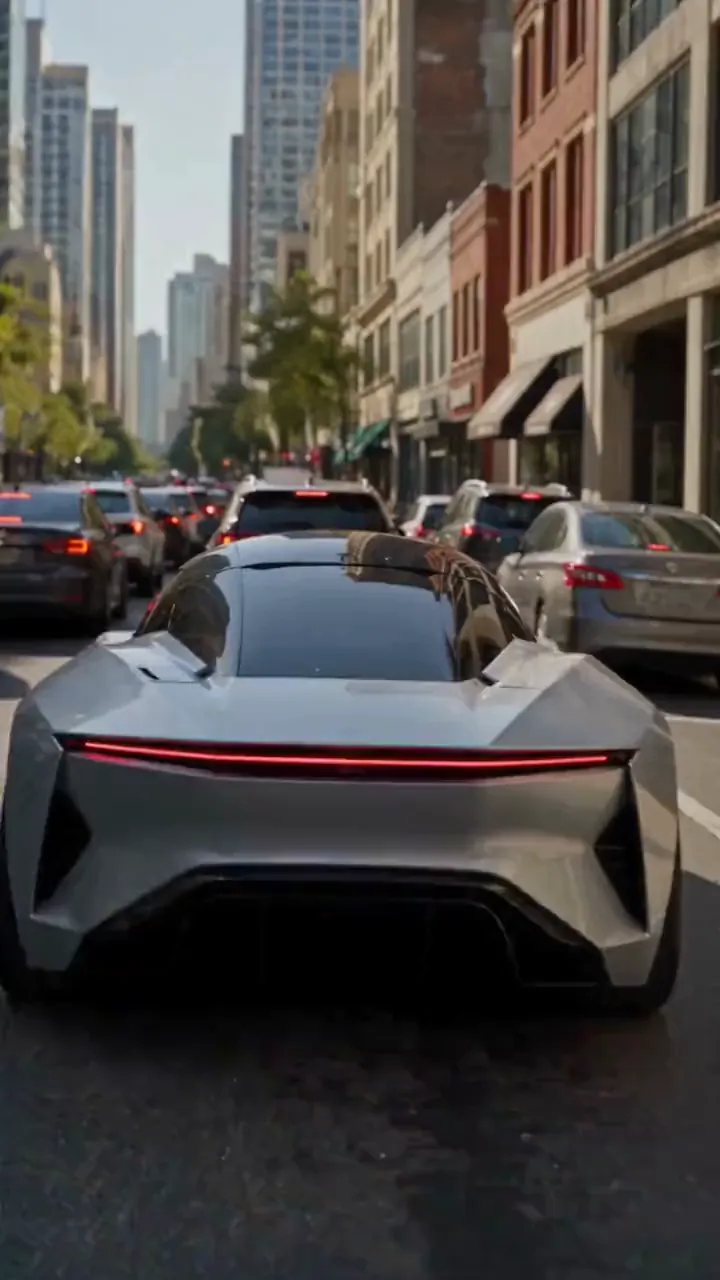
Video
Eingabe
Create a photorealistic 15-second automotive scene on an ordinary modern city road in natural daylight, following the shot sequence below. REFERENCE ROLES <<<hint/1.webp>>> is the replacement vehicle. Replace the main vehicle from <<<hint/1.mp4>>> with the vehicle shown in <<<hint/1.webp>>>. Preserve its body shape, paint color, proportions and wheels throughout every shot. Use only the vehicle itself from <<<hint/1.webp>>>. Use <<<hint/1.mp4>>> as the reference for the vehicle’s jet-powered takeoff, flight behavior and strong downward jets. Extend that motion naturally into the controlled landing described below. <<<hint/1_1.webp>>> is the replacement logo. Replace the original logos in the existing roadside advertisements from <<<hint/1.mp4>>>, including billboards and wall advertisements, with the logo from <<<hint/1_1.webp>>>. Remove the original advertising logos completely. Reproduce the design, colors and lettering in <<<hint/1_1.webp>>> faithfully, without redesigning, misspelling or combining it with another logo. Retain the existing advertising structures and layout. Fit the replacement logo naturally to each advertising surface, matching its perspective, lighting and material. Replace only the advertising artwork; do not create additional advertising placements. Apply <<<hint/1_1.webp>>> only to roadside advertisements. Never place it on the vehicle. Keep the vehicle free of brand advertising throughout. Keep all brand advertisements outside the camera frame until after landing. Apart from the vehicle motion and existing advertising references specified above, use the daylight city setting and shot plan below. VISUAL STYLE Restrained documentary camera work, everyday traffic, natural reflections, realistic shadows and believable vehicle weight. Maintain the same replacement vehicle consistently across every cut. 0–3s: Street-level rear three-quarter tracking shot. The vehicle slows behind a short traffic jam. Ordinary shops, concrete buildings and parked vehicles line the street. Keep brand advertisements out of frame. 3–6s: Cut to a low roadside view. Strong white cold-gas jets fire straight downward beneath the vehicle, blowing dust across the asphalt. The vehicle slowly lifts until its wheels clear the stopped traffic. Attach the jets naturally beneath the replacement vehicle and keep them synchronized with its movement. 6–10s: Wide side tracking shot. The vehicle flies forward over the queue, upright and level, with continuous strong downward white vapor jets. Keep the vehicle, its moving shadow and the traffic together in frame. Maintain believable weight and steady forward momentum. 10–12s: Rear three-quarter view. The vehicle clears the last stopped vehicle and descends into an empty lane, with downward jets still running. Reduce its altitude smoothly while maintaining a stable, upright posture. 12–15s: Low roadside shot. The tires touch down, the suspension compresses and the jets shut down. Only after landing, the vehicle accelerates past the existing roadside advertisements, whose original logos have been replaced with the exact logo from <<<hint/1_1.webp>>>. Frame the moving vehicle and an existing roadside billboard together for the final shot. Keep the vehicle free of brand advertising. SOUND City traffic, idling vehicles, ignition hiss, cold-gas thrust, tire touchdown and an electric motor accelerating away.
Deinen eigenen Flugauto-Effekt erstellen
Steuere Fahrzeug, Bewegung und Szene mit Bildreferenzen und Prompt.
Mit einem Autofoto beginnen
Nutze Fahrzeugfoto und Flugreferenz für eine Autobahnszene mit Start, Flug über den Verkehr und Rückkehr auf die Straße.
Markenenthüllung mit deinem Logo
Kombiniere Fahrzeugbild, Logo und Videoreferenz für eine Flugauto-Werbung mit gebrandeten Straßenanzeigen.
Den Tesla Roadster-Flug nachstellen
Ersetze das Hauptauto im Referenzclip durch dein Fahrzeug. Der Clip steuert den düsengetriebenen Start, die Flugrolle, Originalumgebung, Kamerabewegung und das Timing.
Mehrere Videomodelle erkunden
Starte mit Seedance 2.5 oder teste Seedance 2.0, Wan 3.0, Kling 3.0 und weitere Modelle für unterschiedliche Umsetzungen deiner Flugauto-Idee.
Autoinhalte über die Straße hinausdenken
Entwickle aus einem vertrauten Fahrzeug und einer Bewegungsreferenz eine Idee und verfeinere sie zum teilbaren oder präsentierbaren Clip.
Mit einer kreativen Richtung beginnen
Wähle eine Ausgangsrichtung für dein Video und passe Referenzen und Prompt an, statt die ganze Szene neu zu schreiben.
Dem Konzept eine eigene Note geben
Mache ein vertrautes Fahrzeug zum Mittelpunkt einer unerwarteten Flugszene und steuere sein Aussehen mit deinem Foto.
Auf bevorzugten Bewegungen aufbauen
Zeige den gewünschten Flug mit einem Referenzclip, um Aktion und Kamerarichtung leichter zu vermitteln.
Kreative Richtungen vergleichen
Vergleiche generierte Versionen im Verlauf und verfeinere Fahrzeugaussehen, Bewegung oder Bildausschnitt schrittweise.
Flugauto-Videos für Kreativprojekte
Entwickle Flugauto-Clips für Social Content, Fahrzeugkampagnen und visuelles Erzählen.
Auto-Clips für Social Media
Verwandle ein Fahrzeugfoto in einen fiktiven Flugauto-Clip für TikTok, Instagram und weitere soziale Kanäle.
Konzepte für Markenwerbung
Erkunde eine Fahrzeugkampagne mit einem zum Projekt passenden Auto und Markenauftritt und teile das Konzept anschließend mit deinem Team.
Edits für Autobegeisterte
Gestalte eine eigene Version des Tesla-Flugauto-Clips für Auto-Communitys und Fanbeiträge.
Bilder für Storys und Pitches
Nutze einen erfundenen Fahrzeugflug als Einstellungsidee für Storyboard, Präsentation oder Kreativpitch.
So erstellst du ein KI-Video mit fliegendem Auto
Wähle eine Ideenvorlage, passe Referenzen an und generiere dein Video.
Ideenvorlage wählen
Wähle eine Ideenvorlage passend zu deinem gewünschten Video.
Referenzen anpassen
Füge ein klares Fahrzeugfoto und die für deine Ideenvorlage benötigten Referenzen hinzu. Passe Bewegungsprompt und verfügbare Videoeinstellungen an.
Generieren und prüfen
Generiere dein Video und prüfe Fahrzeugaussehen und Bewegung im Erstellungsverlauf. Verfeinere das Ergebnis durch angepasste Referenzen oder Prompts.

Weitere KI-Tools für kreative Videos
Erkunde Bild- und Videotools für filmische Effekte, Fahrzeugkonzepte und Social Content.


























