
Meet Nano Banana 2.1, our latest image generation and editing model 🍌 This upgraded version outperforms our previous models across the board, with notable leaps in visual design, mask-based editing, and subject consistency to help you create more natural-looking images.
Nano Banana 2.1 KI-Bildgenerator
Erstelle mit Nano Banana 2.1 auf UGC Maker Produktfotos, UGC-Werbung und Kampagnenmotive. Beginne mit einem schriftlichen Briefing oder hochgeladenen Bildern für die Bearbeitung. Optionale Web- und Bildersuche unterstützen deine kreative Richtung.
0 / 5000
Einführung in das Nano Banana 2.1 KI-Bildmodell
Entdecke, wie Nano Banana 2.1 schriftliche Ideen und Bildreferenzen in neue Motive verwandelt.
Beginne mit einem Prompt oder lade Referenzen zur gezielten Bearbeitung hoch. Wähle Komposition und Ausgabeauflösung. Aktiviere die Web- oder Bildersuche, wenn aktuelle Informationen oder online gefundene Bildreferenzen deiner Idee helfen.
Kernfunktionen des Nano Banana 2.1 KI-Bildmodells
Entdecke Bilderstellung, referenzgestützte Bearbeitung und Posterkomposition. Beschreibe dein Ziel und verfeinere die visuelle Richtung mit gezielten Anweisungen und Details, die erhalten bleiben sollen.
Individueller Produktprompt & Referenzeingabe
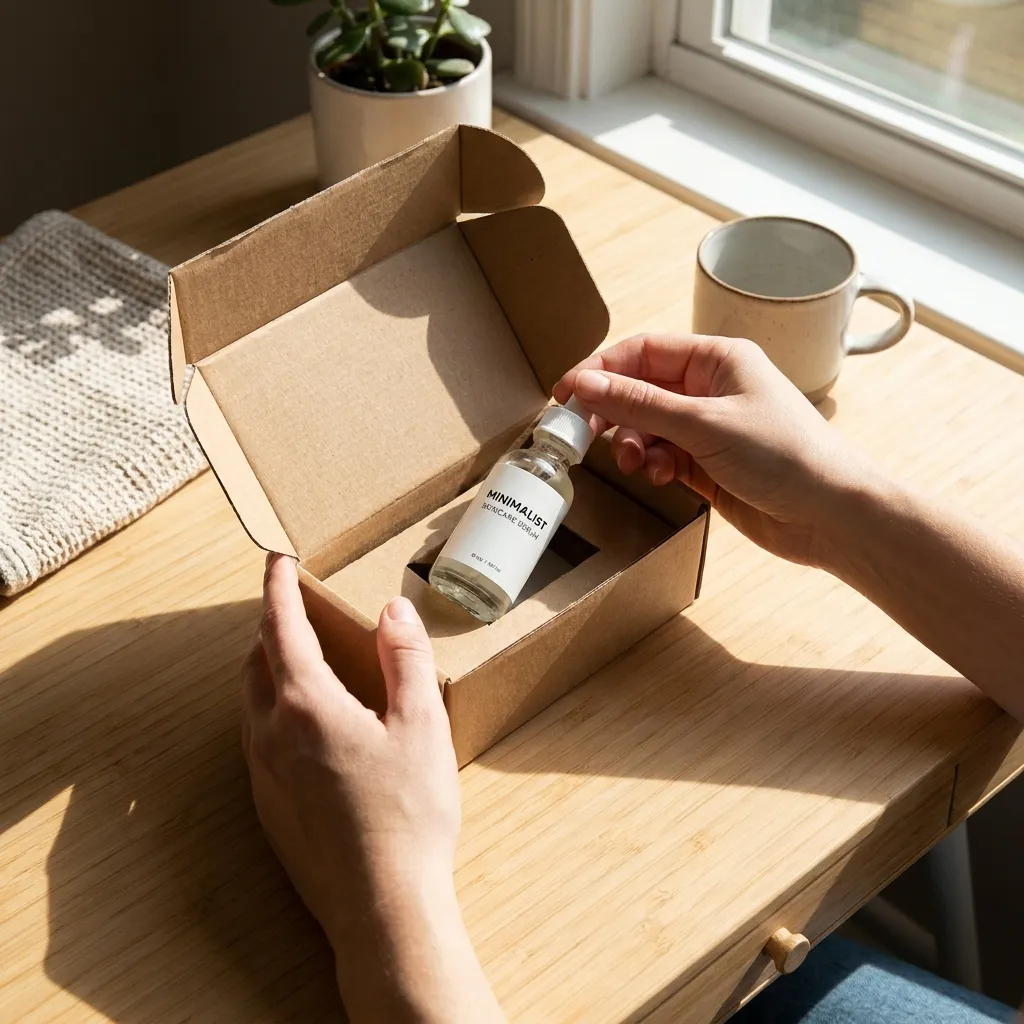
Eingabe
Authentic UGC product unboxing photograph, clean aesthetic wooden desk, hands unboxing a minimalist premium skincare glass dropper bottle, natural afternoon sunlight, cozy modern lifestyle feel, 8k commercial photography.
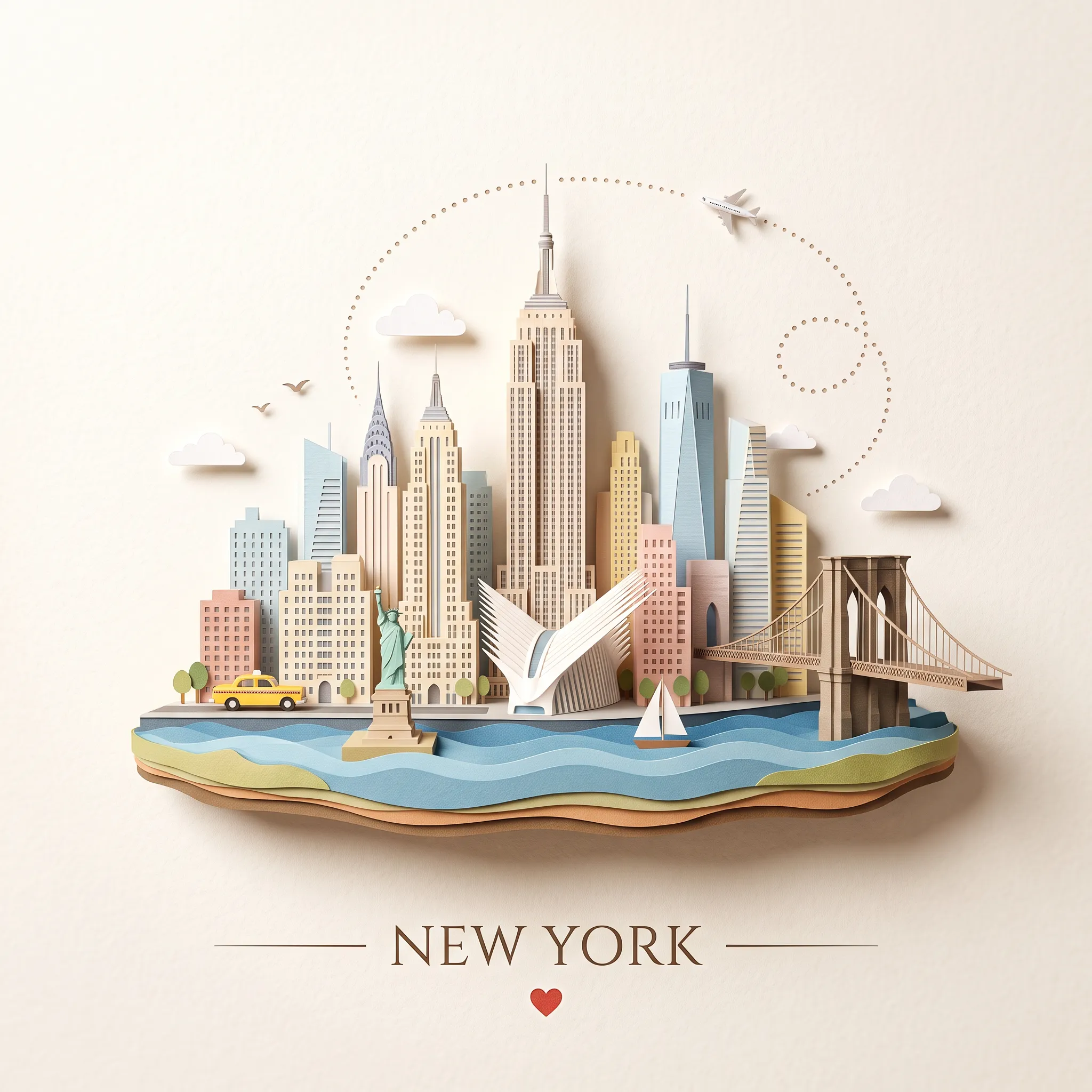
Eingabe
Create a whimsical miniature 3D paper-cut diorama postcard of New York City on a warm off-white textured paper background, centered with lots of negative space. The city sits on a floating island base with layered cut-paper edges and a blue wavy waterfront in the foreground. Include a dense Manhattan skyline featuring the iconic Empire State Building as the central tower, surrounded by classic Art Deco high-rises and sleek modern glass skyscrapers; include a miniature Statue of Liberty on a tiny pedestal in the harbor and the sculptural white-ribbed Oculus building nestled downtown. Add exactly one classic yellow taxicab along a street at the front left, exactly one historic Brooklyn Bridge with dual gothic stone arches and suspension cables extending to the right over the water, exactly one small white sailboat in the water, exactly one tiny airplane in the upper right, and exactly one dotted looping flight path curving behind the skyline. Add exactly three small fluffy white clouds around the skyline and exactly two flying birds on the left. Use delicate handcrafted paper model details, soft shadows, pastel colors with warm accents, realistic miniature depth of field, clean composition, and a travel-souvenir illustration mood. At the bottom center, place the elegant typography text "NEW YORK" with a thin horizontal line on each side and a small red heart underneath, keeping the typography minimal and refined. No extra text, no watermark, no people in close-up.
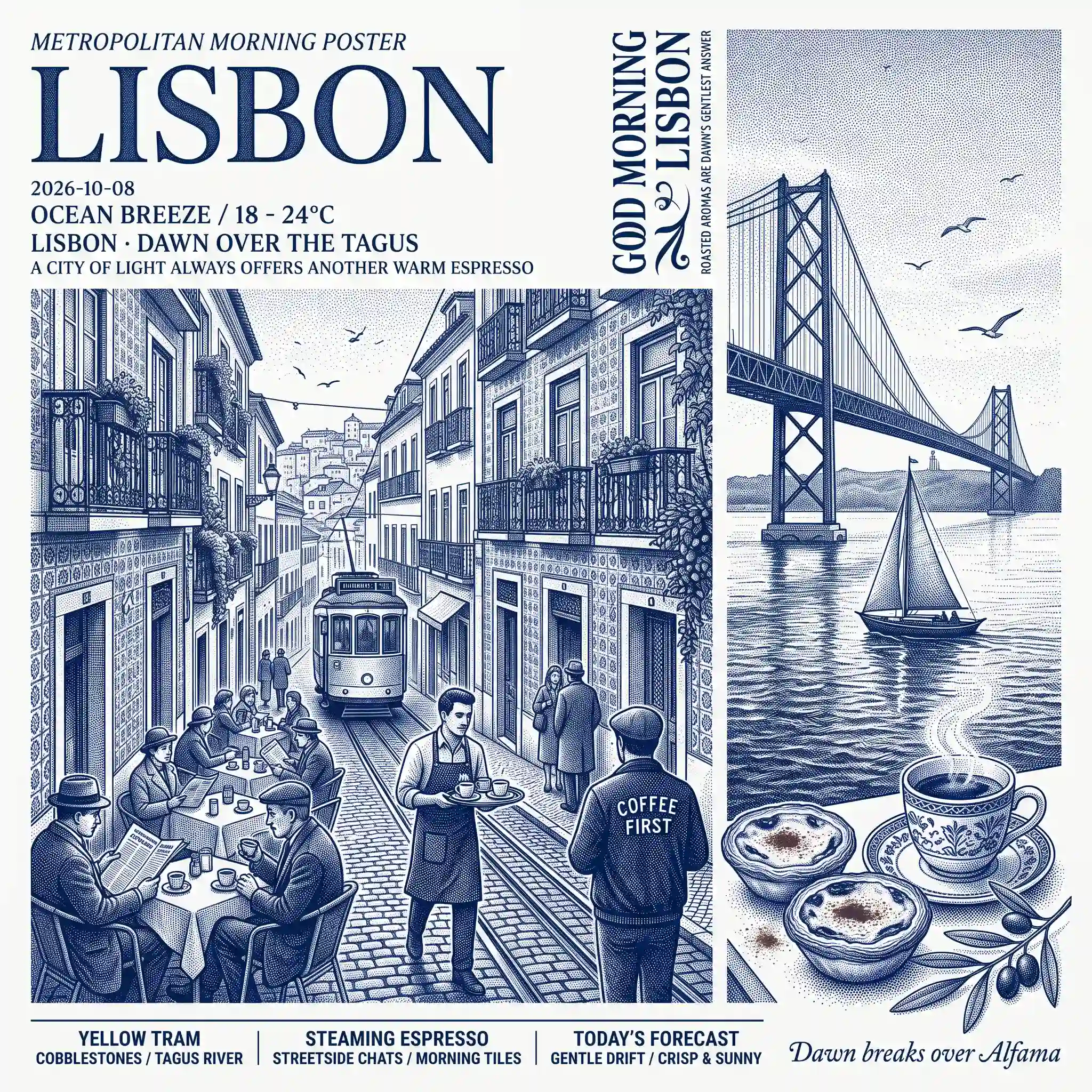
Eingabe
Create a vertical poster illustration in a monochromatic cobalt blue, Prussian blue, and crisp white palette, using stippled pointillism and copperplate engraving. The scene depicts morning coffee culture in Lisbon. Layout & Text: Top Left: Small text "METROPOLITAN MORNING POSTER" above a large serif title "LISBON". Below: date "2026-10-08", weather "OCEAN BREEZE / 18 - 24°C", subtitle "LISBON · DAWN OVER THE TAGUS", and small caption "A CITY OF LIGHT ALWAYS OFFERS ANOTHER WARM ESPRESSO". Top Right: Stylized vertical text reading "GOOD MORNING LISBON". Beside it, smaller vertical typography: "ROASTED AROMAS ARE DAWN'S GENTLEST ANSWER". Bottom Footer: Horizontal band with three divider-separated sections: "YELLOW TRAM / COBBLESTONES / TAGUS RIVER", "STEAMING ESPRESSO / STREETSIDE CHATS / MORNING TILES", and "TODAY'S FORECAST / GENTLE DRIFT / CRISP & SUNNY". On the far right is a script signature "Dawn breaks over Alfama". Visual Elements: Foreground/Left: A lively morning terrace along a steep cobblestone alley in Alfama. Buildings display ornate Azulejo tile motifs and wrought-iron balconies. Bistro tables are filled with patrons reading newspapers and sipping espresso. A vintage tram ascends the hill. A barista in an apron carries a tray. A man with his back turned wears a jacket reading "COFFEE FIRST". Background/Right: The 25 de Abril suspension bridge spans the Tagus River against stippled clouds and circling seagulls. A classic sailboat glides along the water. Details: In the bottom right corner, a vignette of two warm Pastéis de Nata custard tarts dusted with cinnamon, a porcelain espresso cup with blue rim motifs, and an olive branch.
Produktbildbearbeitung & Lifestyle-Szenen
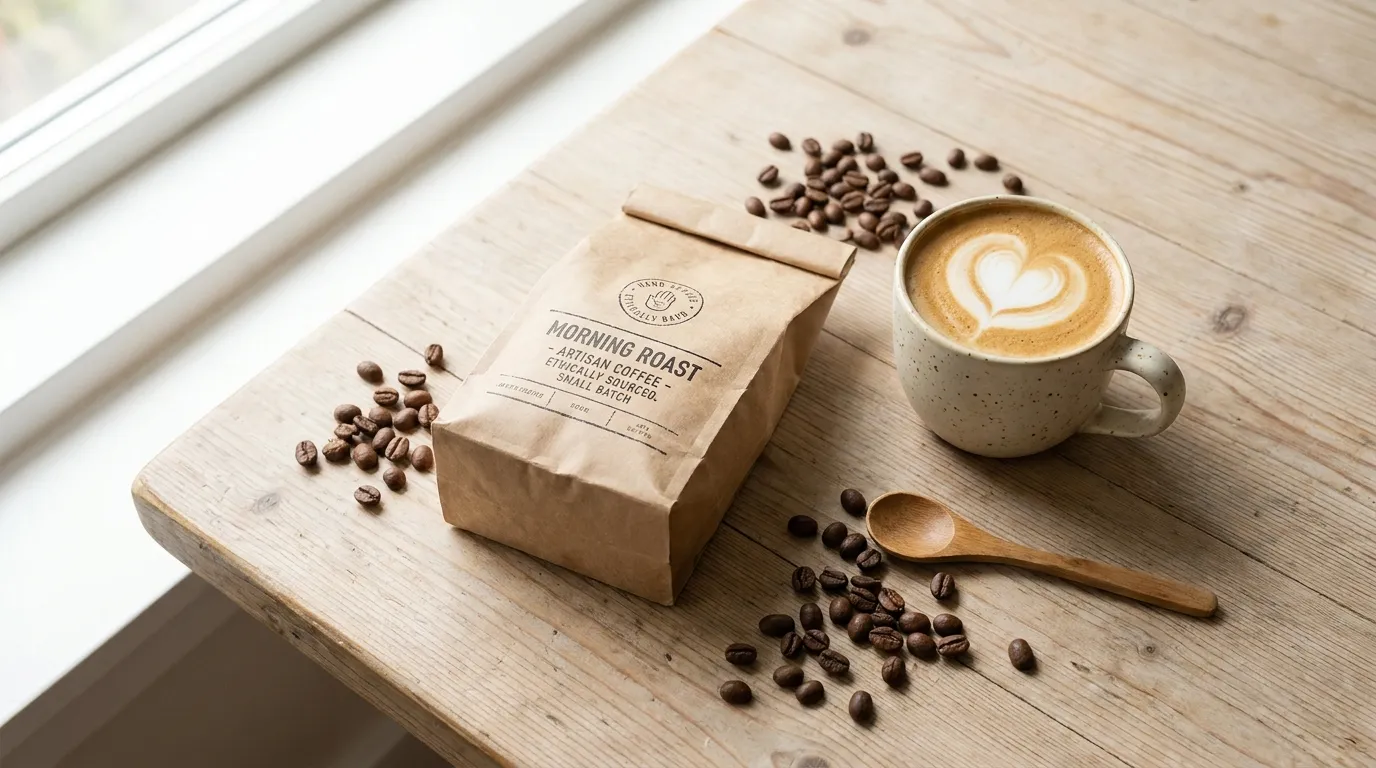
Produktfoto als Referenz (Eingabe)
A clean authentic UGC product flat-lay on a rustic light-wood tabletop, showing a premium packaged artisan coffee bag alongside a ceramic mug with latte art and scattered roasted coffee beans, soft natural morning window light, 16:9 wide.
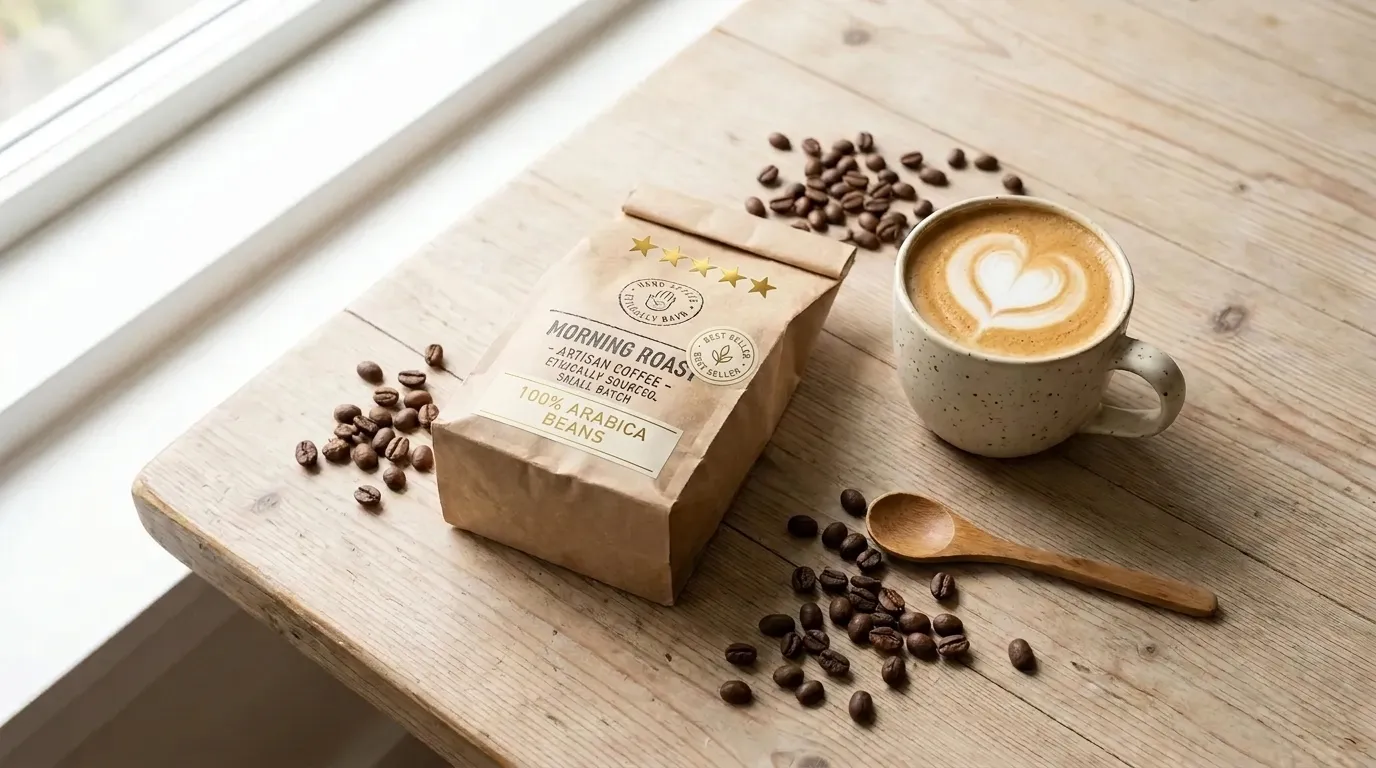
Lifestyle-Szene bearbeiten (Eingabe)
Based on the provided image, perform an image edit: enhance the flat-lay into a high-converting social media promotional ad layout, adding clean minimalist sticker labels, five golden review rating stars, and elegant typography callout '100% ARABICA BEANS', preserving the exact coffee bag, ceramic mug, scattered beans, and tabletop.
Präzise Vorgaben für Anzeigenlayout, Überschrift & Produkt
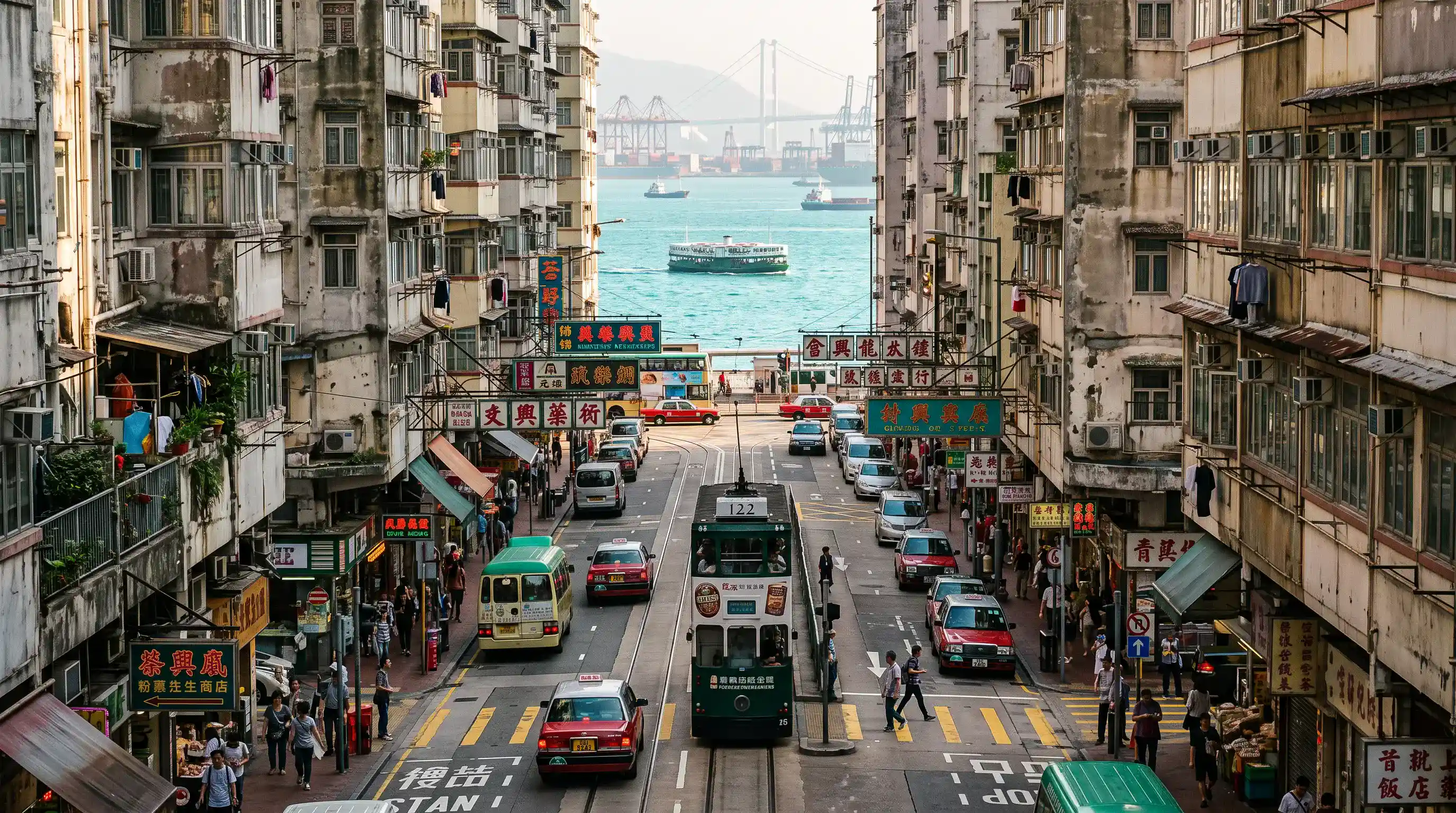
Ursprüngliches Anzeigenlayout (Eingabe)
A telephoto shot looking down a steep Hong Kong street toward Victoria Harbour. A vintage double-decker tram drives down the center of the road. Dense weathered apartment buildings with air conditioners and retro hanging shop signs flank both sides. Yellow taxis, mini buses, and zebra crossings on the asphalt street. In the background, bright turquoise sea with a ferry cruising across, cargo port cranes, and a large suspension bridge in the haze. Documentary street photography, afternoon sunlight, rich colors, ultra-detailed.
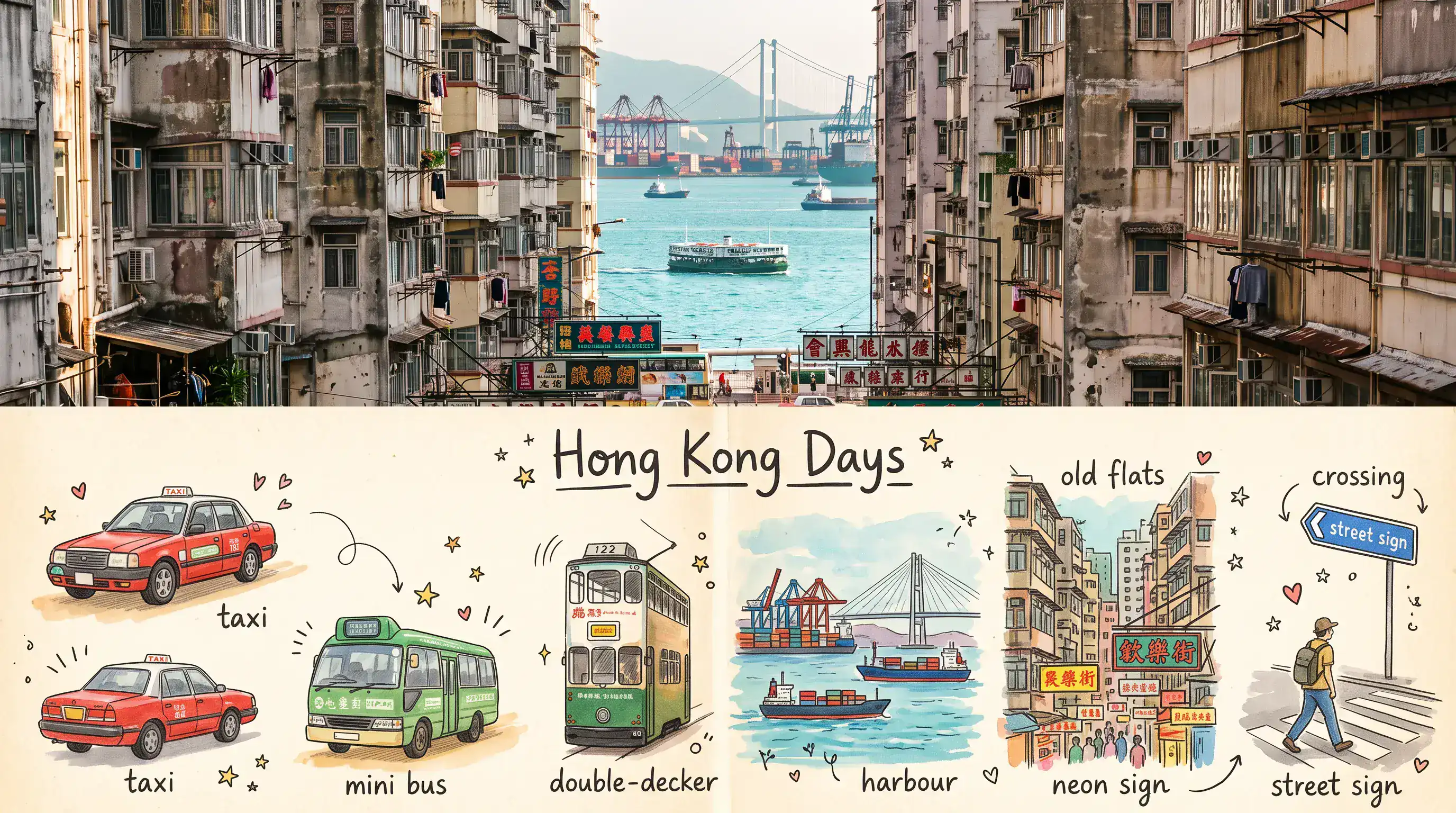
Überarbeitete Überschrift & Komposition (Eingabe)
Create a vertical Hong Kong travel scrapbook poster based on the reference images. The composition should have a large realistic travel photograph on the top half and a hand-drawn illustrated travel journal on the bottom half. Top: A vibrant Hong Kong street sloping downhill toward the turquoise Victoria Harbour. Dense old high-rise buildings and storefronts line both sides, with Chinese signs, a vintage double-decker tram, green minibuses, red taxis, cars, pedestrians and traffic lights. In the distance, show the busy harbor with cargo ships, colorful container cranes, and a large cable-stayed bridge against hazy green mountains and a bright blue sky. Warm sunny daylight, realistic photography, rich colors, cinematic depth, authentic busy Hong Kong atmosphere. Bottom: On warm textured cream paper, create a clean 6-panel hand-drawn travel diary collage featuring illustrated versions of the key elements: double-decker bus, green minibus, red taxi, harbor with cargo ship and cranes, cable-stayed bridge, colorful old apartment buildings, Hong Kong neon sign, blue street sign, and a traveler crossing the street. Use loose watercolor and colored-pencil strokes, hand-inked outlines, slightly imperfect handmade details, blue/green/red/yellow accents, tiny stars, hearts and decorative marks. Add small handwritten labels such as "bus," "mini bus," "taxi," "harbour," "bridge," "old flats," "neon sign," "street sign," "crossing." Add a handwritten title "Hong Kong Days" centered above the illustrations, with subtle underline decoration. Keep the layout spacious, charming and cohesive. Aesthetic: premium travel journal, nostalgic scrapbook, watercolor + colored pencil, handmade paper texture, vibrant Asian city atmosphere, editorial travel poster, realistic photo-to-illustration transformation, clean composition, vertical 16:9 ratio, highly detailed, no watermark.
Vorteile des Nano Banana 2.1 KI-Bildgenerators
Entwickle Ideen mit überschaubaren Überarbeitungen weiter. Eine klarere kreative Richtung reduziert die Notwendigkeit, vielversprechende Kompositionen neu aufzubauen.
Aus einem schriftlichen Briefing erstellen
Beschreibe Motiv, Umgebung, Licht und Layout als visuellen Ausgangspunkt. Entwickle Porträts, Illustrationen oder Kampagnenkonzepte entlang einer klaren kreativen Richtung.
Bearbeitungen mit Bildreferenzen steuern
Kombiniere bis zu 14 Referenzbilder mit deinen Anweisungen. Erkläre die Rolle jeder Referenz und welche Merkmale bei der Überarbeitung erhalten bleiben sollen.
Mit optionaler Suche Kontext ergänzen
Aktiviere die Websuche für aktuelle Informationen oder die Bildersuche für online verfügbare visuelle Referenzen. Beide Optionen lassen sich passend zum Briefing unabhängig nutzen.
Das passende Format für dein Projekt wählen
Erstelle quadratische, vertikale oder horizontale Bilder und wähle eine passende Ausgabeauflösung. Berücksichtige bei der Komposition den geplanten Einsatzort.
Anwendungsfälle des Nano Banana 2.1 KI-Bildgenerators
Entwickle Produktfotos, UGC-Werbung und Kampagnenmotive mit einheitlicher kreativer Richtung. Beginne bei Zielgruppe, geplantem Einsatzort und den zu erhaltenden Details.
Visuelle Produktion für Social Media & UGC-Stil
Erstelle lockere Produkt-in-der-Hand-Konzepte, alltägliche Lifestyle-Szenen und Werbestandbilder im Creator-Stil. Gib einen ungezwungenen fotografischen Look für deine gewünschten Social-Media-Kanäle und Zielgruppen vor.
Werbung, Produkt- und Ecommerce-Creatives
Verwandle eine Produktreferenz in eine Küchenszene, ein Reise-Arrangement oder ein klares Studiokonzept. Erkunde mit KI-Produktfotografie Präsentationsideen und ergänzende Bilder für einen Shop oder eine Kampagne.
Design-Entwürfe und visuelles Prototyping
Entwirf Launch-Poster, Verpackungskonzepte, Präsentationsgrafiken und Kampagnen-Moodboards. Stimme Botschaft und Bildgestaltung ab, bevor du eine ausgewählte Richtung ins finale Design überführst.
Markengeschichten & redaktionelle Bilder
Illustriere eine Produktgeschichte, ein saisonales Thema oder einen Markenartikel mit originellen Bildkonzepten. Erstelle ergänzende Motive mit derselben Farbpalette und fotografischen Richtung wie die übergeordnete Kampagne.
So nutzt du den Nano Banana 2.1 KI-Bildgenerator
Beginne mit einer Idee oder einem Ausgangsfoto. Erstelle eine erste Version, prüfe sie und verfeinere die für dein Projekt wichtigen Details.
Prompt eingeben und Ziel festlegen
Beschreibe Motiv, Umgebung, Licht und Komposition. Ergänze für die Bildbearbeitung ein Referenzfoto und benenne sowohl gewünschte Änderungen als auch zu erhaltende Details.
Richtung festlegen und generieren
Wähle Seitenverhältnis und Auflösung und aktiviere bei Bedarf die Web- oder Bildersuche. Prüfe vor der Generierung die angezeigten Credit-Kosten; Suchoptionen und hochgeladene Referenzen beeinflussen die Summe.
Verfeinern, neu generieren und exportieren
Prüfe das Ergebnis und überarbeite jeweils ein Detail. Verwende dein bevorzugtes Bild als Referenz für weitere Bearbeitungen und lade anschließend die ausgewählte Version herunter.

Nano Banana 2.1 Kreationen auf X entdecken
Entdecke kreative Ansätze für Bildgenerierung und referenzgestützte Bearbeitung mit Nano Banana 2.1.

Nano Banana 2.1 is here! This upgraded version outperforms our previous models across the board, with notable leaps in: - visual design - mask-based editing - subject consistency - more natural-looking imagery Try it now in @GeminiApp, @GoogleAIStudio, and more.


ChatGPT Image 2.5 vs Nano Banana 2.1 (the difference is clear)


it got worse? Nano Banana 2.1 is here so had to put it up against NB2 for the good old continuity stress test. the strange thing is 2.0 kept my likeness a lot more all the way through. I'm still very different from the original, but you can kinda recognise me? On 2.1 it just

Nano Banana 2.1 is live on ElevenCreative. Google's image generation and editing model brings faster generations, better visual design, and subject consistency. Try it now: elevenlabs.io/creative
