
0 / 5000
비행 자동차 AI 생성기: 자동차 사진을 이륙 영상으로
AI로 내 자동차를 날려보세요. 차량 사진, 참조 영상, 프롬프트로 소셜 게시물이나 창의적 캠페인용 영화 같은 비행 자동차 클립을 만듭니다.
비행 자동차 브랜드 공개와 고속도로 비행
차량 이미지, 참조 영상, 맞춤 프롬프트로 만든 도심 브랜드 공개 장면과 고속도로 비행 시퀀스를 탐색하세요.
원본 이미지
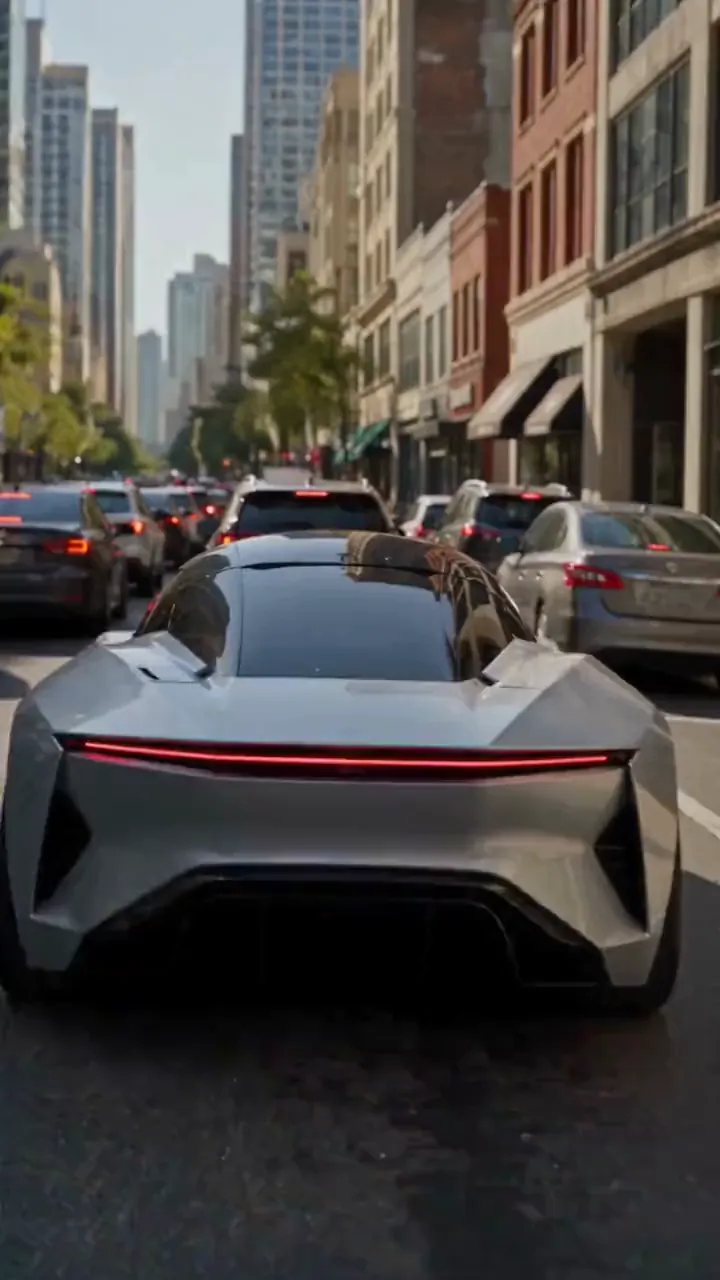
비디오
프롬프트
Create a photorealistic 15-second automotive scene on an ordinary modern city road in natural daylight, following the shot sequence below. REFERENCE ROLES <<<hint/1.webp>>> is the replacement vehicle. Replace the main vehicle from <<<hint/1.mp4>>> with the vehicle shown in <<<hint/1.webp>>>. Preserve its body shape, paint color, proportions and wheels throughout every shot. Use only the vehicle itself from <<<hint/1.webp>>>. Use <<<hint/1.mp4>>> as the reference for the vehicle’s jet-powered takeoff, flight behavior and strong downward jets. Extend that motion naturally into the controlled landing described below. <<<hint/1_1.webp>>> is the replacement logo. Replace the original logos in the existing roadside advertisements from <<<hint/1.mp4>>>, including billboards and wall advertisements, with the logo from <<<hint/1_1.webp>>>. Remove the original advertising logos completely. Reproduce the design, colors and lettering in <<<hint/1_1.webp>>> faithfully, without redesigning, misspelling or combining it with another logo. Retain the existing advertising structures and layout. Fit the replacement logo naturally to each advertising surface, matching its perspective, lighting and material. Replace only the advertising artwork; do not create additional advertising placements. Apply <<<hint/1_1.webp>>> only to roadside advertisements. Never place it on the vehicle. Keep the vehicle free of brand advertising throughout. Keep all brand advertisements outside the camera frame until after landing. Apart from the vehicle motion and existing advertising references specified above, use the daylight city setting and shot plan below. VISUAL STYLE Restrained documentary camera work, everyday traffic, natural reflections, realistic shadows and believable vehicle weight. Maintain the same replacement vehicle consistently across every cut. 0–3s: Street-level rear three-quarter tracking shot. The vehicle slows behind a short traffic jam. Ordinary shops, concrete buildings and parked vehicles line the street. Keep brand advertisements out of frame. 3–6s: Cut to a low roadside view. Strong white cold-gas jets fire straight downward beneath the vehicle, blowing dust across the asphalt. The vehicle slowly lifts until its wheels clear the stopped traffic. Attach the jets naturally beneath the replacement vehicle and keep them synchronized with its movement. 6–10s: Wide side tracking shot. The vehicle flies forward over the queue, upright and level, with continuous strong downward white vapor jets. Keep the vehicle, its moving shadow and the traffic together in frame. Maintain believable weight and steady forward momentum. 10–12s: Rear three-quarter view. The vehicle clears the last stopped vehicle and descends into an empty lane, with downward jets still running. Reduce its altitude smoothly while maintaining a stable, upright posture. 12–15s: Low roadside shot. The tires touch down, the suspension compresses and the jets shut down. Only after landing, the vehicle accelerates past the existing roadside advertisements, whose original logos have been replaced with the exact logo from <<<hint/1_1.webp>>>. Frame the moving vehicle and an existing roadside billboard together for the final shot. Keep the vehicle free of brand advertising. SOUND City traffic, idling vehicles, ignition hiss, cold-gas thrust, tire touchdown and an electric motor accelerating away.
나만의 비행 자동차 효과 제작
시각적 참조와 프롬프트로 차량, 움직임, 장면을 안내하세요.
자동차 사진에서 시작
차량 사진과 비행 참조로 이륙, 차량 흐름 위 비행, 도로 복귀가 담긴 고속도로 장면을 만드세요.
내 로고로 브랜드 공개
차량 이미지, 로고, 참조 영상을 결합해 브랜드 도로변 광고가 있는 비행 자동차 홍보를 구상하세요.
Tesla Roadster 비행 재현
참조 클립의 주 차량을 내 차량으로 바꾸세요. 클립으로 제트 이륙, 공중 롤, 원래 배경, 카메라 움직임, 타이밍을 안내합니다.
여러 영상 모델 탐색
Seedance 2.5에서 시작하거나 Seedance 2.0, Wan 3.0, Kling 3.0 및 다른 모델로 비행 자동차 아이디어의 다양한 해석을 시험하세요.
자동차 콘텐츠를 도로 너머로
익숙한 차량과 움직임 참조에서 아이디어를 발전시켜 공유하거나 발표할 클립으로 다듬으세요.
창작 방향부터 시작
영상의 시작 방향을 선택하고 참조와 프롬프트를 조정하세요. 전체 장면을 처음부터 작성할 필요는 없습니다.
나만의 콘셉트로 만들기
사진으로 외관을 안내해 익숙한 차량을 예상 밖의 비행 장면 주인공으로 만드세요.
좋아하는 움직임을 활용
참조 클립으로 원하는 비행을 보여줘 동작과 카메라 방향을 쉽게 전달하세요.
창작 방향 비교
기록에서 생성 버전을 비교하며 차량 외관, 움직임, 구도를 단계적으로 다듬으세요.
창작 프로젝트용 비행 자동차 영상
소셜 콘텐츠, 자동차 캠페인, 시각적 스토리텔링용 비행 자동차 클립을 구상하세요.
자동차 소셜 클립
차량 사진으로 가상의 비행 자동차 클립을 만들어 TikTok, Instagram 등 소셜 채널에 활용하세요.
브랜드 홍보 콘셉트
프로젝트에 맞는 차량과 브랜드 정체성으로 자동차 캠페인을 탐색하고 팀에 콘셉트를 공유하세요.
자동차 팬을 위한 편집 영상
자동차 커뮤니티와 팬 게시물용 Tesla 비행 자동차 클립을 나만의 방식으로 만드세요.
스토리와 제안용 비주얼
상상 속 차량 비행을 스토리보드, 발표, 창작 제안의 샷 콘셉트로 활용하세요.
AI 비행 자동차 영상 만드는 법
프리셋을 선택하고 참조 자료를 맞춤 설정한 뒤 영상을 생성하세요.
아이디어 프리셋 선택
만들려는 영상에 맞는 아이디어 프리셋을 선택하세요.
참조 자료 맞춤 설정
선명한 차량 사진과 선택한 프리셋에 필요한 참조 자료를 추가하세요. 움직임 프롬프트와 사용 가능한 영상 설정을 조정합니다.
생성 및 검토
영상을 생성한 뒤 창작 기록에서 차량 외관과 움직임을 검토하세요. 참조 자료나 프롬프트를 조정해 결과를 개선합니다.

창의적 영상을 위한 더 많은 AI 도구
영화 효과, 자동차 콘셉트, 소셜 콘텐츠용 이미지·영상 도구를 탐색하세요.


























