
ASMR 템플릿 선택
힐링 템플릿을 제공하는 AI ASMR 동영상 생성기
이미지나 장면 아이디어를 편안한 ASMR 동영상으로 바꾸세요. 자르기, 두드리기, 모래, 슬라임 템플릿을 살펴보고 UGC Maker AI에서 원하는 움직임과 소리를 설명하세요.
AI ASMR 동영상 예시 살펴보기
얼음, 액체, 초콜릿 질감이 움직이는 모습을 보고 프롬프트를 복사해 나만의 ASMR 클립을 만드세요.
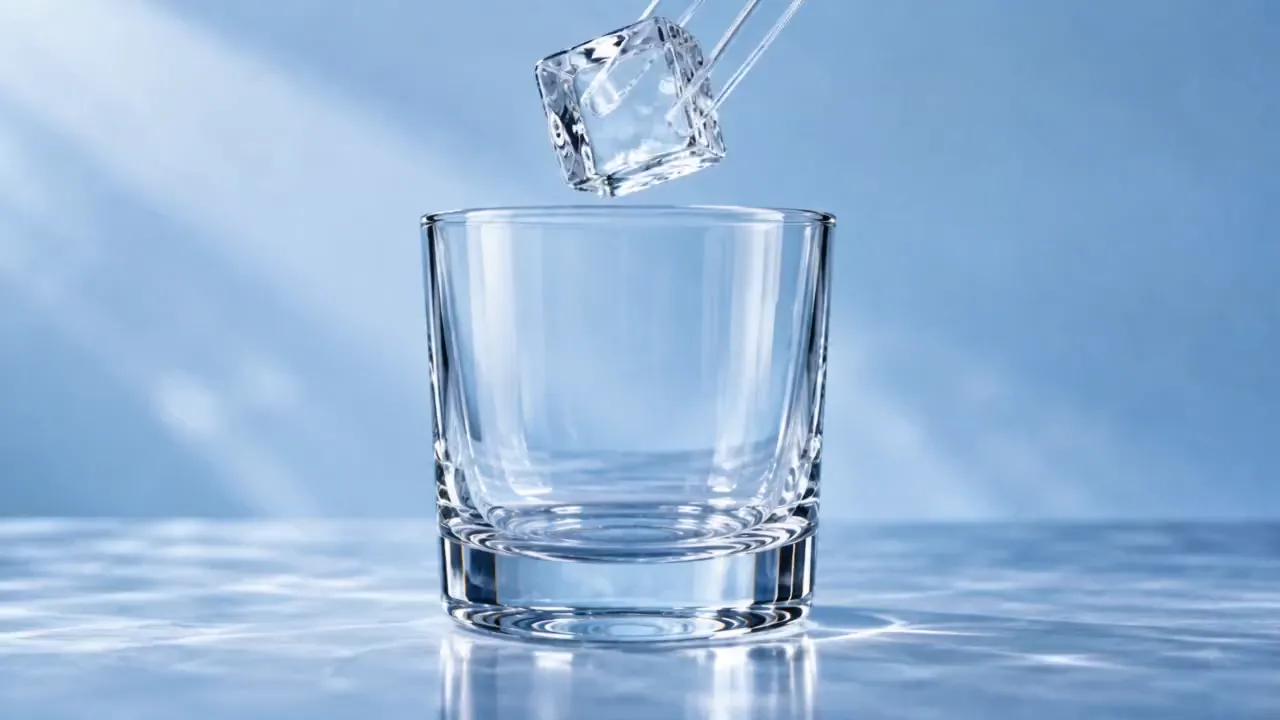
원본 이미지
프롬프트
15-second 16:9 reference-image-to-video ASMR video. Begin from the exact reference-image composition and retain the glass vessel, ice geometry, liquid colors, and cool studio lighting. No labels, text, logos, face, or drinking action.
0–2s: a clear square ice cube is placed into the empty glass with a crisp resonant clink.
2–4s: a thin stream of cobalt-blue liquid flows around the ice and fills the lower third of the glass.
4–7s: a second stream of amber liquid enters from the opposite side, forming visible swirling boundaries without instantly mixing.
7–9s: a glass stirrer turns once; the colors spiral around the cube in layered ribbons.
9–11s: a second ice cube drops in, displacing the liquid and creating a controlled ripple against the glass.
11–14s: condensation beads form and slide down the outer surface while the internal colors settle into a rich gradient.
14–15s: close macro of one bead rolling downward, ending on a clear glass chime.
Camera: extreme macro at glass height, slow focus transition from the pour to the condensation bead. Audio: precise ice clinks, liquid pour, glass stir, no music, no voice.
비디오
ASMR 클립 세부 연출
집중된 장면, 의도적인 움직임, 명확한 소리 설명을 활용하세요.
만족감을 주는 프롬프트 템플릿
유리 과일, 키네틱 샌드, 슬라임, 두드리기로 시작한 뒤 프롬프트에서 재질, 피사체, 속도를 바꾸세요.
이미지 기반 동영상 제작
이미지를 업로드해 시작 장면의 외형을 유도하고 피사체가 어떻게 움직일지 설명하세요.
호환 모델로 소리 생성
원하는 접촉음을 설명하고 오디오 지원 모델로 생성하세요. 선택한 모델에 오디오 스위치가 있다면 켜 두세요.
생성된 버전 검토
동영상 기록에서 생성된 클립을 비교하고 원하는 움직임, 구도, 소리에 맞게 프롬프트를 다듬으세요.
만족감을 주는 동영상 아이디어 탐색
하나의 촉각적 동작을 중심으로 짧은 클립을 구성하세요.
자르기와 썰기
의도한 카메라 각도로 매끄러운 절단, 층층이 쌓인 재료, 질감 클로즈업을 탐색하세요.
모래와 부드러운 재료
절제된 움직임으로 알갱이가 부서지는 모습, 부드러운 압축, 가지런한 형태를 시도하세요.
슬라임과 기포 질감
느린 늘어남, 접힘, 작은 터지는 소리를 설명해 촉각적인 시청각 콘셉트를 유도하세요.
두드리기와 사물 소리
안정적인 구도로 가벼운 접촉, 표면 질감, 조용한 장면에 집중하세요.
AI ASMR 동영상 제작 방법
템플릿으로 시작해 행동과 소리를 모두 유도하세요.
템플릿과 이미지 선택
ASMR 프리셋을 선택하고 피사체와 시작 구도를 유도하고 싶다면 이미지를 업로드하세요.
움직임과 소리 설명
프롬프트에 구체적인 행동, 속도, 소리를 작성하세요. 오디오 지원 모델을 사용하고 스위치가 있다면 오디오를 활성화하세요.
생성 후 듣기
클립을 생성하고 소리와 함께 확인하세요. 타이밍이나 질감을 다듬어야 한다면 프롬프트 또는 모델 설정을 조정하세요.

더 많은 AI 창작 도구 살펴보기
UGC Maker AI의 이미지 및 동영상 도구로 다음 시각적 아이디어를 구현하세요.






자세히 알아보기간략히 표시





















AI ASMR 동영상 생성기 자주 묻는 질문
AI ASMR 동영상 관련 글 더 보기
Loading...