
เลือกเทมเพลต ASMR
เครื่องมือสร้างวิดีโอ AI ASMR พร้อมเทมเพลตชวนเพลิน
เปลี่ยนภาพหรือไอเดียฉากเป็นวิดีโอ ASMR ชวนเพลิน สำรวจเทมเพลตการตัด การเคาะ ทราย และสไลม์ แล้วอธิบายการเคลื่อนไหวและเสียงที่ต้องการด้วย UGC Maker AI
สำรวจตัวอย่างวิดีโอ AI ASMR
ชมพื้นผิวของน้ำแข็ง ของเหลว และช็อกโกแลตขณะเคลื่อนไหว แล้วคัดลอกพรอมต์เพื่อสร้างคลิป ASMR ของคุณ
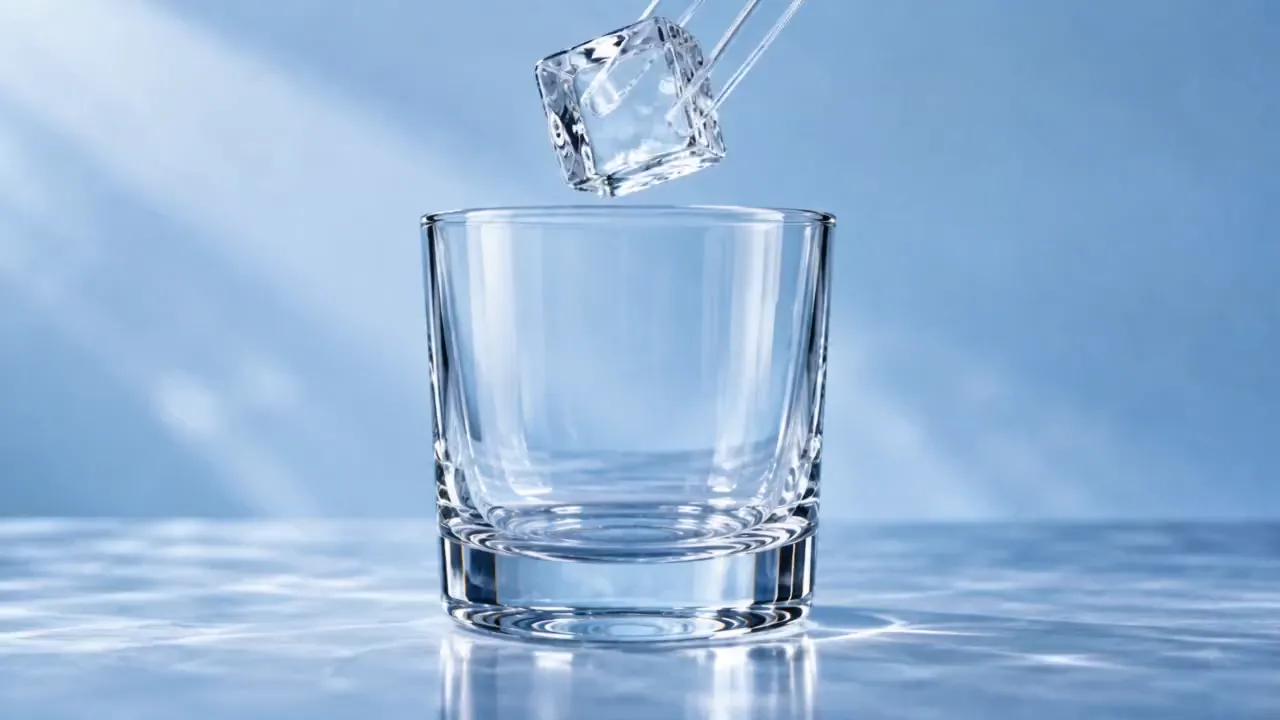
รูปต้นฉบับ
พรอมต์
15-second 16:9 reference-image-to-video ASMR video. Begin from the exact reference-image composition and retain the glass vessel, ice geometry, liquid colors, and cool studio lighting. No labels, text, logos, face, or drinking action.
0–2s: a clear square ice cube is placed into the empty glass with a crisp resonant clink.
2–4s: a thin stream of cobalt-blue liquid flows around the ice and fills the lower third of the glass.
4–7s: a second stream of amber liquid enters from the opposite side, forming visible swirling boundaries without instantly mixing.
7–9s: a glass stirrer turns once; the colors spiral around the cube in layered ribbons.
9–11s: a second ice cube drops in, displacing the liquid and creating a controlled ripple against the glass.
11–14s: condensation beads form and slide down the outer surface while the internal colors settle into a rich gradient.
14–15s: close macro of one bead rolling downward, ending on a clear glass chime.
Camera: extreme macro at glass height, slow focus transition from the pour to the condensation bead. Audio: precise ice clinks, liquid pour, glass stir, no music, no voice.
วิดีโอ
กำกับรายละเอียดคลิป ASMR ของคุณ
ใช้ฉากที่มีจุดเน้น การเคลื่อนไหวที่ตั้งใจ และคำอธิบายเสียงที่ชัดเจน
เทมเพลตพรอมต์ชวนเพลิน
เริ่มจากผลไม้แก้ว ทรายมหัศจรรย์ สไลม์ หรือการเคาะ แล้วเปลี่ยนวัสดุ ตัวแบบ หรือจังหวะในพรอมต์
สร้างวิดีโอจากภาพ
อัปโหลดภาพเพื่อกำหนดรูปลักษณ์ตอนเปิด แล้วอธิบายว่าตัวแบบควรเคลื่อนไหวอย่างไร
สร้างเสียงด้วยโมเดลที่รองรับ
อธิบายเสียงสัมผัสที่ต้องการแล้วสร้างด้วยโมเดลที่รองรับเสียง หากโมเดลที่เลือกมีสวิตช์เสียง ให้เปิดเสียงไว้
ตรวจดูรูปแบบต่าง ๆ
เปรียบเทียบคลิปในประวัติวิดีโอ และปรับพรอมต์ให้ได้การเคลื่อนไหว การจัดเฟรม และเสียงที่ชอบ
สำรวจไอเดียวิดีโอชวนเพลิน
สร้างคลิปสั้นโดยเน้นการกระทำที่ให้ความรู้สึกสัมผัสอย่างเดียว
การตัดและหั่น
สำรวจการตัดที่ลื่นไหล วัสดุเป็นชั้น และพื้นผิวระยะใกล้ด้วยมุมกล้องที่ตั้งใจเลือก
ทรายและวัสดุนุ่ม
ลองการแตกตัวเป็นเม็ด การกดเบา ๆ และรูปทรงที่จัดเรียงอย่างเป็นระเบียบด้วยการเคลื่อนไหวเล็กน้อย
พื้นผิวสไลม์และฟอง
อธิบายการยืดช้า ๆ การพับ และเสียงป๊อปเบา ๆ เพื่อกำหนดแนวคิดภาพและเสียงที่ให้ความรู้สึกสัมผัส
การเคาะและเสียงวัตถุ
เน้นการสัมผัสเบา ๆ พื้นผิว และฉากเงียบสงบด้วยองค์ประกอบภาพที่นิ่ง
วิธีสร้างวิดีโอ AI ASMR
เริ่มจากเทมเพลต แล้วกำหนดทั้งการกระทำและเสียง
เลือกเทมเพลตและภาพ
เลือกพรีเซ็ต ASMR แล้วอัปโหลดภาพหากต้องการกำหนดตัวแบบและองค์ประกอบภาพตอนเริ่ม
อธิบายการเคลื่อนไหวและเสียง
แก้ไขพรอมต์ให้มีการกระทำ จังหวะ และเสียงที่ชัดเจน ใช้โมเดลที่รองรับเสียง และเปิดเสียงเมื่อโมเดลมีสวิตช์ให้เลือก
สร้างและฟัง
สร้างคลิปแล้วตรวจดูวิดีโอพร้อมเสียง ปรับพรอมต์หรือการตั้งค่าโมเดลหากต้องปรับจังหวะหรือพื้นผิวให้ดีขึ้น

สำรวจเครื่องมือสร้างสรรค์ AI เพิ่มเติม
สร้างไอเดียภาพถัดไปด้วยเครื่องมือภาพและวิดีโอบน UGC Maker AI






อ่านเพิ่มเติมแสดงน้อยลง





















คำถามที่พบบ่อยเกี่ยวกับเครื่องมือสร้างวิดีโอ AI ASMR
บทความเพิ่มเติมเกี่ยวกับวิดีโอ AI ASMR
Loading...