
รีวิว Opus Clip AI: ค้นหาขั้นตอนสร้างวิดีโอสั้นที่เหมาะกับคุณ
สำรวจวิธีที่ OpusClip นำวิดีโอยาวมาใช้ใหม่ แล้วสร้างวิดีโอต้นฉบับด้วย UGC Maker AI ใช้เครื่องมือด้านล่างเปลี่ยนพรอมต์หรือภาพเป็นคลิปใหม่สำหรับแคมเปญถัดไป
0 / 5000
สำรวจตัวอย่างวิดีโอ AI
ชมแนวคิดวิดีโอครีเอเตอร์ด้านฟิตเนสและท่องเที่ยว พร้อมสำรวจพรอมต์เบื้องหลังแต่ละวิดีโอ
รูปต้นฉบับ
พรอมต์
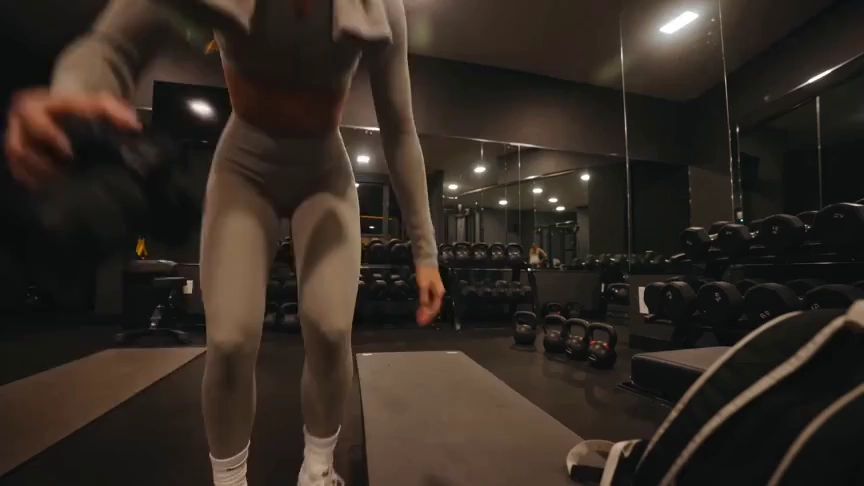
Create a 15-second, 16:9 intimate end-of-workout vlog starring one consistent fictional 24-year-old Brazilian fitness creator, CHASE: slim athletic build, real glowing skin, expressive brown eyes, and long wavy chestnut-brown hair in a loose ponytail. She wears a fitted long-sleeve workout top, high-waisted leggings, white socks, sneakers, and a towel over her shoulders. Handheld DV-camcorder vlog footage with warm 16mm-inspired analog tape: CHASE films herself at arm’s length, then sets the camera on a bench, gym bag, or beside a stretching mat; the camera never appears in frame or reflection. Include subtle shake, drifting framing, autofocus hunting, rushed reframes, uneven zooms, occasional face crops, tape grain, soft lamp halos, exposure shifts, low contrast, and accurate skin. In a mostly empty boutique gym late evening with warm lights, darker corners, mats, mirrors, dumbbells, workout bag, and protein shake, keep her tired, funny, unpolished, breathing audibly, relaxed, and natural. Sequence: on the mat, “Okay… that session is officially over.” Stretching, “I definitely pushed that last set too far.” Shoulder roll, “Tomorrow is going to be interesting.” Close-up sipping a shake, “Wait… this one is actually good.” Side lean, “I’d call today a solid eight and a half.” Resting on one knee, “Exhausted, but in the best way.” Finally bags up and waves: “I’m calling it. See you at the next workout.” Natural English lip sync, blinking, micro-expressions, identical face, hair, wardrobe, and physique. Avoid polished commercial styling, plastic skin, robotic movement, face swaps, added people, captions, logos, watermarks, visible camera, or AI artifacts.
วิดีโอ
รีวิว OpusClip: ทำอะไรได้บ้าง?
OpusClip เน้นเปลี่ยนฟุตเทจเดิมเป็นคลิปสั้น เครื่องมือตัดต่อช่วยครีเอเตอร์เตรียมคลิปให้พร้อมสำหรับแพลตฟอร์มโซเชียล
การตัดคลิปวิดีโอด้วย AI
OpusClip ระบุช่วงต่าง ๆ ในวิดีโอยาวแล้วเปลี่ยนเป็นคลิปสั้น เหมาะกับครีเอเตอร์ที่มีบทสัมภาษณ์ วิดีโอบันทึก หรือฟุตเทจอื่นให้ใช้ใหม่อยู่แล้ว
คำบรรยายและการจัดเฟรมใหม่
เครื่องมือคำบรรยายและจัดเฟรมใหม่ช่วยปรับคลิปเดิมให้เหมาะกับการชมบนโซเชียล โดยคงผู้พูดหรือตัวแบบเป็นจุดสนใจ
การแก้ไขหลังตัดคลิป
ตัวแก้ไขมีการตัดต่อผ่านข้อความ เค้าโครง และ B-roll จาก AI เพื่อปรับคลิปหลังการเลือกเบื้องต้น
UGC Maker AI เหมาะกับงานใด
ใช้ UGC Maker AI เมื่อต้องการสร้างฉากใหม่จากไอเดียหรือภาพ เครื่องมือในหน้านี้สร้างฟุตเทจต้นฉบับ ไม่ใช่ตัดวิดีโอบันทึกยาวโดยอัตโนมัติ
เลือกจุดเริ่มต้นที่เหมาะสม
วัสดุต้นฉบับที่มีช่วยกำหนดว่าขั้นตอนใดเหมาะกับงาน
บทสัมภาษณ์และพอดแคสต์ที่บันทึกไว้
OpusClip ออกแบบมาเพื่อช่วยนำบทสนทนาเดิมมาใช้ใหม่เป็นช่วงสั้น ๆ สำหรับเผยแพร่บนโซเชียล
แนวคิดสินค้าใหม่
เริ่มจากภาพสินค้า แล้วอธิบายการเคลื่อนไหว ฉาก หรือการโต้ตอบที่ต้องการให้ UGC Maker AI สร้าง
ฉากเปิดดึงดูดใจสำหรับวิดีโอโซเชียล
สำรวจฉากเปิดใหม่จากพรอมต์เมื่อต้องการภาพต้นฉบับสำหรับแคมเปญวิดีโอสั้น
รูปแบบสร้างสรรค์ต่าง ๆ
ใช้ UGC Maker AI ลองทิศทางฉากต่าง ๆ จากบรีฟเดียวกัน แล้วดูวิดีโอที่สร้างในประวัติ
สร้างวิดีโอด้วย UGC Maker AI
ลองขั้นตอนการสร้างอีกแบบได้โดยตรงบนหน้านี้
เริ่มจากพรอมต์หรือภาพ
อธิบายฉากหรืออัปโหลดภาพเพื่อกำหนดตัวแบบและรูปลักษณ์ของวิดีโอ
เลือกโมเดลวิดีโอ
เลือกโมเดลที่มี แล้วปรับระยะเวลา เค้าโครง และการตั้งค่าการสร้างที่รองรับ
สร้างและตรวจดู
เข้าสู่ระบบ ส่งงานวิดีโอ แล้วดูผลลัพธ์ในประวัติวิดีโอ ปรับพรอมต์เพื่อสำรวจทิศทางอื่น

สำรวจเครื่องมือสร้างสรรค์ AI เพิ่มเติม
สร้างไอเดียภาพถัดไปด้วยเครื่องมือภาพและวิดีโอบน UGC Maker AI


























