
Opus Clip AI 评测:找到适合你的短视频流程
了解 OpusClip 如何将长视频再利用,再用 UGC Maker AI 创作原创视频。使用下方视频生成器,将提示词或图片转为下一次营销活动的全新短片。
0 / 5000
探索 AI 视频示例
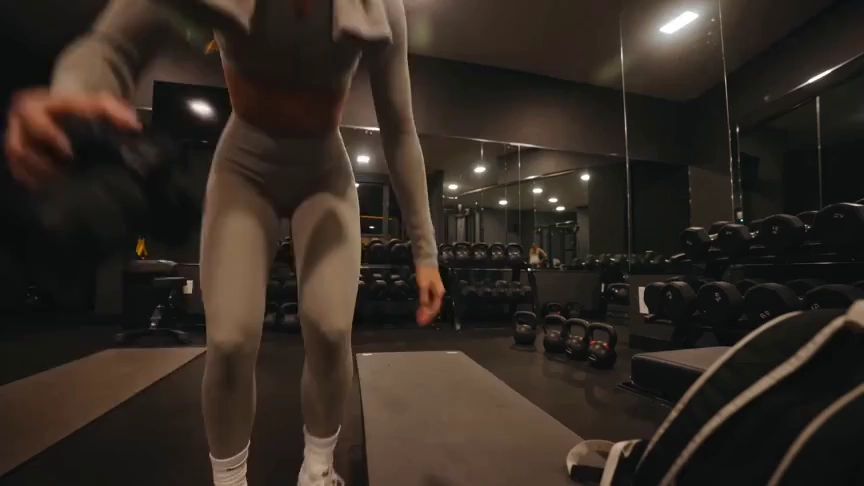
观看健身与旅行创作者视频概念,探索每个视频背后的提示词。
原始图片
提示词
Create a 15-second, 16:9 intimate end-of-workout vlog starring one consistent fictional 24-year-old Brazilian fitness creator, CHASE: slim athletic build, real glowing skin, expressive brown eyes, and long wavy chestnut-brown hair in a loose ponytail. She wears a fitted long-sleeve workout top, high-waisted leggings, white socks, sneakers, and a towel over her shoulders. Handheld DV-camcorder vlog footage with warm 16mm-inspired analog tape: CHASE films herself at arm’s length, then sets the camera on a bench, gym bag, or beside a stretching mat; the camera never appears in frame or reflection. Include subtle shake, drifting framing, autofocus hunting, rushed reframes, uneven zooms, occasional face crops, tape grain, soft lamp halos, exposure shifts, low contrast, and accurate skin. In a mostly empty boutique gym late evening with warm lights, darker corners, mats, mirrors, dumbbells, workout bag, and protein shake, keep her tired, funny, unpolished, breathing audibly, relaxed, and natural. Sequence: on the mat, “Okay… that session is officially over.” Stretching, “I definitely pushed that last set too far.” Shoulder roll, “Tomorrow is going to be interesting.” Close-up sipping a shake, “Wait… this one is actually good.” Side lean, “I’d call today a solid eight and a half.” Resting on one knee, “Exhausted, but in the best way.” Finally bags up and waves: “I’m calling it. See you at the next workout.” Natural English lip sync, blinking, micro-expressions, identical face, hair, wardrobe, and physique. Avoid polished commercial styling, plastic skin, robotic movement, face swaps, added people, captions, logos, watermarks, visible camera, or AI artifacts.
视频
OpusClip 评测:它能做什么?
OpusClip 专注于将现有素材转为短片。其编辑工具帮助创作者整理短片,以便发布到社交平台。
AI 视频剪辑
OpusClip 识别长视频中的片段,将其转为短片。适合已有访谈、录制内容或其他素材,希望进行再利用的创作者。
字幕与画面重构
字幕与画面重构工具帮助现有短片适应社交观看场景,同时保持说话者或主体突出。
剪辑后的编辑
其编辑器提供基于文本的编辑、布局与 AI 补充镜头,便于在初步筛选后完善短片。
UGC Maker AI 适合哪些需求
想通过创意或图片生成新场景时,可使用 UGC Maker AI。本页生成器创作原创素材,而非自动剪切长篇录制内容。
选择合适的起点
现有素材有助于判断哪种流程更适合任务。
已录制的访谈与播客
OpusClip 旨在将已有对话再利用为更短片段,便于社交传播。
新产品创意
从产品图片开始,描述希望 UGC Maker AI 生成的动作、场景或互动。
社交视频吸睛开场
短视频营销需要原创视觉时,可通过提示词探索全新开场场景。
创意变体
使用 UGC Maker AI 根据同一份创意说明尝试不同场景方向,再在历史中查看生成视频。
使用 UGC Maker AI 创作视频
直接在本页尝试另一种视频生成流程。
从提示词或图片开始
描述场景或上传图片,引导视频的主体与外观。
选择视频模型
选择可用模型,调整其支持的时长、布局与生成设置。
生成并查看
登录后提交视频任务,并在视频历史中查看结果。优化提示词,探索其他方向。

探索更多 AI 创作工具
用 UGC Maker AI 上的图像与视频工具,构思下一次视觉创意。


























