0 / 5000
Photo to Rap Video Generator for UGC and Social Ads
Create rap performance clips for UGC, social ads, and creator campaigns with UGC Maker. Pair a portrait with a recorded verse or brand message, then describe the scene and gestures. Choose from five Rap Hints to make creator introductions, promotional teasers, and performance clips for your ad edits.
Photo to Rap Examples for Studio and Rooftop Performances
See how a portrait and recorded verse can become a studio performance or rooftop clip. Load an example photo, audio track, and prompt, then adapt the materials to your own message.
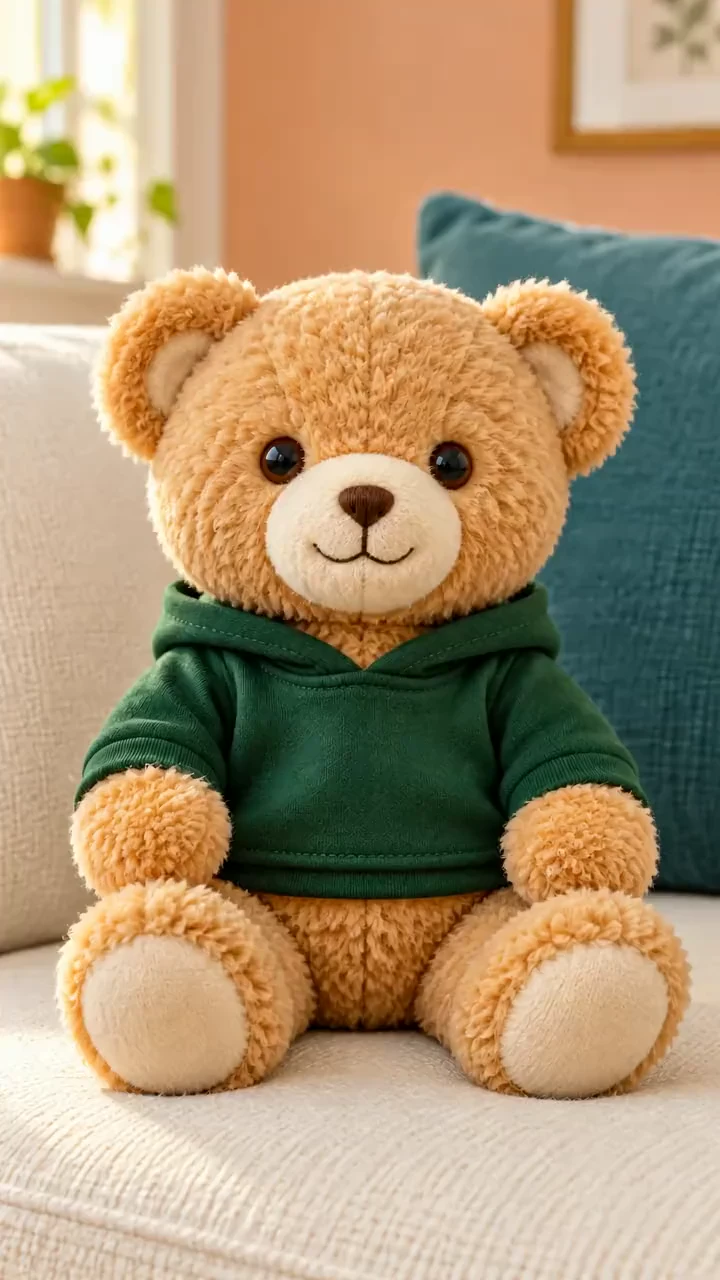
Original Image
Video
Prompt
Use <<<image_1>>> as the exact reference for ONE plush teddy bear. Preserve honey-tan fur, button eyes, cream muzzle, embroidered nose, sewn mouth, green hoodie, stuffed proportions, sofa and cushions. 10s vertical 9:16, full-color realistic toy photography; never turn into a live bear or human. Fixed eye-level medium shot. Seated feet remain on cushion. Small head bobs and soft torso pulses compress the stuffing naturally; fuzzy fibers and hoodie settle after each movement. Rounded plush arms stay low. The fabric mouth seam flexes into readable rap shapes while staying cloth; no human teeth, wet tongue or realistic animal jaws. Original 120 BPM 4/4 bouncy funk hip-hop: punchy drums, rubbery bass, crisp claps and short muted-guitar chops. One playful confident LOW adult baritone rap voice, warm grain and strong rhythmic consonants, a funny contrast to the cute toy. Beat audible from frame one beneath lead vocals through the ending. 0-0.5s: Mouth closed, tiny head bob. 0.5-2.5s: "SOFT little BEAR / with a heavyweight SOUND." Two soft nods. 2.5-4.5s: "BUTTON eyes SHINE / when the beat comes ROUND." Small torso pulse. 4.5-6.5s: "FLUFF in my ARMS / got a rhythm to SHARE." One low plush-arm accent. 6.5-8.5s: "BIG little GROOVE / from your favorite BEAR." Proud head tilt, then center. 8.5-10s: Vocals stop, cloth mouth closes, soft final nod; music continues. Precisely synchronize fabric lips and soft muzzle with each audible syllable. Only quoted lyrics; slashes silent, capitals accented. One shot, one toy and one voice. No other subjects, puppeteer, human hands, extra limbs, standing, large jumps, backing vocals, narration, text or logos. Audible rap AND instrumental music.
Create Rap Videos from Photos and Audio for UGC Campaigns
Use a photo to guide the performer, a recording to guide the rhythm, and a prompt to set the scene for your creator or advertising content.
Portrait References for Your Creator Video
Start with a clear creator portrait. Describe the face, hairstyle, and outfit details to retain throughout the rap performance.
Rap Recordings as Performance References
Upload audio with a supported reference model and trim the part you want to feature. Let the recording guide the cadence and timing of the clip.
Scene Direction for Creator Videos
Describe the location, lighting, gestures, and framing. Try a close studio performance or a wider rooftop scene to fit your content idea.
Photo and Audio Examples to Customize
Preview the existing performances, then load a matching photo, recording, and prompt. Swap in your materials and adjust the direction.
Make Rap Content for Ads from Photos and Recordings
Turn a portrait and recorded verse into a performance clip for a UGC post, social ad, or creator campaign.
Create a Performance Without a New Shoot
Use an existing portrait and recording to generate a rap performance. Add the finished clip to a creator post or combine it with product footage in an ad edit.
Your Recording Communicates the Rhythm
Provide the rap audio rather than describing every syllable. Use the prompt for visible action and review how the result follows the recording.
Multiple Creative Directions for One Message
Change the location, camera view, or gestures while keeping the same performer and verse as references.
Clips for a Wider Content Edit
Download a preferred take for a teaser, introduction, or creative presentation. Check the face, sound, and timing before including it in your final post.
Rap Video Ideas for UGC Ads and Creator Campaigns
Use a recorded verse to introduce a creator, deliver a campaign message, or produce a short promotional clip.
Creator Introductions and Social Profiles
Give a profile photo a performance moment with a short verse that introduces the creator and their style.
Rap Teasers for Social Feeds
Visualize a hook or memorable line for a Reel, TikTok post, or Short. Choose a scene that supports the energy of the recording.
Personalized Shout-Out Videos
Pair a photo with a recorded birthday verse or friendly message. Adapt the background and gestures to the recipient.
Rap Performances for Social Ads
Record a short verse around your campaign message and pair it with a creator portrait. Generate a performance clip to include in your UGC ad or promotional edit.
How to Make a Photo to Rap Video with UGC Maker
Start with a portrait and verse, customize the scene, then review your generated performance.
1. Load a Portrait and Rap Recording
Select a Rap example or upload your own photo and audio. Trim the recording to fit the selected reference model limits.
2. Set the Performance Direction
Describe the location, camera movement, and gestures in your prompt. Choose video settings and review the credit cost before selecting Generate.
3. Preview Your Rap Clip
Open the result in history and review the face, mouth movements, and sound. Download the clip or adjust the direction for another take.

More AI Tools for Creative Videos
Explore image and video tools for performer portraits, creator posts, and social campaigns.