
AI UGC Video Maker: Higgsfield AI Alternative
Higgsfield AI UGC Video Generator gives brands, creators, agencies, and e-commerce teams a focused way to create UGC-style product videos. Start with a product image, add a creative prompt or use an existing example as a direction, then create creator-style ads, social hooks, campaign variations, and creative previews around your product story.
0 / 5000
Examples of AI UGC Video Generator
Use a product image with a creative prompt or existing example to explore UGC-style video directions in UGC Maker. Build around product benefits, creator-style scenes, social hooks, audience questions, campaign concepts, and clear calls to action for product marketing.
Original Image
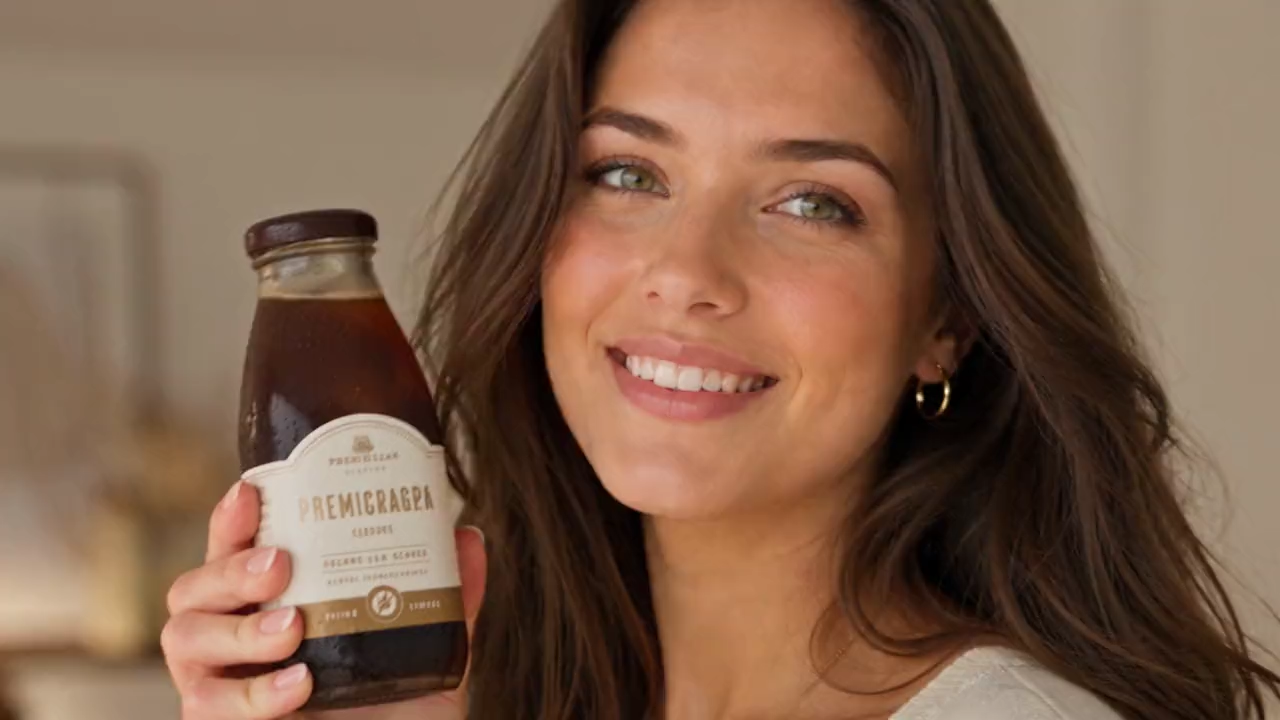
Video
Prompt
Create a 15-second vertical 16:9 premium UGC iced-coffee commercial. Use the uploaded reference image <<<image_1>>> as the exact woman in every shot; preserve her identity perfectly with natural expressions, realistic hands and no face drift. Use the same iced-coffee bottle throughout with identical branding, label, colors, packaging and cap. Setting: a warm modern apartment with soft window light, wooden surfaces, neutral cozy décor, realistic reflections, shallow depth of field, cinematic commercial lighting and luxury café color grading. Premium photorealistic coffee, ice, milk swirls and condensation. Smooth handheld/gimbal movement, quick elegant cuts. TIMELINE: 0.0–1.5s — Close-up: she smiles directly at camera, holding the chilled bottle beside her face with an excited, natural presentation. 1.5–2.7s — Clean macro: bottle standing on a wooden table; condensation beads, premium label sharp and clear. 2.7–3.7s — Extreme macro: hand slowly twists the cap open; satisfying opening motion, fresh droplets. 3.7–5.7s — Cinematic macro: rich iced coffee pours over crystal-clear ice; ice gently clinks. 5.7–7.0s — Close-up inside glass: milk blends into smooth, elegant marbled coffee swirls. 7.0–8.8s — She takes a refreshing sip, briefly closes her eyes, then smiles naturally. 8.8–10.0s — She holds the bottle toward camera and gives a confident thumbs-up. 10.0–11.5s — Fast lifestyle insert: bottle beside laptop, sunglasses and book on the wooden table. 11.5–12.8s — Brief outdoor warm-sun shot: she walks naturally holding the bottle, relaxed smile. 12.8–15.0s — Premium hero shot: bottle on wood surrounded by roasted coffee beans, warm sunlight; her hand enters beside the bottle. Slow push-in as she says: “Good coffee. Good mood. Anytime.” Fade out. Natural English lip sync. No on-screen text, subtitles, added logos beyond product packaging, watermarks, duplicate people, distorted hands, flicker, cartoon style, AI artifacts, oversaturated colors or low-resolution textures.
What Makes UGC Maker a Practical Higgsfield UGC Video Alternative
UGC Maker offers a focused product-image, creative-prompt, and existing-example workflow for teams that want to explore UGC-style product videos without building every campaign direction from the ground up.
Product Image and Creative Prompt to UGC Video
Upload a clear product image, then describe the benefit, audience, hook, creator-style scene, and campaign goal you want to explore in a UGC-style product video.
Example-Led Creative Direction
Start from an existing example when you need a clearer creative direction, then adapt the product message, audience angle, visual approach, and call to action for your campaign.
UGC-Style Product Video Workflow
Create product-focused, creator-style video directions for social campaigns, e-commerce promotion, product launches, and early creative testing.
Campaign Variation Exploration
Refine the creative prompt or switch the example direction to explore different hooks, product angles, creator tones, and campaign messages before choosing a final concept.
Why Use UGC Maker for UGC-Style Product Videos
UGC Maker can be a practical Higgsfield UGC video alternative when you need a product-image and prompt-led workflow for UGC-style video creation, existing creative examples, and campaign variation planning.
One Focused UGC Video Workflow
Move from a product image and creative direction to a UGC-style product video on one page, making it easier to turn a campaign idea into a reviewable creative direction.
Product-Led Creative Briefs
Guide each video with the product benefit, intended audience, creator-style setting, social hook, problem-solution message, and campaign goal that matter to your brief.
Clearer Alternative Research
Use UGC Maker when you are comparing UGC video workflows and want to assess a straightforward product-image and creative-prompt path for product videos, social hooks, and creator-style ads.
Lower Concepting Overhead
Start with a product photo, a few lines of creative direction, or an existing example instead of defining every scene and message before you begin exploring a campaign concept.
Use Cases for Higgsfield UGC Video Generator Workflows
Higgsfield UGC video alternative workflows are useful when marketing teams need product-led UGC-style videos, creator-style ad concepts, social hooks, and creative variations built from a product image and a clear direction.
DTC and E-commerce Product Videos
Create UGC-style product video directions for launches, seasonal offers, storefront campaigns, product detail stories, and direct-response creative exploration.
Social Hooks and Ad Concepts
Explore different opening hooks, creator-style scenes, product benefits, audience angles, and calls to action for short-form social and paid campaign concepts.
Marketing and Agency Previews
Create first-pass product video directions for internal discussion, client review, campaign planning, and early creative testing.
Creator-Style Product Stories
Turn product benefits, customer questions, unboxing ideas, testimonial angles, and problem-solution stories into creator-style video concepts.
How to Create UGC-Style Product Videos with UGC Maker
Create UGC-style product videos with a focused Higgsfield UGC video alternative workflow in three simple steps.
Upload a Product Image and Set the Creative Direction
Upload a clear product image, then write a creative prompt or select an existing example that fits the product story, social hook, creator-style scene, or campaign direction you want to explore.
Describe the Product Story
Add the product message, target audience, key benefit, hook, creator tone, scene direction, and call to action so the UGC-style video follows a clearer creative brief.
Generate, Review, and Refine
Generate the UGC-style product video, review the creative result, then refine the prompt or try another example direction to explore additional campaign variations.

Explore More AI Tools for UGC Video Creation
Continue from Higgsfield UGC video alternative research into AI UGC video creation, product visuals, creative-prompt tools, and short-form marketing workflows.

























