0 / 5000
Product Video Generator: Turn Product Ideas into Video
Create product-focused videos from product images, reference materials, or a clear creative brief. Shape motion, camera energy, and product storytelling for ads, ecommerce, social content, demos, and launches.
Product Video Examples Made for Attention
Explore product reveals, lifestyle moments, close-up demonstrations, and campaign-ready concepts created from a product reference and a specific creative direction.
Original Image
Video
Prompt
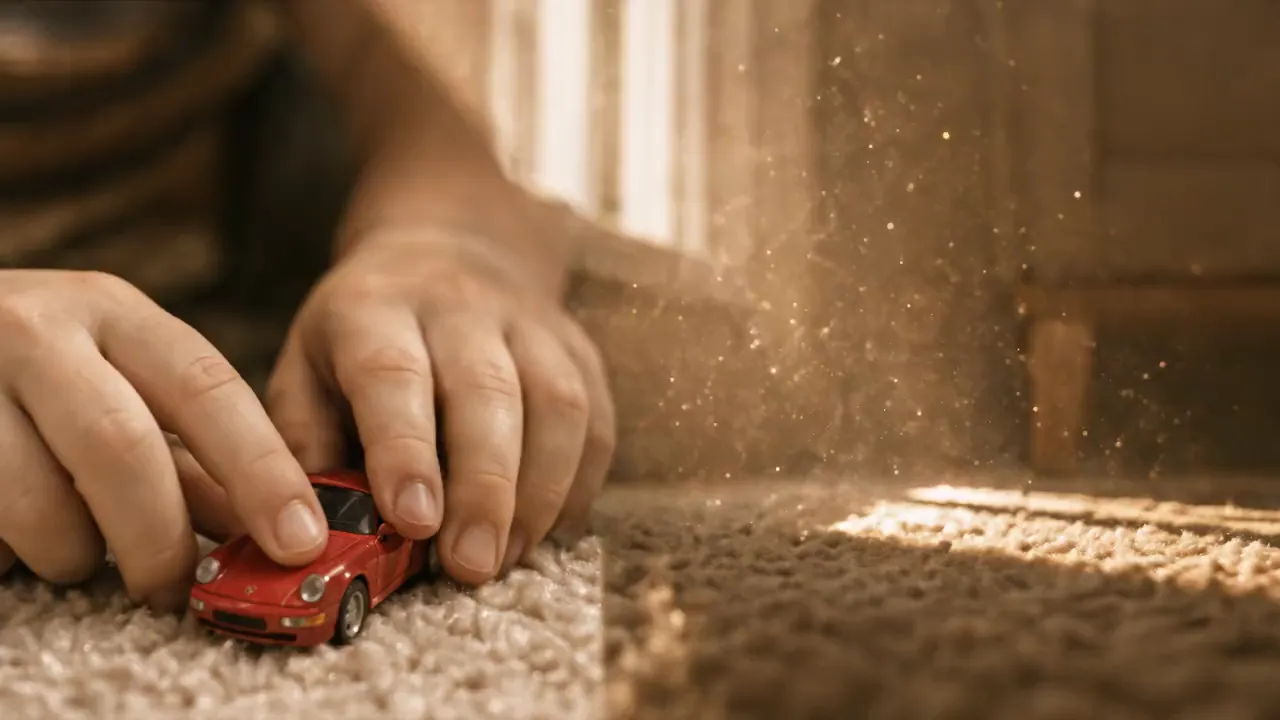
Premium cinematic car-commercial realism with grounded, oppressive speed, smooth shadow-wipe transition, stable framing, and consistent @ identity from childhood to adulthood. 0.0–4.0s: ultra-low ground-level macro on a beige plush carpet in warm golden afternoon light with dust motes and Kodak-like yellow-gold warmth. Show only @ as a child’s tender hand launching a red Porsche toy sports car. The lens hugs its nose in a first-person high-speed racing track; speed rises and childhood imagination ignites. 4.0–5.5s: the toy races into the dark shadow beneath a sofa. Light disappears, carpet fibers stretch into radial speed streaks, and darkness fills the frame; use the dive into shadow as a seamless childhood-to-reality wipe. 5.5–9.0s: an engine roar erupts as a real red Porsche 911 GT3 bursts from darkness onto a cold gray racetrack in sharp daylight. Preserve the identical ground-level tracking composition as the toy shot; fierce paint reflections, heat haze, and light tire dust make the scale jump physically convincing. 9.0–12.0s: extreme interior close-up: a gloved racing hand grips an Alcantara wheel and makes a violent shift, with crisp mechanical vibration, sweat, and friction. Tilt and push into @’s burning eyes beneath a helmet; sweat runs down the forehead. Whip-pan through the cabin with heavy shake, ending on the eyes at the emotional peak. Avoid blur, low resolution, deformed face or hands, extra people, wrong car model, jump cuts, stiff transitions, stutter, dropped frames, plastic or fake-car look, excessive VFX, anime styling, cheap filters, unstable face, and broken age continuity.
Everything You Need to Create Product Videos
Bring product assets and a creative direction together in one workflow for more polished motion content without starting every concept from a production brief.
Start with Product Context
Use a product image, reference material, or concise brief to give your video a clear subject, look, and campaign direction before generation begins.
Direct Motion and Camera Energy
Describe the reveal, interaction, movement, pacing, or camera language you want so the video is shaped around the way your product should be seen.
Keep the Product at the Center
Build videos around the details that matter to shoppers, from material and silhouette to use moments, close-ups, and a more deliberate product presentation.
Create with Supported AI Video Models
Generate product-video concepts with supported AI video models, including Wan 3.0 when available, while keeping your prompt and references focused on the product story.
A More Flexible Way to Produce Product Content
Create product-video concepts for ongoing content needs while keeping the product, the campaign goal, and the visual direction aligned.
Move from Asset to Concept Faster
Turn the product images and visual references you already have into a video direction without planning a separate shoot for every new idea.
Explore More Creative Angles
Test different product reveals, environments, camera treatments, and storytelling approaches when one campaign needs more than a single static visual.
Make References Work Harder
Give the generation visual context with supplied materials, then use a focused prompt to guide how the product is presented within the scene.
Built for Product-Led Content
Keep the workflow centered on the item, its use, and its selling moment instead of adapting a generic video idea after the fact.
Create Product Videos for Every Selling Moment
From the first product reveal to an ongoing stream of campaign assets, build product-led videos for the channels and moments that matter to your brand.
Ecommerce Product Pages
Turn a product still or visual brief into motion-led content that can help show materials, details, and use moments on a product page.
Social and UGC-Style Ads
Create product-focused concepts with an opening hook, hands-on moment, or lifestyle setting for social campaigns that need fresh creative direction.
Product Launch Campaigns
Develop reveal videos, teaser concepts, and launch visuals that put a new product, collection, or limited release at the center of the story.
Demos and Feature Stories
Visualize how a product is used, what makes it distinct, or how it fits into a customer's day through focused motion and close-up storytelling.
How to Use the Product Video Generator
Start with a clear product reference and a focused creative brief. The more specific your direction is about the product, scene, motion, and intended use, the easier it is to develop a video concept that fits your campaign.
Step 1: Add Your Product Reference
Upload a product image or add the reference material that best communicates the item, its appearance, and the visual details you want to carry into the video.
Step 2: Write the Product Video Direction
Describe the product moment you want to create, including the setting, action, camera feeling, visual style, and the key detail viewers should notice.
Step 3: Generate and Review Your Video
Create the product video, review how the product and motion come together, and refine your direction when you want to explore another creative angle.

Explore More Advanced AI Video Tools for Video Creation
Explore more AI tools for video creation, UGC ads, product clips, and short-form creative testing.